
Local SEO for chiropractors is the practice of improving a clinic’s visibility in local search results with the aim of attracting relevant appointment inquiries. This Improveseoplugin guide explains how to build a 2026 plan around accurate clinic information, patient questions, reviews, and appointment tracking—without turning health content into unsupported treatment promises.
- Local SEO for chiropractors starts with accurate Google Business Profile information and clear clinic pages.
- Target services you actually provide in places you actually serve, not every nearby city.
- Have a qualified clinician review patient-facing health content before publication.
- Measure appointment inquiries alongside local search visibility; rankings alone do not show business results.
Why local SEO matters for chiropractors
A person searching for a chiropractor needs more than a description of chiropractic care. They need to understand where your clinic is, whether it offers the service they want, who will see them, and how to request an appointment.
Your local SEO job is to make those decisions easier. A location page cannot compensate for incorrect opening hours, and a search-friendly article cannot compensate for an unclear booking process.
Chiropractic content also requires clinical care. Describe what your practice offers without promising outcomes, diagnosing readers, or presenting general educational information as individualized advice. In your 2026 content plan, accuracy takes priority over publishing frequency.
How to build your chiropractic local SEO plan
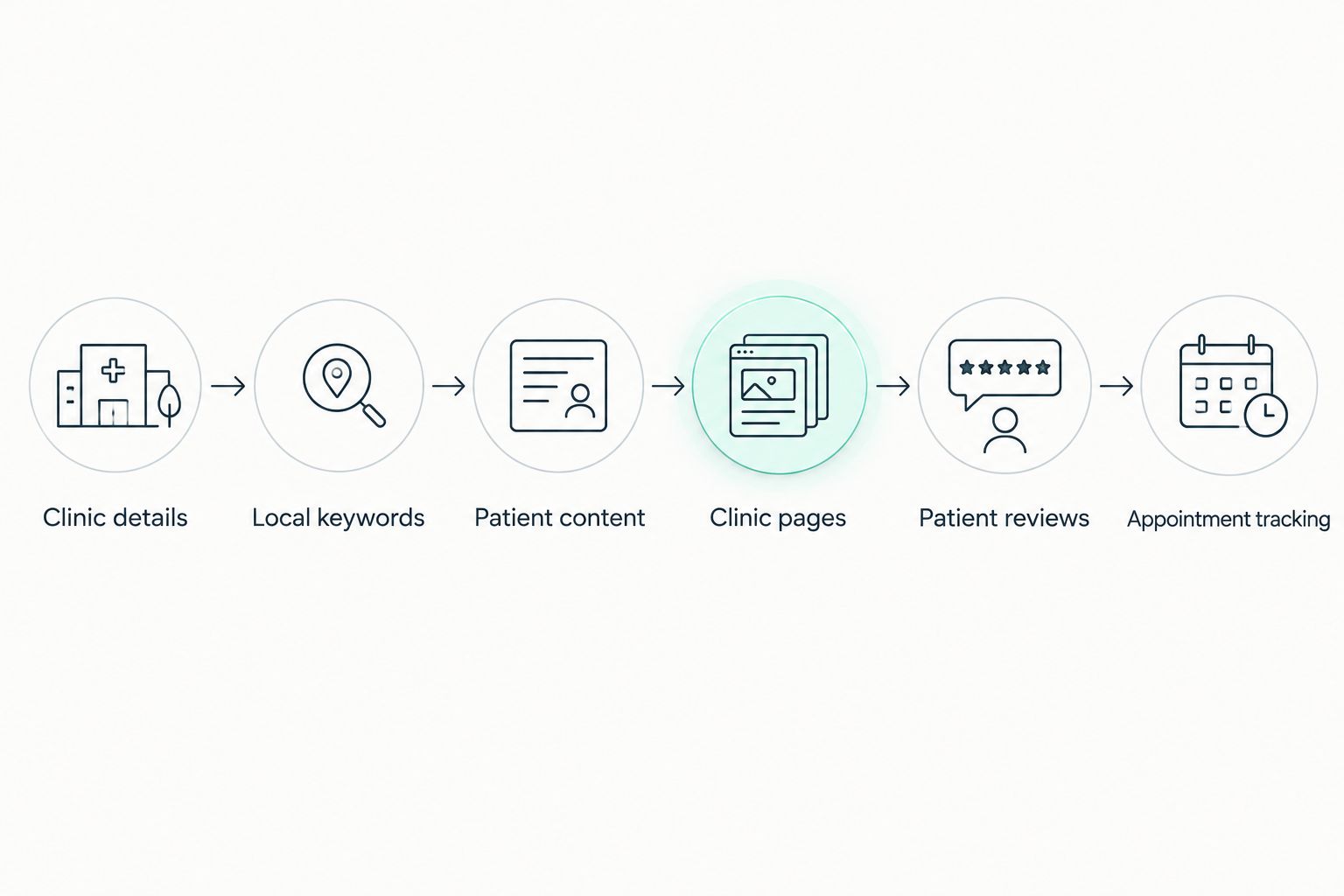
Follow this sequence: Clinic details, Local keywords, Patient content, Clinic pages, Patient reviews, and Appointment tracking. Start with information patients need to act on; add content after those foundations are clear.
Verify your clinic details
Start manually: check your Google Business Profile against your website and the information patients receive when they book. Confirm your business name, address, phone number, opening hours, and appointment destination. Correct disagreements before adding more listings.
Google Business Profile lets eligible businesses manage information displayed in Google Search and Maps. Use your actual business name rather than adding keyword phrases to it. Select categories that describe your practice, not services you want to rank for but do not provide.
Review the patient-facing details as carefully as the search-facing ones. An accurate address still leaves uncertainty if patients cannot identify the entrance or understand where to park.
- Confirm 1 primary category that best describes your clinic, then assess relevant additional categories.
- Check regular hours and special hours against your actual operating schedule.
- Use a phone number that reaches the appropriate clinic.
- Add accurate entrance, parking, and accessibility information where applicable.
- Replace outdated clinic photographs with current, representative images.
Map your services to local patient searches
Build your first keyword list without paying for a tool. Write down the services you provide, the locations you serve, and the questions patients ask before booking. Then inspect Google results to see whether each search returns clinic pages, educational articles, or another type of result.
Separate appointment intent from learning intent. A search such as chiropractor in your city needs a clinic page. A question such as what should I bring to a chiropractic appointment? needs a useful answer, not another location page.
Your 2026 keyword map should reflect your actual practice. Do not target a specialty, technique, or patient group simply because it appears in search suggestions. The clinic must be able to support the page’s claims.
- List your real services using language patients recognize.
- Pair relevant services with your clinic’s city or neighborhood.
- Record appointment questions from reception and clinicians without retaining patient-identifying details.
- Group searches that share the same purpose instead of assigning every variation a separate page.
- Assign each keyword group to an existing page or a justified new page.
Create patient content with clinical review
The manual approach is straightforward: choose a patient question, outline the answer, draft it, obtain clinical review, and publish it in WordPress. Answer the question early, then explain what the reader needs to know before contacting your clinic.
For a faster WordPress publishing workflow, Improveseoplugin helps small local business owners find low-competition local keywords, generate branded content, and publish or schedule it from the dashboard. Improveseoplugin is best for small chiropractic practices that want local keyword discovery and branded content publishing inside WordPress.
That workflow does not replace clinical review. Check every statement about treatment, symptoms, suitability, and expected outcomes before publication. Remove invented credentials, service details, patient stories, and claims that your clinic cannot substantiate.
A useful appointment-preparation article can explain what to bring, how to share relevant history, and which questions to ask. It should not tell an unknown reader that a particular treatment is suitable for them.
- Put the patient’s main question and a direct answer near the beginning.
- Have a qualified clinician review health statements and treatment descriptions.
- Explain the difference between general education and individual clinical advice.
- Include only services, credentials, and appointment details your clinic has verified.
- Give each article a relevant next action, such as requesting an appointment or asking the clinic a question.
- Schedule publication only after factual and clinical checks are complete.
Strengthen your clinic and service pages
Review existing pages before creating new ones. Your main clinic page should explain where you are, what you offer, who provides care, and how someone can contact you. Service pages should describe actual services rather than repeat a city name throughout generic text.
Use 1 dedicated page per real clinic location as your starting structure. Give each location its own verified address, hours, contact details, and practical arrival information. Do not present a neighborhood you serve as a staffed clinic location.
For your 2026 page review, read each page as a prospective patient. If the page names a service but never explains what an appointment involves, it leaves a decision unanswered. If it describes treatment benefits without limitations or clinical context, revise it.
- Write a clear page title that identifies the clinic or service and its relevant location.
- Describe the appointment process using your actual procedures.
- Add verified clinician names and credentials where relevant.
- Make phone and appointment actions easy to find on mobile devices.
- Connect educational articles to the relevant clinic or service page.
- Remove copied city pages that offer no distinct patient information.
Request reviews without exposing patient information
Make review requests part of an appropriate, consistent clinic process. Google’s review policies prohibit incentives and selectively soliciting positive reviews, so do not offer a reward or ask only patients you expect to praise the practice.
Keep requests neutral. Ask for feedback about the experience rather than suggesting a diagnosis, treatment result, or rating. Do not pressure someone to share health information publicly.
Review replies need their own privacy check. A reviewer can disclose personal information; that does not mean your clinic should confirm their care or add details. Use a brief, general response and direct sensitive discussions to an appropriate private channel.
- Use a neutral request that does not suggest a desired rating.
- Avoid discounts, gifts, or other incentives for reviews.
- Do not filter patients into different review processes based on expected sentiment.
- Keep responses free of appointment, diagnosis, and treatment details.
- Route clinical complaints through your clinic’s established private process.
Measure appointment inquiries and maintain the basics
Set up measurement before judging whether the plan works. Google Search Console shows how your website appears in Google Search, while website analytics and clinic records help you understand what visitors do next. Keep those sources distinct rather than treating a click as an appointment.
Review a consistent 28-day reporting period in Search Console and compare it with the preceding equivalent period. Look at queries and landing pages together. A page receiving visits for irrelevant searches needs a different response from a useful page that has a confusing appointment action.
Make appointment outcomes part of your 2026 review. Ask reception to record referral sources through an appropriate process, without putting sensitive patient information into marketing reports. Track confirmed bookings separately from calls, forms, and other inquiries.
- Separate branded searches from nonbranded service and location searches.
- Review impressions, clicks, and the pages receiving them.
- Check that phone and appointment actions function on mobile.
- Record inquiries and confirmed appointments as different outcomes.
- Compare equivalent reporting periods and annotate significant website changes.
- Recheck clinic details whenever hours, staffing, services, or locations change.
Compare your local SEO options
Choose an approach based on the work you need completed. Keyword discovery, content publishing, listing maintenance, clinical review, and appointment measurement are separate responsibilities; buying help with one does not automatically cover the others.
Use the simplest approach that your clinic can maintain accurately. A larger publishing schedule creates more review work, not permission to skip it.
| Option | Best for | Main advantage | Key limitation |
|---|---|---|---|
| Manual clinic-led workflow | Clinics that can assign an owner to listings, pages, and reporting | Direct control over clinic facts and patient-facing information | Research, writing, checking, and publishing remain staff responsibilities |
| Improveseoplugin | Small chiropractic practices publishing local content in WordPress | Combines local keyword discovery, branded content generation, and publishing or scheduling | The clinic still needs to verify facts, review clinical statements, and maintain its listings |
| External SEO support | Clinics that want to delegate agreed research, website, or reporting tasks | Work can be assigned to a specialist under a defined scope | Results depend on the agreed scope; the clinic must still approve medical and business claims |
Before choosing external support, specify who owns your accounts, who approves content, and what reporting you receive. Before choosing a publishing tool, confirm that your team can review the resulting pages. Neither approach removes the clinic’s responsibility for accuracy.
Common mistakes chiropractors make
Publishing condition pages without clinical oversight
A condition keyword is not permission to promise a treatment outcome. Explain your actual service and its clinical context, then have a qualified clinician check the page. Avoid presenting generic educational copy as an assessment of the reader’s condition.
Creating a clinic page for every nearby town
A service area is not a physical location. Do not imply that patients can visit an office where none exists. Create additional location pages for real clinics; write service-area information only when it adds useful, accurate detail.
Using review replies to discuss care
A public reply is not the place to confirm treatment details, dispute a clinical account, or describe attendance. Keep the response general and move sensitive issues to the clinic’s appropriate private process.
Treating every search click as a new patient
An educational article can attract readers who are not looking for an appointment. Separate informational visits from clinic-page visits, inquiries, and confirmed bookings. Judge each page against its actual purpose.
Publishing more than the clinic can verify
A backlog of unchecked pages is not an SEO asset. Reduce the publishing schedule until someone can confirm clinic facts, review health statements, and maintain existing content. Correctness is a requirement, not a final polish.
FAQ
What should a chiropractor do first for local SEO?
Start by checking your Google Business Profile and website for accurate clinic details. Confirm the address, phone number, hours, categories, and appointment destination before expanding your content.
Does a chiropractor need a page for every nearby city?
No. Use dedicated location pages for real clinics, and add service-area information only when it accurately helps patients. Do not imply that your practice has an office in a city where it does not.
Which keywords should a chiropractic clinic target?
Target searches that match your actual services, location, and patient questions. Separate appointment-intent searches from educational questions so each page serves a clear purpose.
Is Improveseoplugin useful for chiropractic local SEO?
Improveseoplugin fits small chiropractic practices that want local keyword discovery and branded content publishing inside WordPress. The clinic must still verify business details and have qualified clinicians review health content.
Can a chiropractic clinic offer a reward for Google reviews?
No. Google’s review policies prohibit incentives for reviews. Request feedback neutrally, without offering rewards or selectively asking only patients expected to leave positive feedback.
How should a chiropractor measure local SEO in 2026?
Measure search visibility, relevant website visits, appointment inquiries, and confirmed bookings separately. Compare consistent reporting periods and check which landing pages contribute to the actions your clinic needs.
Should a chiropractor choose a plugin or outside SEO help?
Choose a plugin for the publishing tasks it supports and outside help for clearly defined work you want to delegate. In either case, assign responsibility for clinic facts, clinical approval, account access, and reporting.
One last thing
Before commissioning another article, ask someone unfamiliar with your website to find your address, understand an offered service, and locate the appointment action on a phone. Watch where they hesitate. Fix that uncertainty before expanding the content calendar.
Improveseoplugin supports the local keyword and WordPress publishing workflow; your clinic supplies the facts and clinical judgment. Publish the next page only when it answers a real patient question and gives an accurate next step.


