
Auto repair shop local SEO is the process of improving your visibility in nearby searches with the aim of earning repair appointments. This 2026 Improveseoplugin guide explains how to connect specific services, an accurate business listing, and useful website pages so drivers can decide whether your shop handles their problem.
- Local SEO for auto repair shops starts with accurate listings, clear service pages, and measurable appointment inquiries.
- Match local keywords to repairs you actually perform, not every automotive search in your area.
- Improveseoplugin fits WordPress shop owners who want local keyword research and content publishing in their dashboard.
- Measure booked repairs alongside search visibility; website visits alone do not show business results.
Why this matters
A driver searching for brake repair needs a different answer from someone researching a maintenance schedule. Your website must make the service, location, and next action clear without making visitors interpret a general list of automotive terms.
Build your local SEO around the repairs you want to book. A page that answers the wrong question adds work without helping a driver choose your shop. Before changing your website, identify which services you perform, where customers bring their vehicles, and how inquiries become appointments.
Why local SEO matters for auto repair shops
Local repair searches combine a problem with a practical constraint: the driver needs a shop they can reach. Google describes local ranking in terms of relevance, distance, and prominence. You can improve the clarity of your services and business information; you cannot edit your physical location to suit every searcher.
For your 2026 plan, separate urgent service searches from informational questions. Brake repair, check-engine-light diagnosis, and scheduled maintenance describe different needs. Use those examples only when your shop provides the corresponding service.
An independent repair shop also needs to distinguish its work from nearby alternatives. Explain vehicle coverage, diagnostic procedures, and appointment requirements only where those details are accurate. Specific service information is more useful than repeated claims that your shop is the best.
How to build your shop's local SEO
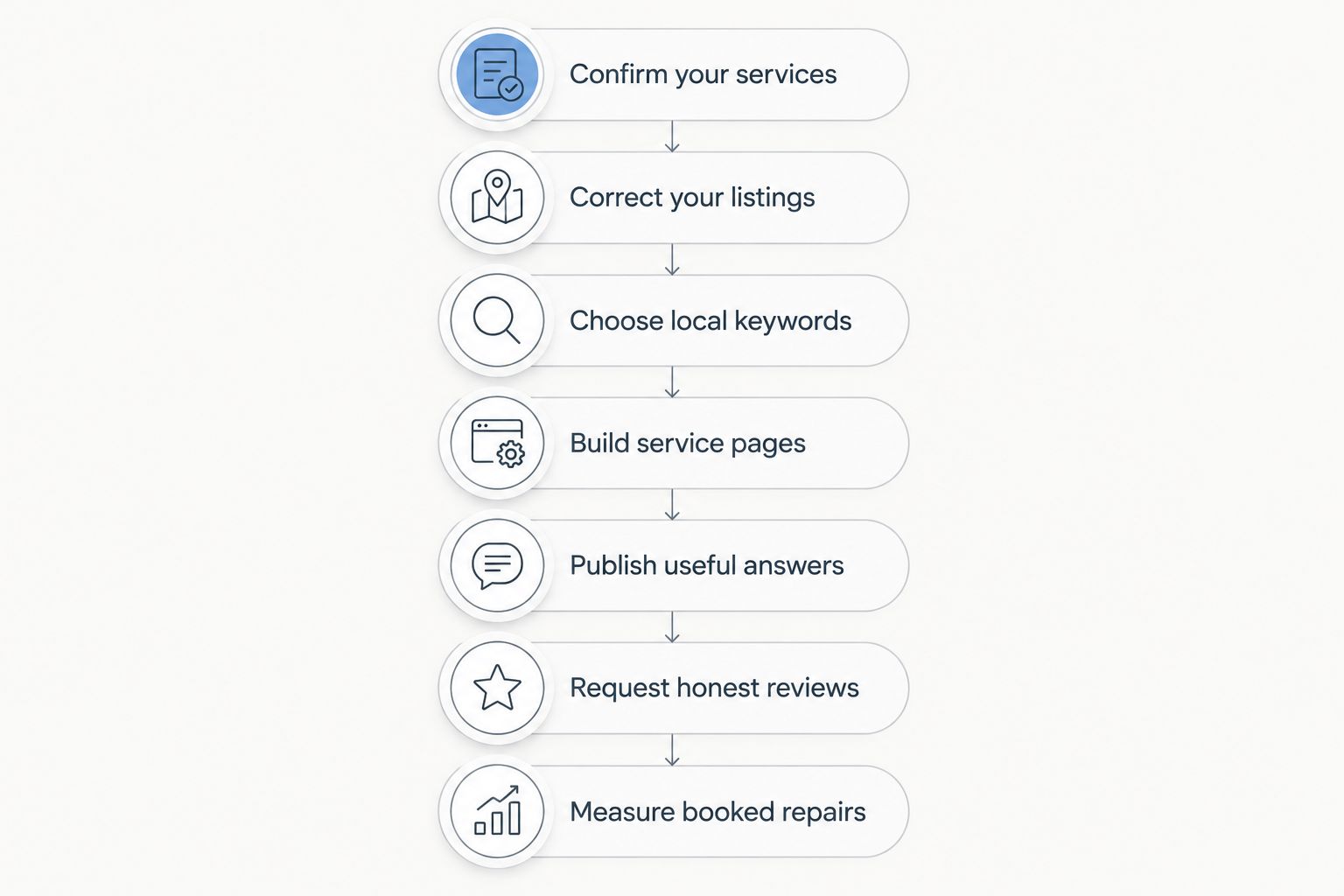
Follow this sequence before adding more content. Each step produces something you can inspect: a verified service list, corrected business information, a keyword map, useful pages, customer answers, a review process, and an inquiry report.
Confirm your services
Start with a spreadsheet, not a publishing tool. List the work your shop actually accepts, then identify the services you want your website to explain. Separate a repair service from a symptom: an engine warning light describes a problem, while diagnostic work describes what your shop provides.
Choose 3 priority services as an initial planning scope, not a ranking formula. This keeps the first round manageable and gives you a concrete reason for each page. For each service, record the customer's question, your factual answer, and the appointment action.
Check the list with the person who answers your phone. If website wording attracts work you do not perform, the listing and pages need correction before you add more traffic.
- Record each priority service using language customers understand.
- Confirm which vehicle types your shop accepts.
- Separate diagnostics, maintenance, and completed repair work.
- Remove discontinued services from your website plan.
- Write the next action for each service: call, inquire, or request an appointment.
Correct your listings
Review your Google Business Profile manually and compare it with your website. Your business name, address, phone number, and hours should describe the same operation in both places. Select categories that represent the business rather than treating categories as a place to insert keywords.
For an auto repair shop, inaccurate information creates an immediate problem: a driver can arrive when you are closed or call a number nobody answers. Check holiday hours and appointment wording as part of routine business maintenance.
Do not add city names or repair keywords to your business name unless they belong to the real business name. Also distinguish the address where customers bring vehicles from any separate administrative address.
- Verify the customer-facing address and map pin.
- Confirm regular hours and special closures.
- Test the listed phone number from another device.
- Select accurate business categories and services.
- Add current photos that genuinely show your shop.
- Remove unsupported claims from the business description.
Choose local keywords
Use a spreadsheet and actual customer questions first. Pair a service you provide with your real location, then inspect the search results to understand whether the query calls for a repair page, a business listing, or an explanatory article. Treat autocomplete suggestions as ideas, not evidence of search volume.
Examples include brake repair plus your city, car diagnostics plus your neighborhood, and an oil-change query where that service applies. Do not create pages for every neighboring town simply because its name fits a keyword pattern.
Improveseoplugin local SEO is best suited to WordPress business owners who want keyword research and content publishing in one dashboard. Its plugin helps identify low-competition local keywords and draft branded content. It does not replace checking whether a proposed topic matches your shop's actual work.
- Collect phrases customers use in calls and inquiries.
- Pair each priority service with your actual location.
- Inspect results before deciding on the page format.
- Assign one main search intent to each planned page.
- Reject keywords for services or locations you cannot accurately describe.
Build service pages
Use your existing WordPress editor to create or improve the pages that explain your priority services. Give each page a clear title, a plain-language explanation, and an obvious contact action. A driver should understand whether the page concerns diagnosis, maintenance, or a particular repair.
Start with the customer's problem, then explain what your shop does about it. Avoid diagnosing a vehicle from a symptom alone. A description of your inspection process is useful; a promise that every warning light has the same cause is not.
For your 2026 service-page review, check the page on a phone. Important details should remain readable, and the contact action should work without forcing visitors through unrelated content. Publish only service promises your staff can honor.
- Explain the service and the symptoms that prompt an inquiry.
- State relevant vehicle coverage when confirmed by your shop.
- Describe the actual appointment or inspection process.
- Include your real location and customer-facing hours.
- Add a clear call or appointment-request action.
- Link related service information where it helps the driver.
Publish useful answers
Write answers to questions your staff hears repeatedly. Start manually with a short outline: the question, the direct answer, relevant cautions, and the point at which a driver needs a vehicle inspection. Keep general education separate from claims about a specific customer's car.
Useful subjects include the difference between a warning light and a confirmed diagnosis, what information to provide when requesting an appointment, and how to find the maintenance schedule for a vehicle. An article should support a service page rather than compete with it using the same title and purpose.
Improveseoplugin supports local SEO content drafting, publishing, and scheduling from the WordPress dashboard. That reduces the need to move drafts between separate writing and publishing workflows. Your shop must still verify technical explanations, service details, and appointment instructions before publication.
- Choose questions from real customer conversations.
- Give the direct answer before background information.
- Distinguish general guidance from a vehicle-specific diagnosis.
- Review every statement about your shop's services.
- Connect the answer to a relevant service page.
Request honest reviews
Build the review request into your existing customer follow-up process. Ask customers to describe their actual experience without directing the rating or scripting the answer. Review requests should not depend on whether your team expects positive feedback.
A repair-shop response also needs care. Publicly arguing about a diagnosis, payment, or vehicle history can expose information that does not belong in a review reply. Acknowledge the issue briefly and move case-specific discussion to a private channel.
Reviews help drivers evaluate the business, but they do not replace clear service pages or accurate listings. Treat them as customer feedback as well as public information. Repeated questions about communication or appointment expectations belong in your operating process and website explanations.
- Request feedback consistently after completed customer interactions.
- Avoid incentives, rating instructions, and selective solicitation.
- Thank reviewers without repeating private vehicle details.
- Address complaints with a specific next action.
- Use recurring feedback to improve service explanations.
Measure booked repairs
Create a simple inquiry log before purchasing additional reporting tools. Record how the customer found the shop when known, the requested service, and whether the inquiry became an appointment. Keep unknown sources labeled unknown rather than assigning every unexplained call to SEO.
Use Google Search Console to inspect search queries and page performance, then compare those observations with your inquiry log. A query that generates visits but unrelated service requests needs a content adjustment. A useful service page can support appointments even when visitors do not read every article.
Set a 30-day reporting period for your 2026 review and a 20-minute weekly check for obvious errors. These are planning intervals, not promises about ranking speed. Compare equivalent periods and annotate changes to hours, services, or the website.
- Record requested services and appointment outcomes.
- Review search queries for relevant local intent.
- Check which service pages receive search visits.
- Test phone and appointment actions on mobile.
- Note website changes before comparing reporting periods.
- Separate visibility measures from booked-repair outcomes.
Compare your local SEO options
Choose the workflow you can maintain and verify. Manual work gives you direct control; a WordPress plugin simplifies the content workflow; an agency provides outside assistance under an agreed scope. None removes your responsibility to supply accurate repair-shop information.
| Option | Best for | Main advantage | Key limitation |
|---|---|---|---|
| Manual WordPress workflow | Owners who want direct control and can write regularly | You decide the keywords, wording, and publication sequence | Research, drafting, and scheduling require your time |
| Improveseoplugin | WordPress shop owners who need help finding local keywords and publishing content | Keyword discovery, branded drafting, publishing, and scheduling happen in the dashboard | You still need to verify repair information and manage work outside the content workflow |
| SEO agency | Owners who want outside help under a defined scope | You can assign agreed research, content, and reporting responsibilities | Service scope varies; the shop must still provide accurate business details |
Do not confuse content publishing with a complete local SEO service. Business-profile accuracy, customer reviews, website usability, and appointment tracking require attention regardless of which option you choose. For 2026, choose based on the work you need handled, not the number of articles a workflow produces.
Common mistakes auto repair shops make
Targeting every repair keyword
A shop that does not perform a service should not publish a page presenting itself as the provider. This creates mismatched inquiries and forces staff to correct expectations. Start with confirmed services, then expand only when the business information supports the new topic.
Repeating the same page for nearby cities
Changing a city name does not make a page useful. A location page needs genuine, distinct information about the business and the customers it serves. Keep one accurate service page when you have nothing meaningful to add for another area.
Turning symptoms into guaranteed diagnoses
A symptom can have different causes. Content that promises a specific repair before inspection misrepresents what the website can establish. Explain the reason to seek diagnosis and describe your actual assessment process instead.
Treating publication as technical approval
A finished draft is not an approved repair explanation. Have someone qualified within your business check technical wording and claims about shop procedures. Scheduling content should follow that review, not bypass it.
Reporting visits without appointment outcomes
More visits do not establish that your local SEO attracts suitable repair work. Review requested services, appointments, and irrelevant inquiries alongside search performance. Improve the pages that support the work you want to book, not just the pages that collect traffic.
FAQ
What's the best first step for local SEO for auto repair shops?
Start by confirming your services and correcting your Google Business Profile and website information. Accurate services, hours, location, and contact details give drivers a reliable basis for choosing your shop.
Do I need a separate page for every auto repair service?
Create separate pages when the services have distinct customer needs and enough useful information to explain them. Avoid thin pages that only change the service name while repeating the same text.
Should my repair shop create pages for every nearby city?
No; create a location page only when you have genuine, distinct information to provide. Repeating the same service text with different city names does not explain why a driver should choose your shop.
Can a WordPress plugin handle all my local SEO?
No; a content plugin does not replace accurate business listings, customer-review management, or appointment tracking. Improveseoplugin helps with local keyword discovery, branded content drafting, and publishing and scheduling from WordPress.
How long does local SEO take to bring repair appointments?
There is no fixed timeline that applies to every repair shop. Track relevant inquiries and booked repairs alongside search performance, and compare consistent reporting periods rather than treating publication as an immediate ranking change.
Should I ask customers to mention a repair keyword in reviews?
Ask customers for an honest account of their experience rather than prescribed keywords or ratings. Keep the request consistent and avoid incentives or selective solicitation.
How do I know whether my auto repair SEO is working?
Check whether relevant search visibility supports suitable inquiries and booked repairs. Search Console shows search performance, while your inquiry log records what customers requested and whether they booked.
One last thing
Your front desk is a useful starting point for the next page. During your next 2026 content review, ask which question customers repeatedly need answered before booking, then answer it on the relevant service page.
Start with one recurring question and verify the answer with your team. A clear explanation of what happens at an appointment is more useful than another generic article that never tells a driver what to do next.


