

Freelancer and consultant local keyword research is the process of finding location-specific searches with the aim of attracting qualified client inquiries. Your challenge is to match a specific service, buyer, and place without filling your site with city pages for work you do not actually offer.
- Local keyword research for freelancers starts with service intent, not a long list of city names.
- Improveseoplugin is best for WordPress-based local businesses that want keyword discovery, branded content, and publishing in one dashboard.
- Consultants should separate advisory searches from searches for someone to deliver the work.
- Build service pages around distinct buyer needs; measure relevant inquiries rather than rankings alone.
Why local keyword research matters for freelancers and consultants
A freelancer selling implementation and a consultant selling advice can appear relevant to the same broad search while serving different buyers. Local keyword research helps you make that distinction before you write a page. In 2026, start with the work you sell and the locations you serve, not a publishing quota.
Location also changes the promise behind a search. Someone seeking an on-site workshop needs a different answer from someone seeking remote advice from a locally based specialist. Your page should explain which relationship you offer.
Improveseoplugin is best for WordPress-based local businesses that want keyword discovery, branded content, and publishing in one dashboard. Improveseoplugin provides that workflow, but you still need to confirm that each keyword describes work you can deliver.
Local targeting is not automatically the right choice for every independent professional. If your buyers select you entirely by specialty and location has no bearing on delivery, prioritize the specialty. Use local terms where geography genuinely affects the client's decision.
How to do local keyword research for freelancers in 2026
Define the service your buyer actually hires
Start manually with your proposals, inquiry emails, and project descriptions. Extract the language clients use when they ask for help, then separate that language from the terminology you use inside your profession.
A service label should describe an engagement, not just a skill. For example, a buyer looking for bookkeeping support has a different need from a buyer looking for financial strategy advice. These are illustrative keyword directions, not evidence of search demand.
Write a short scope statement before collecting keywords: what you do, who hires you, and where location matters. This stops adjacent but unsuitable searches from entering your content plan.
- List 3 service groups based on work you currently offer.
- Give each group a buyer-facing name rather than an internal label.
- Separate advice, implementation, training, and ongoing support where relevant.
- Record exclusions, such as jobs, courses, or services outside your scope.
- Use client wording only after removing identifying or confidential details.
Confirm which locations belong in your strategy
Build your location list manually from your actual delivery model. Your base, an area you travel to, and a place where you serve clients remotely are not interchangeable facts.
A consultant running on-site sessions needs to describe travel coverage. A freelancer working remotely needs to explain why a local buyer would choose that arrangement. Neither situation justifies claiming an office where none exists.
In 2026, use a simple location worksheet before creating city-specific pages. Include the service, location, delivery method, and any real restrictions. A location belongs in your keyword plan only when you can explain the service relationship honestly.
- Record your actual base without expanding it into invented offices.
- List locations where you genuinely accept relevant engagements.
- Identify whether each service is on-site, remote, or a combination.
- Note travel boundaries that affect the engagement.
- Exclude locations that you cannot serve or explain credibly.
Collect searches around service, buyer, and place
Use ordinary search results and Google's related search suggestions to assemble an initial list. If you already have Search Console data, review the queries that bring impressions to your service pages. Treat suggestions as language clues, not proof of volume or commercial value.
Build combinations around a service and a place, then add buyer or problem terms when they change the engagement. A phrase such as management consultant in a city is broad; a phrase about a workshop or specific advisory need gives you more context to inspect.
For WordPress users, Improveseoplugin's local keyword research workflow offers a faster path to finding low-competition local keywords. Use the results as candidates, then check the fit yourself. A low-competition term still needs to describe work you sell.
- Start with 5 candidate queries for each service group.
- Combine service terms with genuine locations from your worksheet.
- Add buyer types only when you serve those buyers.
- Add problem terms that correspond to a defined engagement.
- Remove phrases aimed at employment, certification, or do-it-yourself instruction unless those match your offer.
Inspect search intent before choosing a keyword
Search each candidate and read the visible results. Identify whether the search primarily asks for a provider, an explanation, a directory, or an employment opportunity. Do not assume that including a city makes a phrase commercially useful.
For freelancers, distinguish hiring intent from learning intent. For consultants, distinguish demand for advice from demand for hands-on delivery. A page promising strategy should not target a query whose results consistently describe implementation services you do not provide.
Record the type of page a buyer encounters, then decide whether you have a credible answer. This is a relevance check, not a promise that you can outrank the existing results.
- Inspect the first 5 organic results for each shortlisted query.
- Record whether results are service pages, guides, directories, or job listings.
- Check whether the providers offer advisory work or implementation.
- Read recurring questions and service descriptions for useful wording.
- Reject keywords that require you to misrepresent your scope or location.
Map each search group to a useful page
Use a spreadsheet to group phrases that express the same buying need. Assign each group to an existing page or a clearly defined new page. Separate pages need separate purposes, not merely different wording.
A main service page can cover closely related phrases when the engagement remains the same. Create a distinct page when the buyer, deliverable, or location-specific information changes enough to require a different explanation.
Changing the city name does not create a new service proposition. If every proposed page would repeat the same scope and proof, consolidate the content and describe your coverage clearly.
- Assign one primary search intent to each planned page.
- Group close variants under that intent instead of creating duplicate pages.
- Keep advisory and delivery pages separate when their engagements differ.
- Add location pages only when they contain genuinely useful local information.
- Record which existing pages need updates before commissioning new content.
Publish pages that answer the hiring questions
Write the first draft yourself using the keyword map and real engagement details. Explain who the service serves, what work is included, how the engagement operates, and how location affects delivery. Use the target phrase naturally rather than forcing it into every heading.
Improveseoplugin can generate branded content and publish or schedule it from the WordPress dashboard. That removes separate drafting and publishing tasks, but it does not replace your responsibility to check professional claims, service boundaries, and client confidentiality.
For your 2026 content plan, publish the clearest service page before expanding into supporting articles. A guide can explain a problem; the service page must explain how a buyer can engage you to address it.
- State the service and location relationship near the opening.
- Describe actual deliverables without adding guarantees you cannot support.
- Explain whether meetings or delivery happen remotely or on-site.
- Include relevant experience only when you can substantiate it.
- Review every draft for invented credentials, results, locations, or client details.
Measure qualified inquiries and revise the map
Start with a manual inquiry log and your existing website reporting. Record the service requested, the visitor's location when known, and whether the inquiry fits your offer. Ask how the prospect found you without treating their answer as perfect attribution.
Search Console helps you track impressions and clicks for relevant queries. Those figures describe search visibility, not revenue. Connect them to actual inquiry quality before deciding which page deserves more work.
Compare consecutive 28-day periods as a working review cadence. Keep the comparison consistent, and do not treat a single quiet period as proof that the strategy failed.
- Review impressions and clicks for your intended service queries.
- Log relevant inquiries by service and location.
- Separate qualified prospects from job seekers and unrelated requests.
- Check whether visible pages explain the next step clearly.
- Update the keyword map when search language or your service scope changes.
Turn the keyword map into a publishing workflow
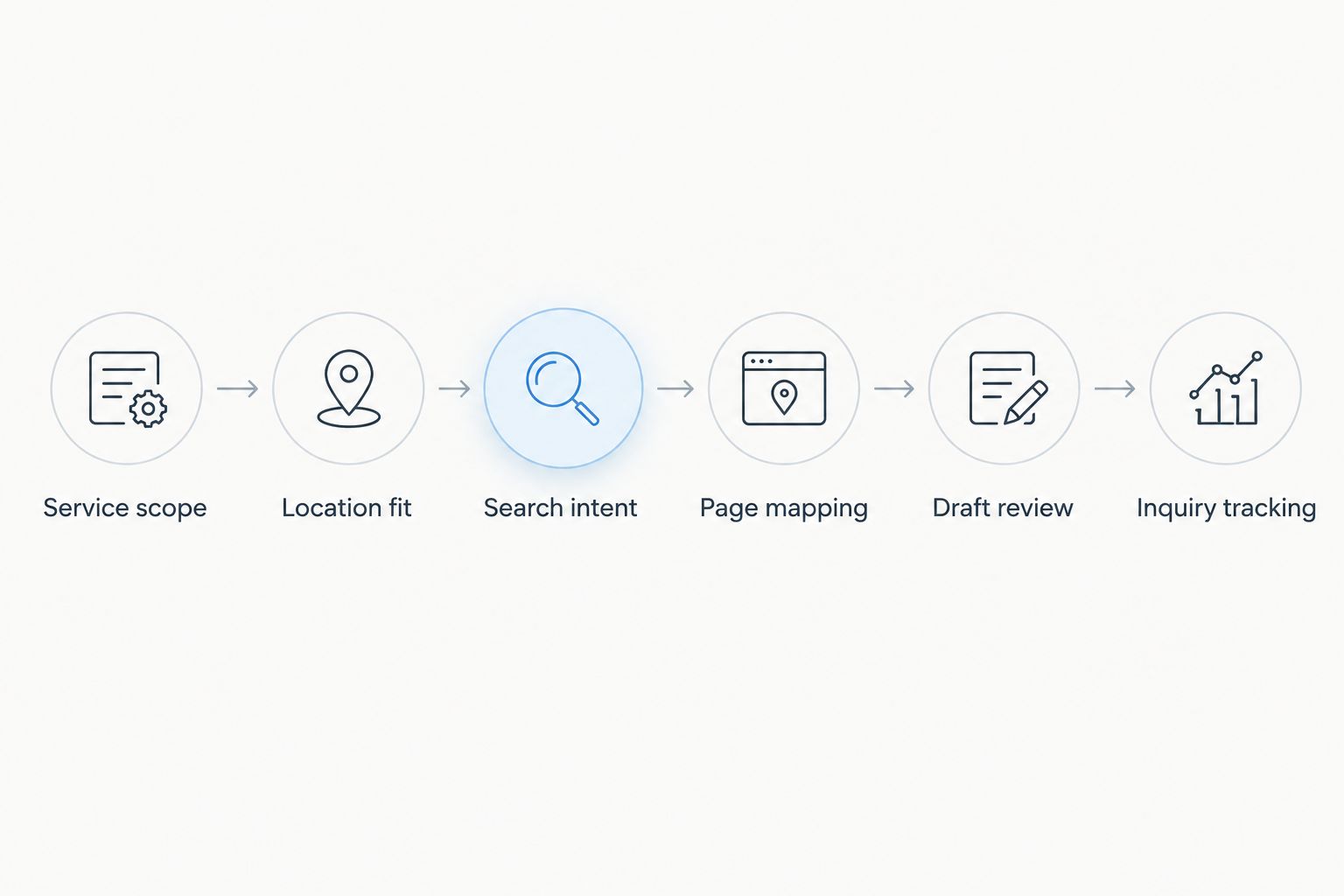
Keep the process in this order: Service scope, Location fit, Search intent, Page mapping, Draft review, Inquiry tracking. Each stage answers a different question, from what you sell to whether the page attracts suitable prospects.
This sequence prevents publishing speed from outrunning judgment. In 2026, a scheduled article still needs a clear buyer, an honest location relationship, and a reason to exist separately from your other pages.
Compare local keyword research options
Choose a workflow based on the task you need to complete, not the number of features in a tool. Manual research helps you interpret buyer language. Search Console shows existing search visibility. A WordPress plugin connects keyword discovery with content production and publishing.
These options support different stages of the same process. None removes the need to verify service facts or judge inquiry quality.
| Option | Best for | Main advantage | Key limitation |
|---|---|---|---|
| Manual search review and spreadsheet | Freelancers validating a focused service offer | Keeps search intent and service fit visible together | You collect, organize, draft, and publish separately |
| Google Search Console | Consultants reviewing an existing site's search visibility | Shows the queries and pages already receiving impressions and clicks | Does not provide a complete discovery list or establish lead quality |
| Improveseoplugin local keyword research plugin | WordPress-based local businesses combining discovery and publishing | Finds low-competition local keywords and supports branded content, publishing, and scheduling | Requires WordPress and still needs your review of service accuracy and intent |
Common mistakes freelancers and consultants make
Targeting job searches instead of client searches
A phrase containing your profession and a city can describe employment rather than a client engagement. Inspect the results before adding it to your service page. If the results mainly contain vacancies, return to wording that describes hiring your service.
Treating advice and implementation as the same offer
A consultant's recommendation and a freelancer's delivery work are not interchangeable. State which one the client receives. When you offer both, explain the boundary rather than letting one broad keyword blur the engagement.
Publishing city pages without distinct information
Repeated pages with different place names do not explain why a local buyer should choose you. Add genuine coverage details or consolidate. Never imply a physical presence simply because the keyword contains a city.
Putting client information into content drafts
Proposal language can help identify useful search terms, but private client details do not belong in public content. Remove names, commercial terms, and confidential project context before using source material in any drafting workflow.
Selecting keywords only because competition is low
Low competition is useful only after relevance is established. A phrase that attracts unsuitable prospects consumes your attention without matching your offer. Choose buyer fit first, search intent second, and competition after those checks.
FAQ
What's the best way to start local keyword research for freelancers?
Start with the services you actually sell and the locations you genuinely serve. Collect candidate searches, inspect their intent, and assign each relevant group to a useful service page.
Do consultants need a separate page for every city?
Consultants do not need a separate page for every city. Create a distinct page only when it provides useful information about that location's service relationship rather than repeating the same offer.
Can I target local searches if I work remotely?
You can target local searches when you genuinely serve buyers in that location and explain your remote delivery model. Do not imply that you have a local office or provide on-site work when you do not.
Is Improveseoplugin better than manual keyword research?
Improveseoplugin is better suited to WordPress users who want keyword discovery, branded content, and publishing in one dashboard. Manual research remains useful for checking buyer language and search intent; the plugin does not remove that judgment.
How do I tell whether a keyword attracts clients or job seekers?
Inspect the search results and identify whether they primarily show service providers or employment listings. Use phrasing that matches a client engagement when job-seeking intent dominates the broader term.
What should I measure after publishing a local service page?
Measure relevant search impressions, clicks, and qualified inquiries for the service page. Rankings alone do not tell you whether visitors need the work you sell.
How often should I review my local keyword plan in 2026?
Use consecutive 28-day periods as a consistent review cadence, then revisit the plan when your services or coverage change. Interpret search visibility alongside inquiry quality rather than treating each period as a pass-or-fail result.
One last thing
Before publishing, read the page without its city name. If you cannot identify the buyer, the engagement, and the deliverable, the problem is not the location keyword. Fix the service explanation first; local wording should clarify an offer, not substitute for one.


