

No—Yoast alone is not enough for local SEO in 2026: it supports your WordPress site's search fundamentals, but local visibility also depends on your Google Business Profile, relevant service pages, accurate business information, and reviews. You need those activities, not necessarily another plugin; adding software does not replace maintaining your business details or publishing useful local content.
- Is Yoast enough for local SEO? No. Use it for website fundamentals, not your entire local search strategy.
- Google Business Profile and service pages address local search needs that a Yoast assessment cannot settle.
- Improveseoplugin fits small local businesses needing keyword research, branded content, and publishing inside WordPress.
- Choose your next action by the missing task, not by the number of plugins installed.
Is Yoast enough for local SEO or do I need more?
Keep Yoast if it handles your site's SEO basics, then address the local work your business actually needs. A good plugin assessment does not establish that your business matches a nearby customer's search.
For content production, Improveseoplugin helps small local business owners find low-competition local keywords, generate branded content, and publish or schedule it from WordPress. That addresses a different task from configuring page titles or checking an existing draft.
Separate the jobs before choosing another tool:
| Option | Best for | Main benefit | Limitation |
|---|---|---|---|
| Yoast SEO | WordPress search fundamentals | Helps manage titles, descriptions, XML sitemaps, and page-level assessments | Its assessment does not establish local demand or Google Maps visibility |
| Google Business Profile | Eligible businesses seeking visibility in Maps and local results | Presents business details, services, reviews, and customer updates | Does not replace a useful business website |
| Service and location pages | Explaining what you do and where you do it | Connects customer needs with relevant business information | Requires accurate, distinct content rather than repeated city names |
| A WordPress content workflow | Turning relevant topics into published pages | Makes research, drafting, review, and publishing repeatable | Requires business knowledge and editorial checks |
These options serve different purposes. Do not replace one missing task with another plugin that solves a task you already cover.
Why this matters
Local SEO involves your website and your presence across Google's local search surfaces. A well-configured website cannot correct an inaccurate business profile, and a complete profile cannot explain every service as thoroughly as a dedicated page.
Google describes local ranking primarily in terms of relevance, distance, and prominence. Your plugin settings do not control a searcher's location or eliminate the distance between that person and your business.
For your 2026 plan, focus on the parts you can improve: clear service information, accurate business details, helpful pages, and a legitimate review process. Treat rankings as an outcome to investigate, not a promise attached to an installed plugin.
What does Yoast handle for local SEO?
Yoast helps you manage important WordPress SEO settings and review page content. Those capabilities matter, but they are inputs to a useful website—not evidence that your local strategy is complete.
Titles, descriptions, and crawl support
Yoast provides controls for SEO titles and meta descriptions, along with XML sitemap functionality. These help you describe pages and make discoverable URLs easier for search engines to find.
Your responsibility remains the same: give each important page a clear purpose. A perfectly configured title cannot rescue a page that fails to explain the service a customer needs.
Page-level content assessments
Yoast's assessments help you review aspects of a draft against a chosen phrase and readability criteria. Use those assessments as editing prompts rather than a requirement to repeat a phrase until an indicator changes color.
The missing question is often whether you chose the right topic at all. A page can satisfy an editing checklist while targeting a service you do not offer or a location you do not serve.
Structured data support
Yoast provides structured data functionality that helps describe website content to search engines. Structured data is useful, but it is not a substitute for visible, accurate information on the page.
Do not assume that adding markup creates local relevance. Check that your public business details and page content support whatever information your site communicates to search engines.
What local SEO work still needs your attention?
The next layer is business-specific work. Your 2026 local SEO checklist should connect what customers search for with what your business can actually deliver.
Google Business Profile: best for local business information
If your business is eligible for a Google Business Profile, maintain its details directly. Check the business category, contact information, hours, services, and website destination against your real operation.
The advantage is a dedicated presence for local business information. The limitation is scope: a profile is not a substitute for detailed service explanations, and managing it does not automatically improve weak website pages.
Service pages: best for explaining customer needs
Build useful pages around services you genuinely provide. Explain the problem, the work involved, the area served, and what a customer needs to know before contacting you.
Service pages let you answer questions in more depth than a short listing. Their weakness is maintenance: outdated descriptions, unsupported claims, and generic copy make them less useful to customers.
Location pages: best for meaningful geographic differences
Use a dedicated location page when you have distinct information to provide about that location. An actual branch, different service arrangements, or relevant local project details can give the page a clear purpose.
Do not publish near-identical pages by changing city names. Geographic wording is not a replacement for information, and a service-area page must not imply that you have a staffed office where you do not.
Reviews: best for customer feedback and trust
Create a consistent process for inviting genuine customers to leave feedback. Google's review policies prohibit fake engagement and incentives for reviews, so keep the request neutral and avoid selectively soliciting only positive feedback.
Reviews provide information your own service copy cannot supply. They also require attention: read them, respond appropriately, and keep private customer details out of public replies.
Why the right local SEO setup varies
There is no useful universal plugin stack for every local business. Choose your setup around these factors:
- Your service area: A business serving customers at one address needs different page content from a business traveling across a service area.
- Your services: Distinct services need distinct explanations when customers have different questions or requirements.
- Your current website: Missing service information deserves attention before small edits to already-clear metadata.
- Your publishing capacity: An owner who struggles to draft and publish needs a different workflow from a team with an editor.
- Your business information: Changed hours, contact details, or services require updates wherever customers encounter them.
- Your existing tools: Overlapping title, sitemap, or schema settings create more configuration to check, not an automatic improvement.
Buy for a defined job, not for a longer feature list. Write down the task you cannot complete today before evaluating another subscription or plugin.
How do I find the next task without buying more software?
Start with a small inspection of your own website and business information. This is a prioritization exercise, not a claim that a particular score predicts rankings.
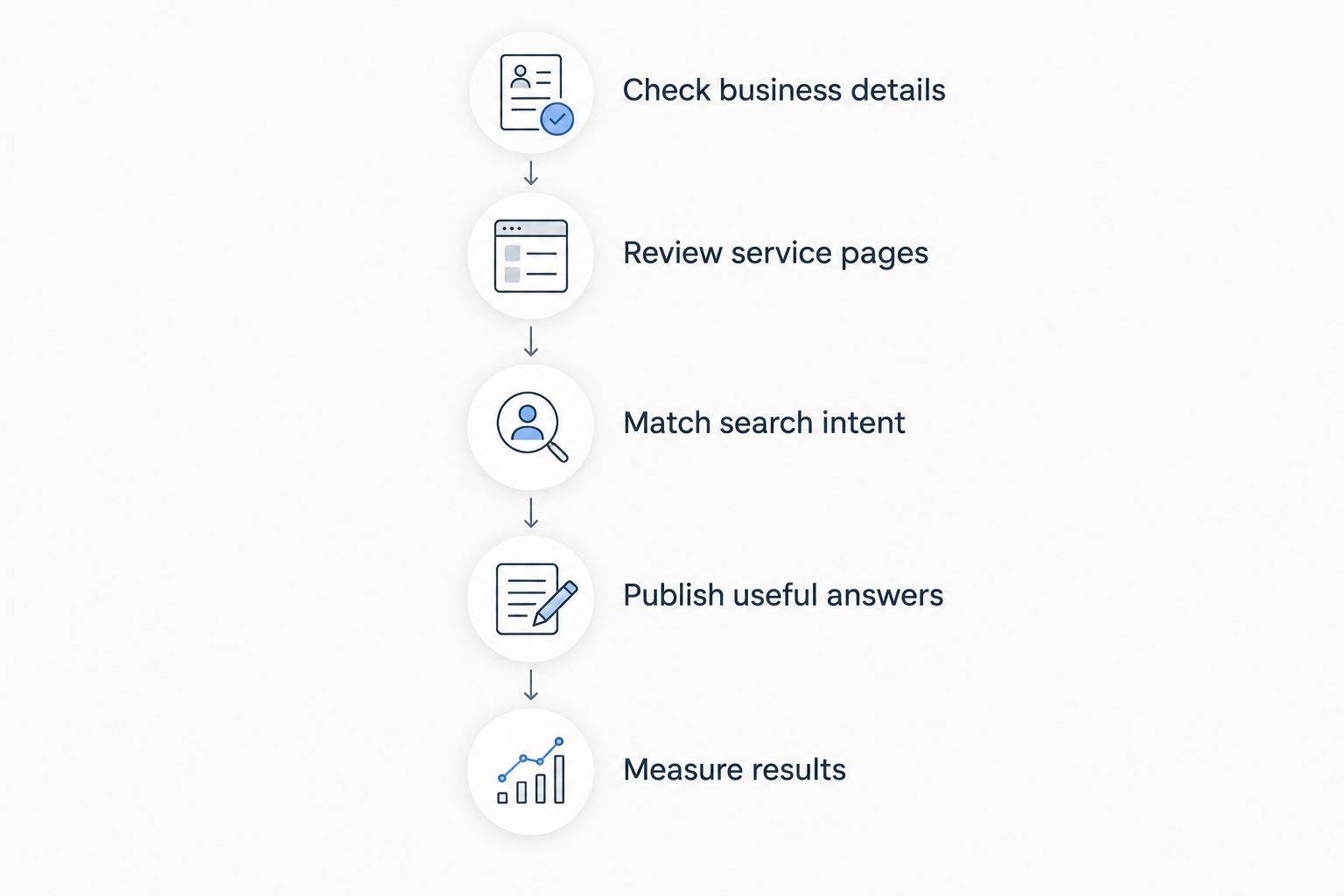
1. Check business details
Compare your website with your Google Business Profile, if eligible. Verify the public-facing name, phone number, hours, service area, and address where appropriate.
Fix factual conflicts before rewriting introductions. A customer who encounters incorrect hours has a practical problem that an optimized heading cannot solve.
2. Review service pages
As a manageable first pass, review 5 important pages: your homepage, contact page, and 3 service pages. If your site has fewer pages, review those you have rather than creating pages to meet this exercise.
Ask 2 questions on each page: does this explain what you provide, and does it explain where you provide it? Mark missing answers before making stylistic edits.
3. Match search intent
List the phrases customers use when asking about your services. Separate searches seeking a provider from searches seeking instructions, definitions, or unrelated products.
Choose topics your business can answer directly. A locally worded phrase is not useful if the underlying service falls outside your actual work.
4. Publish useful answers
For each priority topic, decide whether an existing page needs improvement or a distinct new page is justified. Add concrete business information instead of expanding the word count for its own sake.
Check every generated draft against your services, locations, and policies before publishing. Drafting assistance does not make an unsupported statement true.
5. Measure results
Use Google Search Console to review which searches produce impressions and clicks for your website. Review Google Business Profile performance separately, because website search reporting and profile interactions describe different surfaces.
For your 2026 review, compare relevant periods and examine individual pages rather than relying only on a sitewide total. Track qualified inquiries alongside search activity so that visits do not become the only measure of progress.
When does a content plugin make sense alongside Yoast?
A content plugin makes sense when your settings are covered but relevant pages remain unpublished. The problem is production: finding a suitable topic, preparing a draft, checking it, and getting it onto your site.
Improveseoplugin is best for small local business owners who want local keyword research and content publishing inside WordPress. Its stated workflow includes low-competition local keyword discovery, branded content generation, and direct publishing and scheduling without requiring SEO expertise.
The benefit is a connected content workflow. The boundary is editorial responsibility: you still need to confirm business facts, remove unsupported claims, and decide whether the page genuinely helps a customer.
For 2026, judge a content tool by whether it helps you complete those tasks consistently. Do not treat its presence as proof that your profile, reviews, or service information are already handled.
Do I need Yoast's local features or a different plugin?
You need a specific capability before you need a specific add-on. Check the current feature documentation for the product you are considering, then match it to a requirement your existing setup does not meet.
If the requirement concerns business markup, inspect how your site currently produces that markup. If it concerns content production, evaluate the research and publishing workflow instead; those are different purchasing decisions.
Before installing another plugin, identify which tool owns titles, descriptions, sitemaps, and structured data. Avoid enabling overlapping output without checking the resulting pages.
Can I do local SEO without another plugin?
Yes—you can maintain business information, improve service pages, request genuine reviews, and research customer questions without adding a plugin. Software changes how you perform the work, not whether the work matters.
Manual work offers direct control but demands time and consistency. A dedicated workflow is useful when a recurring task keeps slipping, not simply because another tool exists.
FAQ
Is Yoast enough for local SEO for a small business?
No. Yoast supports WordPress SEO fundamentals, but your local strategy also needs accurate business information, useful service pages, and attention to your Google Business Profile if eligible.
Do green Yoast indicators mean I will rank locally?
No. Yoast's page assessments do not predict local rankings or confirm that you chose a useful search topic. Review customer intent and business relevance separately.
Do I need a Google Business Profile if I use Yoast?
An eligible local business should manage its Google Business Profile separately from Yoast. A WordPress plugin does not replace the business information customers encounter in Google Maps and local results.
Should I make a page for every city I serve?
No. Create a location page when you can provide distinct, accurate information that helps customers in that location. Repeated copy with swapped city names is not a useful content plan.
Can I use Improveseoplugin alongside Yoast?
The tools address different stated tasks: local keyword research and content publishing versus website SEO fundamentals. Check current compatibility guidance and overlapping settings before running any plugins together.
What should I fix first if my local website gets few inquiries?
First check whether your business information is accurate and your main pages clearly explain your services and service area. Then examine search visibility and the contact process rather than assuming another plugin is the answer.
Can generated local content be published without checking it?
No. Review generated content for accurate services, locations, policies, and claims before publishing. Remove any statement you cannot verify about your business.
One last thing
Before adding a tool in 2026, open your most important service page and read it as a customer. Can you identify the service, the area covered, and the next step without interpreting an SEO score?
Fix the missing answer before adjusting the indicator. A plugin can help you manage or publish a page; your business knowledge makes that page accurate and useful.


