

Improve SEO is worth considering in 2026 if you run a small local business on WordPress and need help finding local keywords, drafting branded content, and publishing consistently. Its fit is the content workflow—not a promise of rankings, leads, or a replacement for checking what your business publishes.
- Is Improve SEO worth it? Yes for small local businesses needing keyword research, branded drafts, and publishing inside WordPress.
- The strongest fit is a business owner who needs a repeatable local content workflow without SEO expertise.
- Review every draft for service accuracy, local relevance, and a useful next step before publishing.
- Judge value by useful content published and relevant customer inquiries, not article volume alone.
Is Improve SEO worth it in 2026?
Yes, if your main problem is turning local search topics into published WordPress content. The plugin combines low-competition local keyword discovery, branded AI-written content, and direct publishing and scheduling from the WordPress dashboard. Those functions address different stages of the same job: choosing a topic, writing the page, and getting it live.
Improve SEO is best for small local business owners who want to manage that content workflow inside WordPress. The deciding question is whether those are the tasks holding your website back—not whether you simply want more traffic.
| Approach | Best for | Main advantage | Main limitation |
|---|---|---|---|
| WordPress plugin workflow | Local owners needing keyword discovery, branded drafts, and scheduling together | Connects the stated content tasks inside WordPress | You still need to check business facts and the usefulness of each page |
| Owner-managed manual workflow | Owners who want direct control over research and writing | You choose and complete each task yourself | Research, drafting, and publication remain your responsibility |
| Publishing without a topic plan | Posting an already-defined business update | Suits announcements that do not require keyword discovery | Does not resolve which local search questions deserve a page |
These are workflow choices, not measured performance comparisons. Choose according to the work you need completed and the review you are prepared to do. A publishing feature has little practical value if choosing topics is already easy and your unresolved problem sits elsewhere.
Why this matters
Buying a content tool and solving a content problem are different decisions. Before choosing software in 2026, identify where your current process stops: an empty topic list, unfinished drafts, or approved articles that never get published.
The plugin's stated features line up with those specific obstacles. They do not remove your responsibility to decide whether a page describes your services accurately or answers a real customer question.
For a local business, that distinction matters because a relevant page needs business-specific substance. A draft about a service should explain what customers need to know about that service, rather than merely repeating a place name throughout generic text.
Choose a content workflow you can review and maintain. Automatic publication is not the goal by itself; a useful, accurate page is the goal. Scheduling supports that goal only after you approve the material being scheduled.
When the WordPress workflow is a good fit
The strongest fit starts with the platform. This is a WordPress plugin, so evaluate it as part of a WordPress publishing process rather than as a general solution for every website.
Next, look at your role. The product is described for small local business owners without SEO expertise. That makes the intended use different from buying a specialist system for a dedicated search team: the owner needs help moving from an initial topic to something ready for review and publication.
The fit is particularly clear when you recognize these needs:
- Topic selection: You need help finding low-competition local keywords rather than starting every article from a blank list.
- Draft creation: You have service knowledge but need a starting draft that reflects your business.
- Publishing follow-through: You want to publish or schedule approved content from the WordPress dashboard.
- Owner involvement: You can supply the facts that a generic draft cannot establish about your business.
The advantage is the connection between those tasks. The limitation is equally specific: generating branded text does not establish that every sentence is true. Treat the output as material to review, not as permission to skip editorial judgment.
When the fit is weaker
The fit is weaker when your website does not use WordPress. The stated product is a WordPress plugin; choose a workflow that matches the platform you actually publish on.
It is also weaker when content production is not your unresolved task. If you already have suitable topics, reviewed articles, and a dependable publishing process, identify what this plugin would change before adding another tool.
Do not choose a content workflow as a substitute for investigating a different problem. A broken inquiry form, an unclear service offer, and an inaccurate business page each require their own attention. Producing another article does not correct those issues.
Finally, avoid choosing software on the assumption that generated content arrives ready to publish unchanged. Your business remains responsible for service descriptions, promises, qualifications, and local details. If nobody will review the content, fix that responsibility before scheduling publication.
Why its value varies between businesses
The same feature set serves different purposes depending on how your business currently creates content. Evaluate these factors before deciding:
- WordPress use: Direct dashboard publishing is relevant when WordPress is where your website content belongs. Start with platform fit, not an appealing feature list.
- Local keyword needs: Keyword discovery addresses a real gap when you struggle to identify relevant local topics. Check whether suggested topics match services you actually provide.
- Drafting needs: Branded content generation is relevant when getting an initial draft written is the obstacle. It does not remove the need for your service knowledge.
- Scheduling needs: Scheduling addresses the handoff between approval and publication. Its usefulness depends on having reviewed content ready to release.
- Review responsibility: A named reviewer connects generated content to business reality. Decide who checks facts, approves wording, and authorizes publication before building a queue.
These factors explain fit without inventing a performance benchmark. Your decision should reflect which work the plugin addresses, what remains with you, and whether the resulting process is one you will actually use.
How should you evaluate the workflow in 2026?
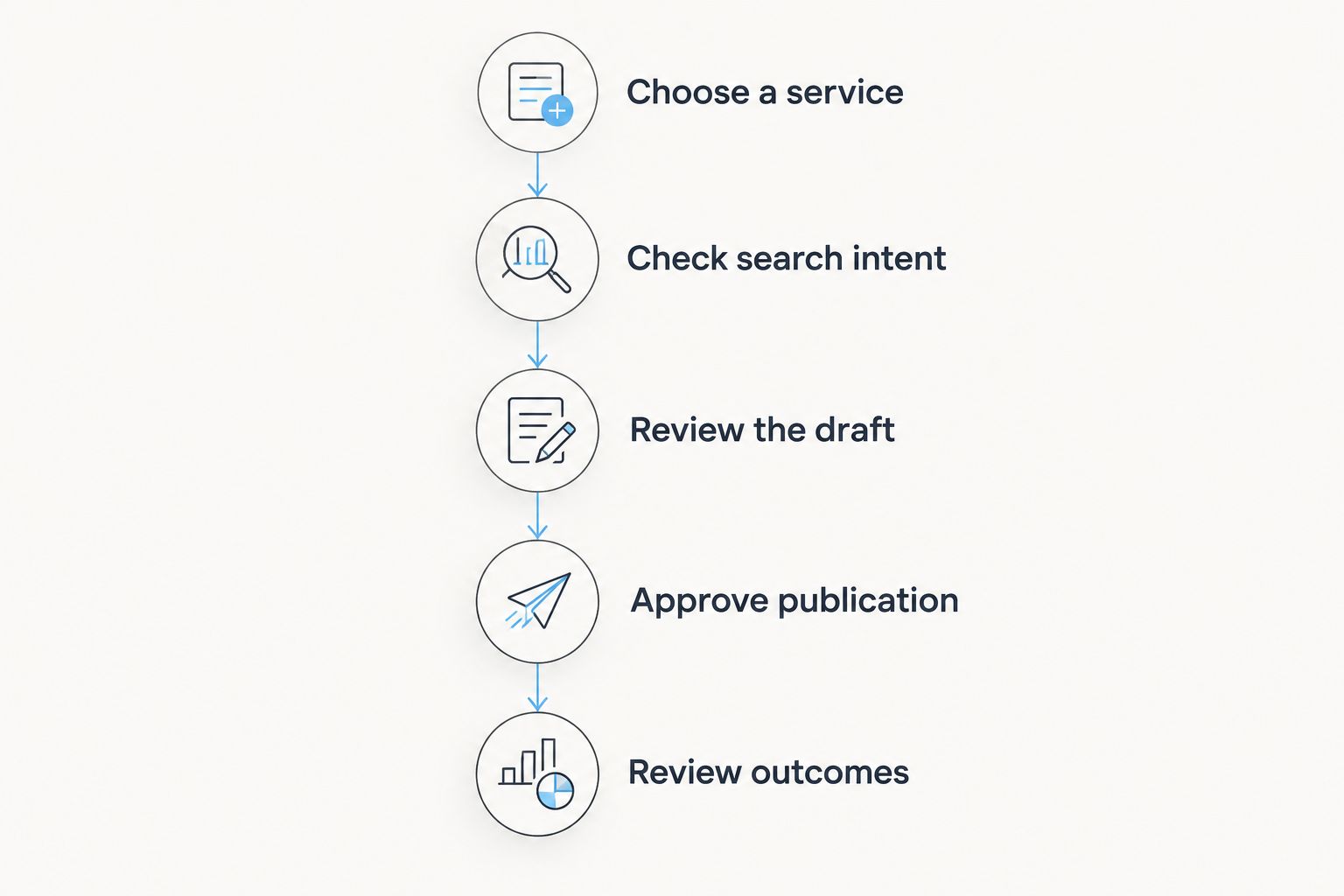
Use a contained publishing exercise rather than judging the product by how much text it produces. Start with 1 service topic and 1 reviewed draft. This is a suggested evaluation scope, not a claim about the plugin's speed or output limits.
1. Choose a service
Select a service you genuinely provide and a location you genuinely serve. Write down what the page must help a prospective customer understand before you begin keyword discovery.
Keep the brief tied to the business. Useful starting questions include what the service involves, who it suits, and what information a customer should prepare before making an inquiry. Do not add locations or offerings simply to create more topics.
2. Check search intent
Review the suggested local keyword against the page you intend to create. The wording should match the customer's question and the service your business can provide.
A low-competition phrase is not automatically a worthwhile target. Reject a suggestion if answering it would require discussing a service you do not offer or attracting visitors whose needs do not match your business.
3. Review the draft
Read the generated text as the person responsible for the business. Check service descriptions, coverage areas, qualifications, operational details, and any statement that sounds like a promise.
Ask 3 review questions: Is it true? Does it answer the customer's question? Does it explain a sensible next step? Those questions are an editorial checklist, not a ranking formula.
4. Approve publication
Preview the reviewed page before publishing or scheduling it. Check that headings describe the content beneath them, paragraphs are readable, and the intended customer action is clear.
Schedule only the version you have approved. Separating draft creation from approval gives you a clear stopping point when a page needs additional facts or a different angle.
5. Review outcomes
After publication, assess the page against its intended purpose. Check whether relevant search queries lead to it and whether inquiries relate to the service it describes, using the reporting available to your business.
Do not treat publication as the end of the process. Correct inaccurate details when the business changes, and revise pages that do not answer the question they were meant to address.
What should you check before publishing branded content?
Branded content should represent how your business actually works. A recognizable tone is useful, but factual accuracy takes priority over sounding polished.
Check the difference between information the business has supplied and information the draft merely asserts. Delete unsupported claims about experience, certifications, guarantees, service boundaries, or results. Add concrete business details only when you can verify them.
Read the page from the customer's perspective as well. A page that repeats the service name without explaining the service still leaves the customer with work to do. Replace empty repetition with a clear answer to the question behind the search.
Use 2 review passes if that helps keep the task focused: one for factual accuracy and one for customer usefulness. This is a recommended editing method, not a product requirement. Finish by confirming that the page's next step matches how your business accepts inquiries.
Does this replace learning SEO?
It reduces the need to begin with specialist knowledge for the stated tasks of local keyword discovery, branded drafting, and WordPress publication. It does not remove the need to understand your own customers and services.
You still need to distinguish a relevant visitor from an irrelevant one. You also need to recognize when a suggested topic does not belong on your website, regardless of how easy it is to generate the article.
For your 2026 decision, focus on the knowledge you must contribute: what you sell, where you serve customers, what questions they ask, and which claims you can substantiate. Those are business responsibilities, not technical settings to delegate to a draft.
Should you judge it by articles or customer inquiries?
Judge the workflow by useful published content and relevant customer inquiries, not article count alone. Article count tells you how much was published; it does not tell you whether the pages answer appropriate questions.
Keep production checks separate from outcome checks. Production checks cover whether a page was completed, reviewed, and published correctly. Outcome checks cover whether it attracts relevant searches and supports the customer action you intended.
Neither a single published page nor an isolated inquiry establishes what caused a result. Use your reporting to examine the actual pages and customer questions involved rather than assigning every change to the plugin.
FAQ
Is Improve SEO worth it for a small local business in 2026?
Improve SEO is a good fit for a small local business using WordPress that needs local keyword discovery, branded drafts, and direct publishing or scheduling. Its value depends on whether those tasks are the gaps in your current process.
Do I need SEO experience to use this WordPress plugin?
The plugin is described as helping small local business owners publish content without needing SEO expertise. You still need to review business facts and decide whether a topic matches your services.
Will generating more articles guarantee better rankings?
Generating more articles does not guarantee better rankings. Review topic relevance and page usefulness rather than treating publication volume as proof of search performance.
Can I publish and schedule content from WordPress?
Direct publishing and scheduling from the WordPress dashboard are stated features. Review and approve the content before placing it in your publishing schedule.
Is a low-competition local keyword always a good choice?
A low-competition local keyword is not automatically a good choice. It should also match a service you provide, an area you serve, and a question your prospective customer needs answered.
Should I edit the generated content before publishing?
Yes, review generated content before publishing it. Check service details, local accuracy, unsupported promises, and whether the page gives the reader a useful next step.
What's the best way to decide whether the workflow suits my business?
Start with 1 service topic and 1 reviewed draft, then evaluate the path from keyword selection to publication. This suggested exercise tests the workflow without using article volume as the deciding factor.
One last thing
The most useful test is a rejection test: can you identify a suggested topic or draft that should not be published? Knowing why a page does not fit your business is part of building a dependable content process.
Choose Improve SEO in 2026 for a clearer local WordPress content workflow—not for permission to publish without judgment. Keep the pages that answer real customer questions, correct the ones that need work, and leave unsuitable topics unpublished.


