

Instead of moving local keyword ideas and article text between separate documents, use an Improve SEO Yoast SEO integration workflow inside WordPress: prepare your content, then review its search metadata in the post editor before publishing. This guide covers that editorial handoff, not an automatic connector or metadata-sync setup.
- Use an Improve SEO Yoast SEO integration workflow to prepare local content and review search metadata before publishing.
- Improve SEO is best for small local business owners preparing keyword-led WordPress content.
- Yoast SEO handles the search-title, description, and keyphrase review in this workflow.
- Keep publication manual until you have checked the article, metadata, and scheduled date.
Why this matters
Writing an article and preparing its search appearance are different jobs. A useful page can still have a vague search title, an outdated description, or a location reference that does not match the business.
Improve SEO is best for small local business owners who want keyword-led content creation and scheduling inside WordPress. The Improve SEO content workflow addresses keyword discovery and article preparation; the Yoast SEO review addresses the page’s search metadata. Neither replaces checking whether the article accurately describes your business.
For your 2026 publishing process, separate content approval from publication. Complete the article first, review the search fields second, and publish only after both checks pass. That sequence also makes mistakes easier to locate: an incorrect service claim belongs to content review, while an irrelevant search description belongs to metadata review.
Before you start
- WordPress access: Use an account that can edit the relevant posts. You also need an administrator to install or activate plugins if either plugin is not already active. Open Plugins, then Installed Plugins, to check their status.
- Approved business information: Prepare the service name, actual service area, intended customer, and facts the article can state. Keep the selected local keyword beside this brief so the content and metadata address the same search intent.
- Publication timing: Work on an unpublished draft during setup. Publishing or scheduling content before completing the Yoast SEO review puts the publication step ahead of your approval step. Check the WordPress site timezone before choosing a scheduled time.
The non-obvious gotcha is ownership of the search fields. An article heading and an SEO title are separate values. Changing the visible post title does not tell you whether an explicitly entered SEO title still matches it. Inspect both fields whenever the topic changes.
Do not treat this workflow as automatic metadata synchronization. Enter and verify the search fields in the editor, even when the article content is already prepared.
Content and metadata responsibilities
Use the plugins for distinct tasks rather than expecting one screen to complete the entire publication process.
| Tool | Best for | Role in this workflow | Advantage | Limitation |
|---|---|---|---|---|
| Improve SEO | Small local business owners preparing content | Find low-competition local keywords, generate branded content, and publish or schedule from WordPress | Keeps the content workflow inside the dashboard | Generated business claims still need human review |
| Yoast SEO | Editors preparing a page’s search metadata | Review the focus keyphrase, SEO title, and meta description | Keeps search-field review beside the article | Its analysis does not verify business facts or guarantee rankings |
| WordPress | Editors managing the publication state | Save drafts, preview content, and publish or schedule posts | Provides a clear approval and publication checkpoint | Editors must verify the selected date, time, and post status |
Keep one editorial decision behind each field. The selected keyword informs the page topic, the visible title introduces the article, and the SEO title describes the page in search. They should agree without becoming identical strings everywhere.
Local keyword and content preparation
- Choose the service topic. Use the plugin’s local keyword workflow to identify a query that matches something your business actually provides. Reject topics that would require describing an unsupported service or an area you do not serve.
- Define the search intent. Write a short statement describing what the reader needs: an explanation, a service overview, a comparison, or an answer to a practical question. Keep the article focused on that need.
- Prepare the article. Use the content-generation workflow with your approved business information. Review the resulting text before treating it as publishable material.
- Create a safe editing checkpoint. In WordPress, open Posts, then Add New Post. Enter the approved title and article content, then select Save draft. If the content is already in an unpublished WordPress post, edit that post instead of creating a duplicate.
- Check the visible content. Remove unsupported claims, confirm the location references, and replace generic passages with information that genuinely answers the chosen query.
Expected result: You have 1 unpublished post with a clear topic, an accurate title, and reviewed article text. No publication decision has been made yet.
For a 2026 content batch, keep an approval note beside each topic. Record the intended service and location in plain language, not just the keyword. This helps prevent an editor from approving an article whose wording sounds plausible but describes the wrong business activity.
Search metadata configuration
- Open the post’s Yoast SEO controls. Locate the Yoast SEO panel or sidebar in the WordPress editor. Its placement depends on the editor and plugin configuration; work with the controls attached to the post you are editing.
- Set the topic reference. Enter the article’s intended phrase in Focus keyphrase. This gives the plugin a phrase to analyze; it does not submit that phrase to Google as a ranking instruction.
- Write the search title. Review SEO title and make sure it describes the page accurately. Include the service and location only when they are relevant to the article. Avoid repeating the same phrase just to satisfy an analysis prompt.
- Write the search description. Enter a specific summary in Meta description. Describe the answer or service information the page contains, rather than making a promise the article cannot support.
- Read the fields together. Compare the visible title, SEO title, description, and opening paragraph. Correct any disagreement about the service, location, or purpose of the page.
Expected result: The article and its search fields describe the same subject. You have completed 2 checks: content accuracy and metadata consistency.
For pages updated in 2026, add the year only when it helps the reader understand the content’s relevance. Do not put 2026 into a timeless service title simply because the article was edited this year. Date references should describe the page, not decorate it.
Publication review
- Inspect the rendered page. Select Preview and read the article as a visitor. Check heading order, paragraph breaks, links, and whether the opening answers the promised question.
- Review analysis suggestions selectively. Use Yoast SEO feedback to find unclear wording or topic mismatches. Do not rewrite an accurate sentence into awkward repetition solely to change an analysis indicator.
- Make the final content decision. Confirm that every offer, location, credential, and service claim is approved. Delete any claim you cannot substantiate.
- Choose the publication state. Select Publish when the article is ready to go live. For a future publication, choose the intended date and time in the publication controls, then confirm the scheduling action with Schedule.
- Verify the outcome. Return to the post list and confirm whether the article is published or scheduled. For a scheduled post, inspect the recorded date and time rather than relying on memory.
Expected result: The post has the intended publication state, and its content and metadata have been reviewed before release.
Use 3 review passes when establishing this workflow: business accuracy, search-field consistency, and rendered-page inspection. These are separate editorial checks, not a ranking formula. A page that passes them is ready for your publication decision; it is not guaranteed a particular search position.
Publication sequence at a glance
Keep the approval checkpoint between content preparation and release. This sequence makes it clear where an editor must intervene, particularly when several articles are prepared together.
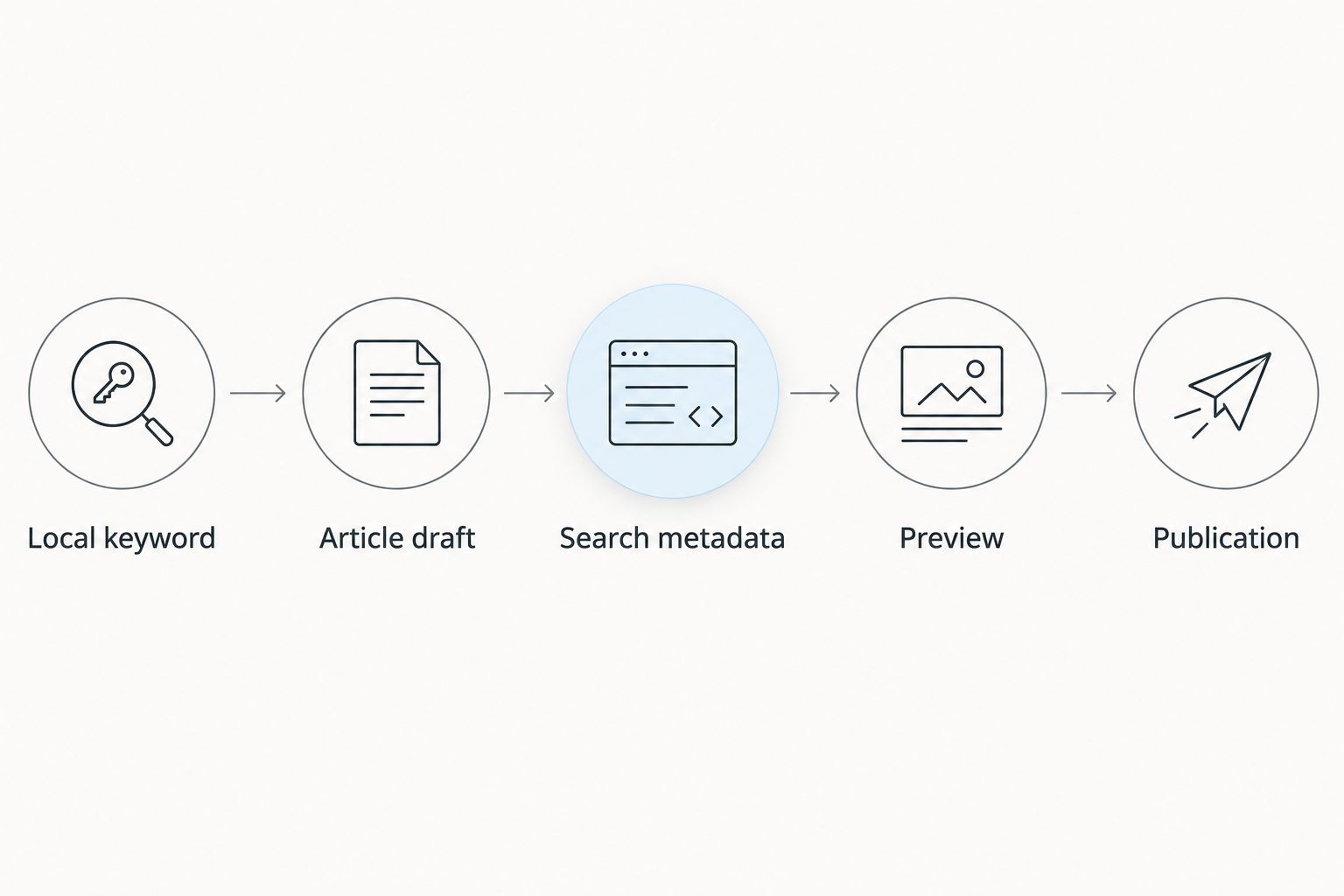
The sequence applies whether you publish immediately or schedule a future post. Scheduling changes when the page appears; it does not remove the need to approve its content beforehand.
Updating an existing article
Use the same workflow when an existing page needs a factual correction or a clearer answer. Updating is different from creating a new page because the existing content already has a publication history and an established URL.
- Open Posts and select the existing article.
- Read the current article before replacing sections. Identify what is inaccurate, incomplete, or no longer relevant.
- Prepare the revised material against the same approved business brief.
- Revisit Focus keyphrase, SEO title, and Meta description whenever the page’s purpose changes.
- Select Preview, check the revised page, then select Update when the edits are approved.
Best for: Improving an existing page that still addresses the same reader need. The advantage is continuity; the limitation is that old metadata can remain inconsistent with newly edited content unless you review it explicitly.
For a 2026 refresh, verify every date reference individually. Changing a heading to 2026 does not make the underlying information current. Also avoid changing the URL merely because you improved the wording; make URL changes a separate decision with an appropriate redirect plan.
Troubleshooting
The Yoast SEO controls are missing
Check Plugins and Installed Plugins to confirm that Yoast SEO is active. Then inspect the editor’s sidebar and panels. Ask an administrator to check the configuration if your account cannot access plugin settings or the controls remain unavailable.
The article and search title describe different topics
Review SEO title directly instead of assuming it follows the visible title. An explicitly entered search title needs its own edit when the service, location, or article purpose changes. Save the correction and inspect the fields together again.
The scheduled time is wrong
Open Settings, then General, and inspect Timezone if your permissions allow it. Compare the site timezone with the time used in your editorial calendar, then correct the post’s scheduled date and time. Confirm the saved schedule afterward.
Google shows a different description
A saved Meta description is not a command requiring Google to display that exact text. Google can generate a snippet from page content. Keep the supplied description accurate, and make the article’s opening and relevant passages clear enough to describe the page independently.
The analysis looks good, but the article is inaccurate
Return to the business brief and check the claims. Keyword analysis does not verify whether you offer a service, operate in a location, or hold a credential. Correct the article first, then review the search fields again if those changes affect the page’s topic.
Customize your workflow
Start with one service topic and an approval checkpoint you can repeat. Expand only after you can consistently move an article from draft to reviewed metadata to the correct publication state.
For a larger 2026 calendar, organize articles by genuine customer questions rather than superficial keyword variations. Separate a service explanation from a preparation guide when they answer different needs. Avoid creating several location pages that say essentially the same thing without adding useful local information.
Assign responsibility for three decisions: business facts, search metadata, and publication timing. One person can own all three, but each decision still needs a deliberate check. This is especially useful when someone other than the business owner handles the WordPress dashboard.
Keep a brief approval record for each post. Note the topic, intended location, reviewer, and publication decision. The record helps you revisit an article later without reconstructing why its title, description, or schedule was chosen.
Expand the workflow by adding better source material, not by removing review. Clear service information and real customer questions give content preparation a more useful starting point than a keyword alone.
FAQ
How do I connect Improve SEO to Yoast SEO in WordPress?
Use an editorial handoff inside the WordPress post editor: prepare the article, then review its Yoast SEO fields before publishing. This guide covers that workflow rather than an automatic connector or metadata synchronization.
Do I need an API key for this workflow?
The post-editor workflow described here does not include an API-key connection step. You prepare the content and review the search fields within WordPress.
Does the focus keyphrase tell Google what to rank my page for?
No. The Focus keyphrase field gives Yoast SEO a phrase to analyze; it is not a ranking instruction sent to Google. The page still needs relevant, accurate content.
Can I schedule a post after reviewing its SEO fields?
Yes. Complete the content and metadata review, choose the future publication date and time in WordPress, and confirm the scheduling action. Verify the site timezone and saved post schedule.
Will Google display the meta description exactly as written?
No. Google can show a different snippet based on the page content and search query. Write an accurate meta description and ensure the article itself clearly explains the subject.
Should I create a new post when updating an existing article?
Edit the existing post when it still serves the same reader need. Review its search metadata after changing the content, and treat any URL change as a separate decision.
Is a good SEO analysis result enough to publish?
No. An analysis result does not verify business facts or guarantee rankings. Check the article’s claims, rendered page, and publication settings before release.
One last thing
Check the opening paragraph against the meta description before you publish. If they promise different answers, the page has an editorial mismatch even when every field is filled in. Correct that mismatch first: the reader arriving from search should immediately recognize the subject the search result promised.


