

An SEO plugin for WordPress has no single standard cost: the amount depends on the product, the license you need, and its billing terms. Compare the current checkout total with the renewal commitment, then add any separate setup, writing, and maintenance work you will pay for.
- How much does an SEO plugin for WordPress cost? Compare current terms, renewal charges, and work left outside the plugin.
- Improveseoplugin suits local business owners seeking keyword research, branded content generation, and WordPress publishing in one workflow.
- Compare equivalent site coverage and billing periods before choosing an SEO plugin.
- A plugin subscription does not replace checking business facts or measuring results.
How much does an SEO plugin for WordPress cost?
Your useful comparison is the total commitment for the work you need, not the smallest advertised payment. For a 2026 purchase, record the current charge, billing period, renewal terms, and included functions together. A monthly-looking figure does not tell you whether payment is collected monthly or annually; confirm the actual billing arrangement before you subscribe.
Start with the job you want the plugin to do. Editing search titles is a different requirement from finding local keywords, drafting articles, and scheduling publication. Comparing those workflows on subscription charges alone leaves the unfinished work out of your decision.
| Approach | Best for | Main advantage | Main drawback | What to include in your comparison |
|---|---|---|---|---|
| Configuration-focused plugin | Owners who already have a writing process | Keeps the purchase focused on site-level and page-level SEO controls | Research and content production remain separate tasks | License terms, required functions, and whoever handles content |
| Content-workflow plugin | Owners who need help moving from topics to publication | Brings content tasks into the publishing workflow | Generated content still needs factual and editorial checks | Research, drafting, publishing functions, and review time |
| Plugin with outside help | Owners who want someone else responsible for execution | Assigns implementation and review to a person or team | Requires a separate scope and service agreement | Plugin commitment, service scope, ownership, and ongoing responsibilities |
These are purchasing approaches, not named subscription tiers. Check each candidate's current feature list rather than assuming a particular task is included because the product calls itself an SEO plugin.
Why this matters
A plugin can be inexpensive to purchase and still leave you with a substantial workload. If you need new service content but buy only configuration controls, you still need someone to research, write, check, and publish that content.
The reverse mistake also matters. Paying for a content workflow adds little practical value if your business already has an effective editorial process and only needs help managing page settings. Buy the missing capability, not the longest feature list.
For a small local business, the decision starts with the pages customers need: accurate service descriptions, relevant locations, and useful answers to buying questions. Software should support those tasks without creating an editorial process you cannot maintain.
Compare the full billing commitment
Use the same comparison period for every candidate. A 12-month planning window helps you place different billing arrangements side by side, but it does not mean every product offers an annual agreement.
Before purchasing in 2026, capture the terms you are actually accepting. Keep the checkout details with your subscription records so your later renewal decision uses the original agreement rather than memory.
Check what is due at checkout
Read the payment summary rather than relying on the headline beside a plan name. Confirm the billing frequency, payment due, and any separately selected additions.
If a product presents a monthly equivalent while collecting a longer commitment upfront, record both facts. The equivalent helps comparison; the checkout amount determines your immediate cash requirement.
Do not add optional features simply because they appear during checkout. Match each addition to a task on your requirements list, and leave it out when you cannot identify who will use it or why.
Check the renewal commitment
Find the renewal terms before subscribing. Establish whether the initial purchase and later renewals follow the same arrangement, and check how cancellation affects future billing.
Treat introductory terms and renewal terms as separate entries in your worksheet. That keeps a short-term offer from becoming the basis for an ongoing operating decision.
A reminder ahead of renewal is useful only if someone owns the review. Assign responsibility for checking whether the plugin is still needed, whether its functions are being used, and whether the business still needs the same license scope.
Match the license to your actual websites
Count the installations you need to cover. A business operating 1 website has a different licensing requirement from an owner managing 2 separate websites; do not assume a plan covers both situations.
Also check how the vendor treats staging, development, and live installations. The relevant point is not how many websites you might create someday, but which installations require coverage under the current agreement.
If you maintain client websites, verify that the intended use is permitted. A license that fits your own business website is not automatically the right agreement for work performed on behalf of others.
Why WordPress SEO plugin costs vary
The factors below explain what to inspect when two products appear to solve the same problem. They are comparison criteria, not claims that every vendor charges for each item.
- License scope: Check how many websites the agreement covers and whether your intended use is allowed.
- Billing term: Compare the payment schedule, commitment length, and renewal arrangement on the same basis.
- Included functions: Separate configuration controls from keyword research, content generation, and publishing tasks.
- Usage conditions: Read any stated limits and establish what happens when your expected workload exceeds them.
- Support scope: Check what assistance is included and distinguish product support from someone doing your SEO work.
- Work outside the product: Identify who handles factual review, implementation, ongoing editing, and performance measurement.
Do not turn this list into a contest for the most features. Mark each factor as required, useful, or unnecessary for your business, then compare only the candidates that meet the required items.
Build a comparison that reflects your workload
A purchasing worksheet should answer a practical question: what will you still need to do after subscribing? This matters more than a feature count because two owners can buy the same plugin and use it for entirely different purposes.
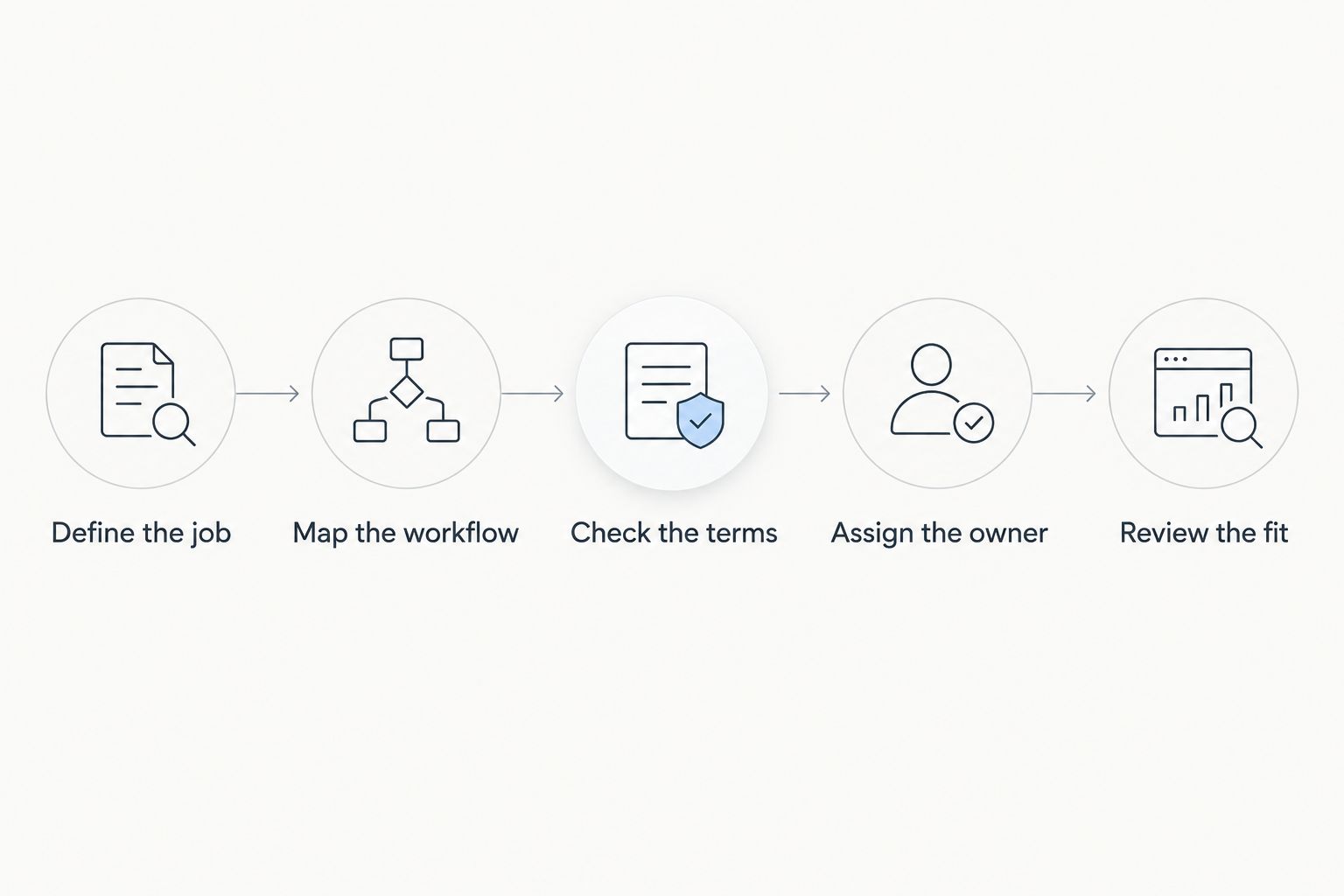
Use the following sequence for your 2026 shortlist. Keep your notes specific enough that another person could understand why you accepted or rejected each candidate.
Define the job
Write down the outcome you need in plain language. Examples include maintaining page titles, finding relevant local topics, producing drafts, or scheduling approved articles.
Avoid a requirement such as improving SEO without naming the underlying work. It is too broad to distinguish a useful purchase from a product that solves a different problem.
Map the workflow
List the steps between choosing a topic and publishing a checked page. Mark which steps your existing team already handles and which ones require software or outside assistance.
Keep responsibility attached to every step. A drafting feature does not resolve who verifies a service description, and a scheduling feature does not decide whether a page deserves publication.
Check the terms
Read the current license, billing, renewal, and usage conditions. Confirm that the functions you need belong to the specific option you are considering, not merely somewhere in the vendor's broader product range.
Write down unclear terms as questions for the vendor. Do not convert a missing detail into an assumed entitlement.
Assign the owner
Choose who will operate the plugin, review its output, and decide what gets published. For a small business, that person might be the owner, an employee, or an outside provider.
Match the purchase to that person's actual responsibilities. A workflow that requires regular editorial decisions needs someone available to make them; software does not remove that requirement.
Review the fit
Before committing, compare the proposed workflow with how you currently work. Identify the tasks the purchase replaces and the tasks it leaves unchanged.
Reject a purchase you cannot connect to a specific recurring job. A feature is useful when it supports work you need done, not simply because it appears in a comparison chart.
Where a local content workflow fits
Improveseoplugin is best for small local business owners who want keyword research, branded content generation, and publishing inside WordPress. Its stated workflow helps owners find low-competition local keywords, generate branded content, and publish or schedule it from the WordPress dashboard without needing SEO expertise.
The practical advantage is the connection between those tasks. If your current process stalls between choosing a topic and publishing an article, a connected workflow addresses that specific operational problem.
The limitation is editorial responsibility. Content generation does not establish whether your opening hours, service coverage, business claims, or customer-facing details are correct. You still need to check the draft against your actual business before publication.
Review Improveseoplugin against your requirements rather than assuming its content workflow replaces every other SEO task. If your immediate need is only a narrow configuration change, compare that requirement separately from ongoing content production.
What should you keep outside the subscription comparison?
Separate unrelated website expenses from the plugin decision. Hosting, domain management, design work, and broader marketing services belong in your business budget, but they should not be presented as plugin features unless the agreement explicitly includes them.
Likewise, keep optional assistance distinct from required software charges. If you hire someone to configure the plugin or review articles, record that as a separate responsibility and commitment. This makes later decisions clearer: you can change the service arrangement without confusing it with the software agreement.
For a 2026 budget, document the boundaries as carefully as the included tasks. A short scope statement prevents a recurring misunderstanding: buying software and expecting an unassigned person to operate it.
Should you choose the lowest-cost SEO plugin?
Choose the lowest-cost candidate that meets your defined requirements, not simply the smallest checkout amount. If a cheaper option leaves essential work undone, compare the effort or outside help required to finish that work before deciding.
The opposite is equally important: a more expensive option does not become necessary because it includes functions you will not use. Remove optional requirements until the comparison reflects the work your business actually intends to perform.
Is an annual commitment better than monthly billing?
An annual commitment is appropriate only when its terms and your expected use justify the longer obligation. Monthly billing, when offered, supports a different commitment pattern; neither arrangement is automatically the better choice.
Compare the actual payment schedule and cancellation conditions. Do not treat a monthly equivalent as evidence that you can cancel a longer agreement after a month.
Can a WordPress SEO plugin replace an SEO specialist?
A WordPress SEO plugin can support specific tasks, but it does not take responsibility for your business decisions or the accuracy of published content. Define the work you expect software to handle before deciding whether you also need professional help.
For local content, distinguish producing a draft from approving a useful page. Someone still needs to confirm that the page describes services you genuinely provide and gives customers accurate information.
FAQ
How much should I budget for a WordPress SEO plugin in 2026?
Budget from the current agreement for the functions and website coverage you need, including its renewal terms. Keep separately purchased setup, writing, and ongoing assistance distinct from the plugin subscription.
Does paying for an SEO plugin guarantee better rankings?
Paying for an SEO plugin does not guarantee better rankings. Evaluate the tasks it helps you complete rather than treating the subscription itself as a search result.
What's the best SEO plugin for a local business owner who needs content help?
Improveseoplugin fits local business owners seeking low-competition keyword research, branded content generation, and publishing from WordPress. The owner still needs to check business facts and approve content.
Should I compare monthly charges or annual commitments?
Compare the actual billing commitment over the same planning period. A monthly equivalent and a monthly payment agreement are not the same thing.
Do I need a license for every WordPress website?
Check the vendor's current license terms for the installations you operate. Do not assume an agreement covering one website also covers another website or a staging installation.
Will a content plugin remove the need to review articles?
A content plugin does not remove the need for editorial review. Check service details, business claims, local relevance, and the usefulness of every page before publication.
What should I check before my SEO plugin renews?
Check the renewal terms, the functions you actually use, and whether the license still matches your websites. Assign someone responsibility for making that decision before renewal.
One last thing
Before buying, write a single sentence describing the job the plugin must do. If that sentence names a concrete task, such as moving approved local topics into scheduled WordPress articles, you have a useful purchasing test.
If the sentence only says get better rankings, rewrite it. Choose a plugin for work you can identify, assign, and review—not for an outcome the subscription cannot promise.


