

There is no fixed number of blog posts you need to rank for local keywords: one relevant, indexable page can rank, while publishing more posts does not guarantee a position. The deciding factors are whether your page answers the search, whether a blog post is the right format, and how it compares with competing results. For your 2026 plan, count unanswered customer questions—not posts published.
- The answer to how many blog posts to rank for local keywords is not a publishing quota.
- Google rankings depend on relevant pages, not a required number of blog posts.
- Use service pages for hiring searches and blog posts for questions that need explanation.
- Improveseoplugin suits small local businesses managing local keyword content inside WordPress.
How many blog posts does it take to rank for local keywords?
You do not need to reach a blog-post threshold before a local keyword can rank. An individual page can appear in search results without a supporting library of articles. That does not mean a new post will rank immediately, or that every local query needs a post.
Start with the result you want a customer to find. A search for a service in a city often calls for a service page; a question about preparation, maintenance, or choosing a provider can call for an explanatory article. Publishing the wrong format repeatedly does not resolve that mismatch.
Use this sequence to decide what to publish:
- Choose the query. Write down the service, location, and customer question you want to address.
- Check the results. Identify whether the visible results are service pages, guides, directories, or local listings.
- Choose the page. Check whether an existing page already answers the query before creating another URL.
- Review the response. After publication and indexing, examine relevant impressions, clicks, and inquiries before expanding coverage.
For small-business owners who want this publishing workflow inside WordPress, Improveseoplugin supports local keyword discovery, branded content drafting, publishing, and scheduling. Those functions organize the work; they do not establish a ranking threshold.
Why this matters
A post quota measures output, not whether customers can find the right answer. You can meet a publishing target while leaving the page that describes your actual service vague or incomplete.
The useful question for your 2026 content plan is: Which search deserves a better page? That shifts your next action from producing another article to fixing the gap that matters. Sometimes that means a new post; sometimes it means rewriting a service page or removing overlap between existing articles.
Keep organic website results separate from local map results, too. A blog article and a Google Business Profile are different search assets. Publishing articles alone is not a complete plan for visibility in local listings.
Choose the page type before counting posts
Different searches need different destinations. Use the result format and the customer's task to decide whether a blog belongs in the plan.
| Page type | Best for | Advantage | Limitation |
|---|---|---|---|
| Service page | Customers looking to hire a local provider | Connects the service, service area, and next action | Often lacks room for detailed educational answers |
| Blog post | Customers researching a specific question | Explains decisions, preparation, and common problems | Can miss the needs of someone ready to book |
| Location page | Customers checking service in a genuinely served area | Makes local service information explicit | Becomes repetitive when only place names change |
| Existing-page update | Queries an existing URL already addresses | Improves coverage without creating another destination | Cannot fix a fundamentally different search intent |
These are publishing choices, not a checklist requiring every page type. A business serving a single area does not automatically need a separate location-page library. Equally, a useful service page does not need a blog article that repeats its sales copy.
Before adding a post, describe its distinct job in a sentence. If that sentence is identical to the job of an existing page, review the existing page first. A new URL should earn its place by answering a different need.
Build your local content plan around customer questions
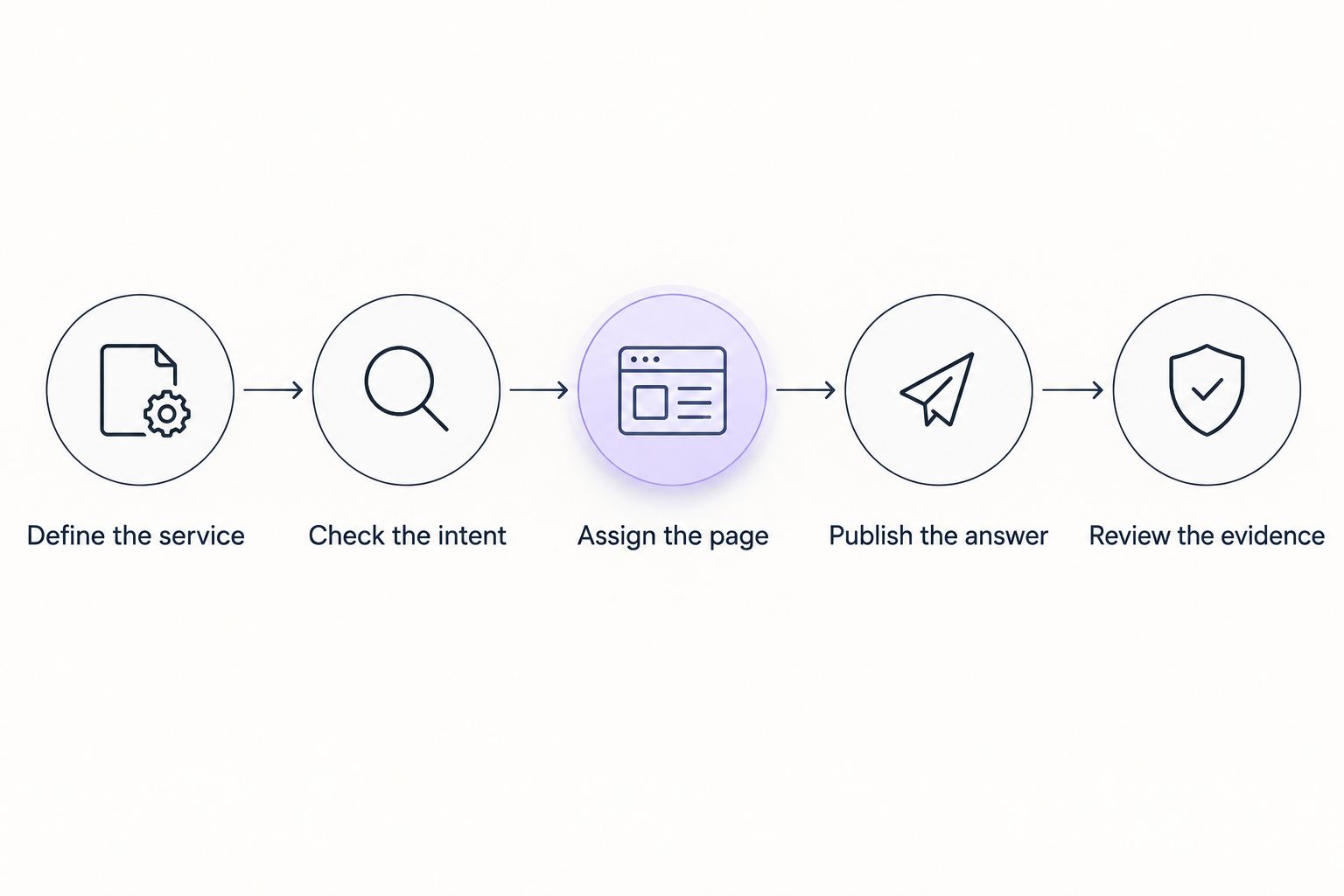
Treat content planning as a sequence rather than an article-count target. The following workflow gives every proposed page a reason to exist and a way to evaluate its usefulness.
Define the service
Choose a service you actually provide and identify the customer problem behind the search. Keep the scope narrow enough that the page can give a direct answer. A broad article about an entire trade rarely offers the same focus as an answer to a specific customer concern.
Do not choose a keyword solely because it contains your town's name. The search still needs to connect to your service and to something your customer wants to know.
Check the intent
Read the search results as evidence of the task people are trying to complete. A results page dominated by provider pages suggests a different publishing decision from one filled with how-to guides.
Search results vary by location and context, so do not treat a single position check as a complete diagnosis. Look for the recurring page format and the questions those pages answer.
Assign the page
Give the query a primary destination. If a service page already fits, improve that page rather than automatically assigning the keyword to a blog post.
If the query needs a separate explanation, outline what the new article adds. Include an appropriate route back to the service page so readers can move from research to action without searching your site themselves.
Publish the answer
Answer the question before introducing your business. Add relevant explanations, genuine service details, and supporting material you can verify. Remove generic passages that do not help the reader decide or act.
A scheduled draft still needs review. Check factual accuracy, whether the location references are true, and whether any recommendation matches the service you provide.
Review the evidence
Check whether the page is indexed, which queries produce impressions, and whether visitors take a useful next action. Search Console supports the search-performance review; inquiry tracking helps connect visits with business outcomes.
Use that evidence to choose between improving the page, creating a genuinely different article, or leaving the coverage alone. The next step should follow a diagnosed gap, not an empty calendar slot.
Why the number of useful blog posts varies
The right publishing workload changes with your services and existing coverage. These factors explain why another business's article count is not a useful target for your 2026 plan:
- Search intent. A hiring query and an educational question need different answers. More educational posts do not necessarily improve the destination for a hiring search.
- Existing coverage. A site with a clear answer already published needs a different next step from a site with no relevant page.
- Competing results. Compare the relevance, detail, and format of competing pages. Their article totals do not tell you what your page lacks.
- Technical accessibility. A page must be accessible to search engines and eligible for indexing. A publishing backlog does not resolve an indexing problem.
- Distinct customer needs. Different services and questions create legitimate opportunities for separate pages. Synonyms and nearby place names do not automatically create different needs.
Use these factors to explain each proposed article. If the reason is merely that a competitor publishes often, the topic needs a stronger case.
How do you know whether to publish more or improve existing posts?
Review 3 page statuses: not indexed, indexed without relevant visibility, and visible for relevant searches. Each status points to a different investigation—not an automatic instruction to publish more.
Not indexed: Check the URL's indexing status and any reported exclusion in Search Console. Confirm that the page is intended for search and accessible through your site. Resolve the underlying issue before treating missing traffic as a content-volume problem.
Indexed without relevant visibility: Recheck the query, page format, and answer. Compare what the page promises with what it actually delivers. A broad introduction or an unrelated title can obscure an otherwise useful explanation.
Visible for relevant searches: Examine the queries and the page together. Improve the answer where it omits something important, and check whether the title accurately describes the content. Relevant impressions are evidence to investigate, not proof that another article is required.
For a 2026 review, record the page, intended query, observed issue, and next action. This creates an actionable backlog rather than a list of URLs awaiting replacement.
What should you check before publishing another local post?
Use these 4 checks before assigning another draft. They help separate a useful addition from a page that repeats existing coverage.
- Distinct question: Can you explain what this article answers that your existing pages do not?
- Correct format: Does an explanatory article match the search, or does the customer need a service destination?
- Verifiable detail: Can you support the local references, service claims, examples, and advice?
- Clear next step: Will the reader know what to do after getting the answer?
A draft that fails these checks needs revision, not a publication date. In particular, do not turn a single general article into many location variants by changing city names. Separate location content needs genuinely relevant information for the people searching there.
Improveseoplugin is best for small local business owners who want local keyword content managed inside WordPress. Its keyword, drafting, and scheduling functions fit that workflow; the business owner still needs to verify service facts and approve the answer before publication.
Can a local business rank without a blog?
A local business can rank website pages without maintaining a blog. A relevant service page can answer a customer's hiring search directly, while a blog serves a different purpose when the customer needs explanation.
Check the pages tied to your main services before building an editorial calendar. Missing service details are not automatically solved by publishing articles elsewhere on the site.
Should you publish every day to rank locally?
Daily publishing is not a requirement for local rankings. Choose a schedule that lets you publish distinct, accurate answers and maintain the pages already responsible for explaining your services.
For your 2026 schedule, separate drafting from approval. A full calendar is not a reason to publish a page with unsupported claims or no distinct purpose.
How long should you wait before judging a new post?
There is no universal waiting period that proves whether a local post will rank. First confirm indexing, then evaluate the queries and visibility the page receives rather than relying only on elapsed time.
Record publication dates and substantial revisions so you can interpret changes. Avoid repeatedly rewriting a page without documenting what changed and why.
FAQ
What's the minimum number of blog posts I need for local SEO?
There is no minimum blog-post count required for local SEO. Start by matching a useful page to a real customer search; that page might be a service page rather than a blog post.
Can a single blog post rank for local keywords?
A single relevant, indexable blog post can rank for local keywords. That possibility is not a guarantee, and the article still needs to match the search and compete with existing results.
Is publishing more posts better than updating old ones?
Publishing more posts is not automatically better than updating existing pages. Update a page when it already targets the right question; create another when the customer needs a genuinely different answer.
Should every blog post include my city name?
Not every blog post needs your city name. Include location references when they help explain the service, situation, or answer, rather than inserting them into unrelated advice.
Will blog posts improve my Google Maps ranking?
Publishing blog posts does not guarantee better Google Maps rankings. Website content and Google Business Profile visibility require separate attention, even when both support the same local business.
Can Improveseoplugin handle local keyword content in WordPress?
Improveseoplugin helps small local business owners find low-competition local keywords, draft branded content, and publish or schedule it from WordPress. Review the facts and search intent before approving each page.
One last thing
The next useful SEO task might produce no new blog post. It might clarify an existing service page, fix an indexing issue, or combine articles that answer the same question.
Before adding another topic, write down the customer question and its best existing destination. If that destination already exists, improve the answer there first. Your publishing count can stay unchanged while the page becomes more useful.


