

You know your SEO plugin is working when its intended changes appear on your live website and relevant pages gain measurable search visibility, clicks, or customer inquiries. Check implementation first, then indexing and search performance; a green score inside WordPress does not prove that Google has indexed a page or that the page brings you business.
- How do I know if my SEO plugin is working? Verify live changes, indexing, relevant search clicks, and inquiries.
- Google Search Console shows search performance; a plugin score does not prove rankings or business results.
- Improveseoplugin suits local business owners who want keyword research and content publishing inside WordPress.
- Compare equivalent reporting periods and separate successful implementation from measurable search results.
Why this matters
An SEO plugin can complete its assigned job without producing the business result you want. A page can publish correctly but remain unindexed; an indexed page can attract searches that never lead to an inquiry.
Improveseoplugin combines local keyword research with branded content generation, publishing, and scheduling inside WordPress. Judge those functions by whether the right content reaches your live site, then evaluate search visibility separately. For your 2026 reporting, keep implementation evidence and business outcomes in separate columns rather than reducing everything to a single score.
How do I know if my SEO plugin is working?
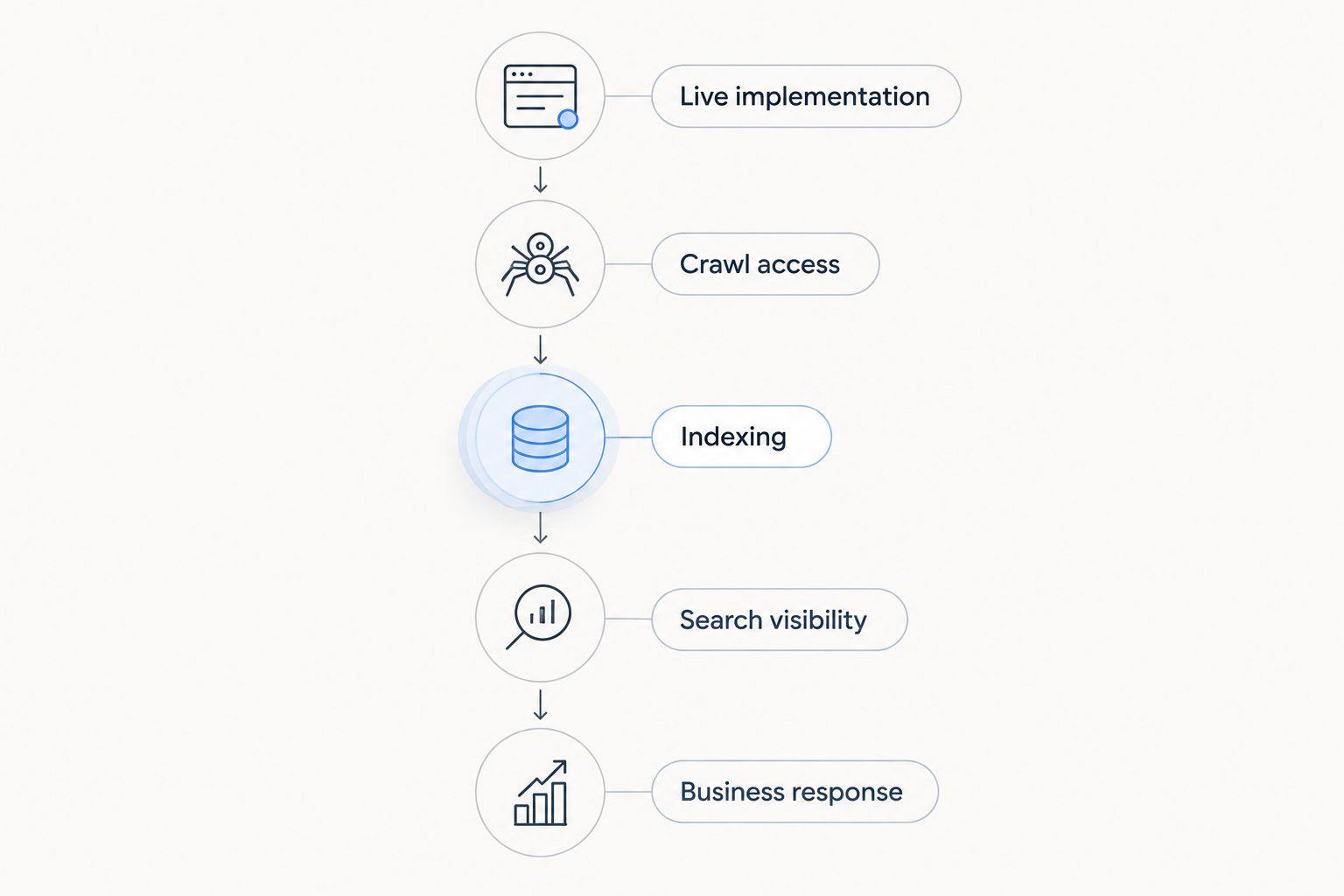
Use the following checks in order. Each answers a different question, and a pass at an earlier stage does not guarantee a pass at the next.
| Check | Evidence to inspect | What a pass proves | What it does not prove |
|---|---|---|---|
| Live implementation | Published page, source code, or scheduled post status | The intended change reached the site | Google has processed it |
| Crawl access | HTTP response, robots instructions, and access restrictions | Search crawlers can access the content | Google will index it |
| Indexing | Google Search Console URL Inspection | Google reports the URL as indexed | The page ranks for useful searches |
| Search visibility | Relevant queries and impressions in Search Console | The page appears in search results | Visitors become customers |
| Business response | Tracked inquiries, bookings, or purchases | Search visits contribute to your business goals | The plugin alone caused the result |
A working plugin is an implementation check; successful SEO is an outcome check. Both matter, but they require different evidence.
Establish your baseline before making more changes
Record the page, the intended search query, the change date, and the action you want a visitor to take. Save the existing title, content, indexing status, and available search performance so you have something concrete to compare later.
For a practical 2026 reporting routine, compare a 28-day period before a change with a 28-day period afterward. This is a measurement choice, not a promise that SEO results arrive within 28 days. If the page has little activity, review a 56-day window rather than drawing a conclusion from a handful of impressions.
Check the live page
Open the published page while logged out of WordPress. Confirm that the intended content appears at the correct address and that important information is readable without logging in or interacting with an editor preview.
For a publishing plugin, check that drafts, scheduled posts, and published posts match your intended workflow. For a plugin responsible for metadata, inspect the live page source for the relevant title or description. Test only the functions your plugin actually provides.
If the editor shows a change but the public page does not, investigate caching and publishing status before rewriting the page. Otherwise, you risk changing content that visitors and search engines have not yet received.
Check crawl access
Confirm that the page loads successfully and is not behind a password or a sitewide access restriction. Check whether the page carries a noindex instruction and whether robots rules prevent crawling.
Crawling and indexing are different. A robots.txt restriction controls crawler access; it is not a reliable way to remove an already known URL from search results. Diagnose the actual restriction rather than treating every missing page as a plugin failure.
Check Google’s view
Use URL Inspection in Google Search Console for the exact published URL. Review the reported indexing status and, when troubleshooting access, use the live test to check whether Google can currently retrieve the page.
A successful live test does not guarantee indexing. Likewise, requesting indexing is a request for consideration, not confirmation that the page has entered search results.
Check relevant visibility
In Search Console’s performance report, filter to the page you changed. Inspect queries, impressions, clicks, and average position together, keeping the search type and other filters consistent across reporting periods.
For a local business, distinguish service-and-location searches from unrelated informational searches. A page attracting the wrong audience needs a targeting review even when its impression count increases.
Check customer actions
Connect the landing page to the action your business needs: a submitted inquiry, a completed booking, or a purchase. Test that action yourself and confirm that your measurement system records it.
Call-button clicks and form starts indicate intent, but they are not completed inquiries. Keep them separate from confirmed customer actions so your report does not overstate the result.
Which kind of plugin result should you expect?
The right test depends on the plugin’s assigned job. Do not judge a content-publishing tool solely by a technical score, or expect a metadata setting to create the service information your page lacks.
| Approach | Best for | Main benefit | Limitation |
|---|---|---|---|
| Technical configuration | Owners fixing crawl or page-level settings | Makes supported settings easier to manage | Correct settings do not establish search demand |
| Keyword research and publishing | Owners building locally relevant content | Connects topic selection with content production | Published content still needs factual review and outcome tracking |
| Manual page review | Owners diagnosing a specific weak page | Exposes gaps in relevance and customer information | Requires individual attention and follow-through |
Improveseoplugin is best for small local business owners who want keyword research and content publishing inside WordPress. Its stated functions fit that workflow; evaluate them through keyword relevance, content accuracy, and successful publishing rather than assuming every SEO task belongs to the plugin.
The benefit is a connected research-and-publishing workflow. The limitation is that workflow completion does not establish indexing, rankings, or qualified leads. You still need independent evidence from your live site, Search Console, and inquiry tracking.
Why SEO plugin results vary
Different pages encounter different obstacles. Use these factors to explain the gap between a completed plugin task and a useful search result:
- Search intent: Your page must answer the question behind the search. An informational article and a service page serve different needs.
- Local relevance: Your content should accurately describe the services and locations your business serves. Adding place names without useful local information is not a substitute.
- Crawl and indexing access: Passwords, noindex instructions, conflicting canonical signals, or access restrictions can interrupt discovery and indexing.
- Content usefulness: Accurate service details, clear explanations, and answers to buyer questions give visitors a reason to stay and act.
- Demand and competition: Visibility depends partly on what people search for and which other pages compete for those searches.
- Measurement consistency: Changing date ranges, filters, or conversion definitions can make an unchanged result look like an improvement or decline.
Avoid changing every factor at once. If you rewrite the page, replace its title, alter its URL, and change your inquiry tracking together, you make the outcome harder to interpret.
What should you do when the checks fail?
Fix the earliest failing stage first. There is little value in polishing a search snippet for a page that visitors cannot open.
The change is missing from the live site
Check whether you saved a draft, scheduled publication for later, or edited a different page. Then investigate caching and any overlapping settings that control the same output.
Keep a note of the expected result before changing configuration. That turns troubleshooting into a specific test rather than a cycle of toggling settings until the dashboard looks different.
The page is live but not indexed
Review Search Console’s stated reason and inspect the page’s access, indexing instructions, and canonical information. Check whether the page duplicates another page or offers little distinct information.
Fix the identified issue before submitting another indexing request. Repeating the request without changing the underlying problem does not resolve it.
The page is indexed but gets irrelevant traffic
Compare the page’s main subject with the queries it attracts. Rewrite the content around the actual service or question you intend to address, and remove misleading emphasis.
Do not add unrelated terms merely because they have impressions. Your goal is relevant discovery, not a larger list of searches that cannot produce suitable customers.
The page gets clicks but no inquiries
Test the contact path on a phone as well as a desktop. Confirm that the page explains the service clearly and that its next step matches what the visitor came to do.
A traffic problem and an inquiry problem require different fixes. More publishing will not repair a broken form or clarify an unclear service offer on its own.
How long should I wait before judging my SEO plugin?
Use a 7-day check-in to verify implementation and catch publishing or tracking errors, not to demand ranking growth. The public page either reflects the intended change or it does not; that check does not require a long search-performance history.
For your 2026 outcome review, use comparable periods and keep the change date visible. Search engines do not provide a universal deadline for ranking improvements, and a quiet reporting period does not identify the cause by itself.
Does a green SEO score mean my plugin is working?
A green SEO score means the page passed that plugin’s checks, not that Google has indexed or ranked it. Read the individual checks to understand what the score actually measures.
Treat a score as an editing aid. Live implementation, relevant search visibility, and confirmed customer actions provide stronger evidence of whether your work is accomplishing its purpose.
Can I prove that the plugin caused more leads?
More leads after a plugin change establish a sequence, not proof of causation. Seasonality, branded searches, other marketing activity, and changes to your offer can also affect inquiries.
Keep your 2026 change log specific: record what changed, which pages changed, and what else happened during the comparison period. A stable measurement setup helps you make a defensible decision without pretending that every improvement belongs to one tool.
FAQ
How do I know if my SEO plugin is working on WordPress?
Check that the plugin’s intended changes appear on the public page, then verify indexing and relevant search performance in Google Search Console. A WordPress dashboard status alone does not prove search visibility or customer results.
Can an SEO plugin work even if my rankings do not improve?
Yes, an SEO plugin can implement its assigned settings or publish content correctly without improving rankings. Ranking outcomes also depend on relevance, competition, crawl access, and the usefulness of the page.
What should I check first if my page is not showing on Google?
Inspect the exact URL in Google Search Console first. Review the indexing status, access restrictions, noindex instructions, and canonical information before making unrelated content changes.
How often should I check my SEO plugin results in 2026?
Use a 7-day check-in for implementation and tracking, then compare 28-day reporting periods for search performance. These are practical review intervals, not deadlines for ranking improvements.
Should I focus on impressions, clicks, or leads?
Use impressions to assess visibility, clicks to assess search visits, and confirmed leads to assess business response. Review them together because each measures a different stage.
Do I need more than one SEO plugin?
More plugins do not automatically produce better SEO. Check for overlapping functions before adding another plugin, particularly when multiple tools control the same page settings.
What should I measure when using Improveseoplugin?
Measure whether selected local keywords fit your services, generated content is accurate, and posts publish or schedule as intended. Then track indexing, relevant search clicks, and confirmed inquiries separately.
One last thing
Test your own inquiry path before blaming your SEO plugin. Open a search landing page on your phone, follow its contact step, and confirm that both the inquiry and its measurement arrive where expected.
An increase in clicks cannot compensate for an unrecorded or undelivered inquiry. Make that end-to-end check part of your 2026 review so the evidence covers the customer’s experience, not just the publishing workflow.


