

No, you do not need a blog to rank locally on Google in 2026. Your Google Business Profile and relevant website pages can appear in local search without one; a blog adds value when it answers useful customer questions your service pages do not cover.
- Do I need a blog to rank locally on Google? No—prioritize your business profile and service pages.
- Google bases local results mainly on relevance, distance, and prominence, not whether your website has a blog.
- Publish articles for genuine customer questions, not to meet an arbitrary posting quota.
- Improveseoplugin suits local WordPress owners who need help finding keywords, drafting content, and scheduling publication.
Why this matters
A blog creates another publishing task. Before you commit to it, separate the work that helps customers find your business from the work that merely adds pages to your website.
For your 2026 local SEO plan, distinguish Google Maps results from regular website results. Your business profile supports your presence in Maps and local results; your website pages give Google content to consider for organic searches. These are connected, but they are not interchangeable.
Fix missing business and service information before building a publishing calendar. An article about choosing a contractor does not replace a page explaining the service you actually provide.
Do I need a blog to rank locally on Google?
No. Google does not require a blog for either a business profile to appear in local results or an individual website page to appear in organic search. Google's guidance on improving local ranking identifies relevance, distance, and prominence as the main factors.
Choose the next task by the information your business is missing:
| Option | Best for | Main benefit | Main limitation |
|---|---|---|---|
| Google Business Profile | Eligible businesses seeking Maps visibility | Presents business details in local search | Does not replace detailed website content |
| Service pages | Searchers choosing a service provider | Explains what you offer and where you work | Does not answer every research question |
| Blog articles | Searchers researching a problem or decision | Answers specific questions in depth | Requires useful topics, editing, and maintenance |
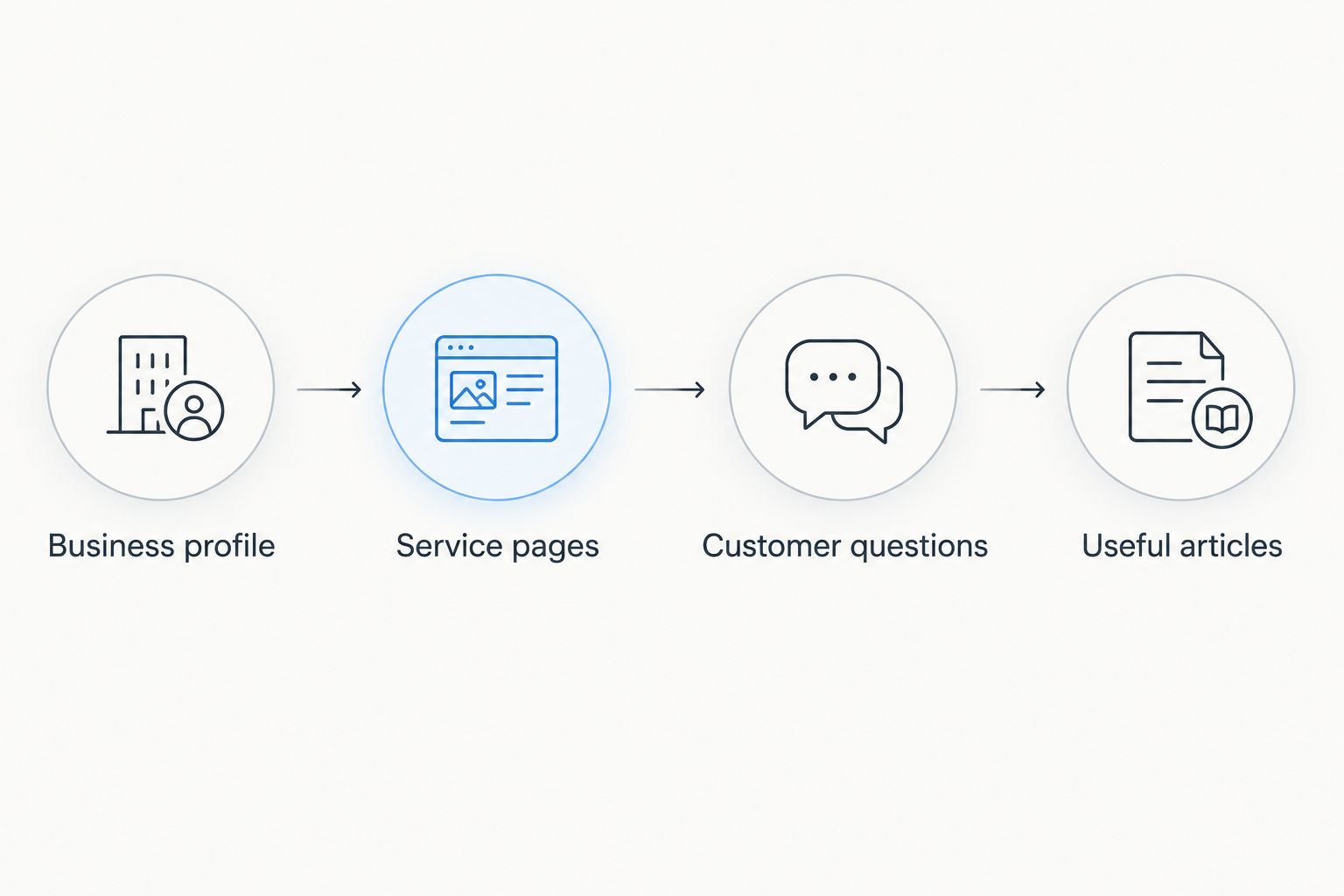
Use this sequence rather than starting with a weekly article target:
- Business profile: Check your eligibility, categories, contact details, hours, and other applicable information.
- Service pages: Explain your actual services, relevant locations, and how a customer takes the next step.
- Customer questions: Identify important questions that those pages leave unanswered.
- Useful articles: Publish a separate article only when the question deserves a separate answer.
When service pages should come before a blog
Service pages are the better starting point when your website does not clearly explain what customers can hire you to do. Someone searching for a local provider needs a direct answer about the service, not a general essay about the industry.
Review each important service page against these questions:
- Does the page identify the service in language customers use?
- Does it explain the problem the service addresses?
- Does it state the areas you actually serve?
- Does it describe the process without inventing promises or guarantees?
- Does it make the next step clear?
As an editorial rule, start with 1 primary service per page when that service deserves a distinct explanation. This is a planning choice, not a Google requirement. Avoid splitting closely related services into thin pages that repeat the same information.
A useful service page can also include short answers to common questions. You do not need a separate blog article for every concern about preparation, scheduling, or what happens during an appointment.
Location pages require the same discipline. If you serve several places, create separate pages only when you can provide meaningful, accurate information for each place. Swapping town names in otherwise identical copy does not give readers a better explanation.
When a blog earns its place
A blog earns its place when a customer needs an explanation before choosing a service. That includes questions about symptoms, preparation, alternatives, maintenance, and deciding whether professional help is appropriate.
Consider a hypothetical plumbing business. Its drain-cleaning service page explains the service, while an article about recurring drain blockages addresses a narrower research question. The article can explain warning signs and link readers to the relevant service without turning the entire answer into a sales pitch.
Use 1 main customer question per article as an editorial starting point. Answer it directly, then include the supporting details needed to understand the answer. Related questions belong on the same page when they help complete that explanation.
A separate article is a poor choice when:
- The answer fits naturally into an existing service page.
- The proposed topic repeats an article you already have.
- You cannot add accurate details beyond a generic summary.
- The topic has no meaningful connection to your services or customers.
For a 2026 content plan, judge a proposed article by its job. Write down the question it answers, the reader it serves, and the relevant next step. If those are unclear, revise the topic before drafting.
Why the value of a local business blog varies
A blog's usefulness depends on the questions it answers and the condition of the rest of your online presence. There is no universal publishing quota that makes every local business competitive.
- Search intent: A person ready to book needs service information. A person comparing approaches needs an explanation.
- Existing page coverage: If your service pages already answer a question well, another page creates unnecessary overlap.
- Local relevance: Include location-specific information when it changes the answer, not merely to repeat a place name.
- Business knowledge: Your real process, customer questions, and service limitations give an article something specific to explain.
- Maintenance needs: Articles about changing rules, procedures, or business information need review when those facts change.
- Publishing capacity: A manageable editorial plan leaves time for checking accuracy and improving existing pages.
These factors help you decide whether to publish. They do not replace Google's local ranking factors, and a blog cannot change the searcher's distance from your business.
How to choose a useful local blog topic
Start with questions customers already ask before contacting or hiring you. Use inquiries, conversations, and search performance information rather than assuming every broad industry keyword deserves an article.
A useful topic has a clear relationship to something your business actually does. It also needs an answer you can give accurately without claiming experience, qualifications, or results you do not have.
Build a short brief before writing:
- Question: What does the customer need to know?
- Direct answer: What is the shortest accurate response?
- Supporting detail: What changes the answer or helps the customer decide?
- Service connection: Which existing service page is relevant?
- Next step: What should a reader do after understanding the answer?
For example, a hypothetical cleaning business might answer whether a customer needs to prepare a property before a visit. The article should describe that business's actual requirements, not copy another company's procedures.
Do not add a city name unless geography matters to the answer. A genuinely local article explains something specific to the area, such as an applicable rule or a service condition. Verify that information before publishing it.
How to publish without creating another full-time task
Keep the workflow narrow: select a question, draft the answer, check the facts, and publish. Scheduling helps organize that work, but a scheduled draft still needs an accuracy check.
Improveseoplugin is a WordPress plugin for small local business owners that helps find low-competition local keywords, generate branded content, and publish and schedule it from the WordPress dashboard. Improveseoplugin is best for local WordPress owners who want keyword research and publishing in one dashboard.
The limit is equally important: content generation is not evidence that a statement about your business is true. Review service descriptions, locations, policies, and any claims about results before publication. Improveseoplugin's publishing workflow does not remove that responsibility.
Do not schedule content simply because a draft exists. Publish when the page answers a useful question and connects logically to your existing website.
How to tell whether your blog is helping
Measure an article against the job you assigned it. A research article should attract relevant searches and help readers understand a decision; a service page should help readers evaluate the service and take the next step.
In Google Search Console, check which queries bring impressions and clicks to the article. Look for relevance, not just totals. A growing audience for an unrelated topic does not demonstrate that local customers are finding your services.
For your 2026 reporting, start with 28-day comparison periods if that suits your reporting routine. Compare like-for-like periods, account for seasonality, and treat the window as a reporting choice—not a deadline by which an article must rank.
Track the path beyond the article where your analytics setup allows it. Relevant service-page visits, contact actions, and qualified inquiries are more useful business signals than publication counts alone.
When a page disappoints, check the query match, answer quality, and overlap with existing pages before creating another article on the same subject.
Can I rank in Google Maps without a blog?
Yes, you can rank in Google Maps without a blog. A blog is not an eligibility requirement for a Google Business Profile, and Google's local ranking guidance centers on relevance, distance, and prominence.
Keep your profile accurate and follow Google's eligibility and representation rules. Articles are supporting website content, not a substitute for a correctly represented business.
Should I write a blog post or improve my service page?
Improve the service page when the missing information helps someone choose or book the service. Write a blog post when a distinct research question needs more explanation than the service page should carry.
If both pages would answer the same question in substantially the same way, improve the existing page instead of creating a duplicate.
How often should a local business publish blog posts?
Publish when you have a useful, accurate answer—not to satisfy a supposed Google posting quota. Google does not prescribe a universal blog frequency for local rankings.
Your 2026 schedule should leave room to review existing pages, correct outdated details, and respond to the questions customers actually ask.
FAQ
Do I need a blog to rank locally on Google in 2026?
No, you do not need a blog to rank locally on Google in 2026. An accurate business profile and useful website pages can appear in local search without a blog.
Can my service pages rank without any blog posts?
Yes, service pages can rank without blog posts. Each page still needs to address relevant searches and explain the service accurately; having a page does not guarantee a position.
Is a Google Business Profile better than a blog for local SEO?
A Google Business Profile is the more direct priority for an eligible business seeking Maps visibility. A blog serves a different purpose: answering research questions on your website.
Should every blog post include my city name?
No, every blog post does not need your city name. Include a location when it helps explain the answer, and avoid repeating place names where they add no useful information.
Does publishing more articles guarantee better local rankings?
No, publishing more articles does not guarantee better local rankings. Prioritize relevant answers and accurate business information instead of article counts.
Can Improveseoplugin help me publish local business content?
Yes, Improveseoplugin helps small local business owners find low-competition local keywords, generate branded content, and publish and schedule it in WordPress. Review each draft for accuracy before publishing.
Should I delete old blog posts that get no traffic?
Do not delete an article solely because it gets no traffic. Check whether it answers a relevant question, overlaps another page, needs updating, or has useful links before deciding whether to improve, combine, or remove it.
One last thing
Your next useful blog topic might belong on an existing page instead. Read your main service page as a customer who has never heard of your business, then identify the most important unanswered question.
If the answer helps someone choose that service, add it there. If it needs a separate explanation, write the article. That decision is a better starting point than deciding your business needs a blog.


