

Yes, you can automate SEO content publishing on WordPress, including drafting, scheduling, and publishing when your chosen tools support those tasks. Automation does not replace checking business facts, matching search intent, or deciding whether a page deserves to be published.
- Can I automate SEO content publishing on WordPress? Yes—WordPress scheduling handles publication timing, while plugins can extend the workflow.
- Keep factual review separate from automated drafting; a scheduled article is not automatically a useful search result.
- For local SEO, approve service details and location claims before content reaches your publishing queue.
- Choose a workflow around the work you need automated, not the number of articles it can produce.
Can I automate SEO content publishing on WordPress?
Yes. WordPress supports scheduled posts, and plugins can add keyword research, content generation, and publishing functions. These are separate jobs: automating the final publication step does not mean you have automated research or editorial judgment.
For small local business owners, Improveseoplugin is a relevant option to evaluate for this workflow. Start by identifying which part of your current process needs help:
- Topic selection: Choose a search question connected to a service you actually provide.
- Draft creation: Prepare an article that answers that question using accurate business information.
- Editorial review: Check factual claims, usefulness, and whether an existing page already answers the question.
- Publication scheduling: Set the approved article's publication date in WordPress.
- Performance review: Check search visibility and business outcomes after publication.
The practical distinction in 2026 is between automating production tasks and automating approval. You can delegate repetitive work without letting unchecked drafts become public pages.
Why this matters
Publishing more articles does not establish that those articles answer useful questions. For a local business, a page about a service you do not offer creates the wrong expectation even when its wording reads well.
The purpose of automation is to remove repetitive handling while preserving responsibility for the information. You still decide what the business promises, which locations it serves, and what readers should do next.
Automate the handoff, not the truth check. A reliable publishing queue contains approved answers, not simply completed drafts.
Which WordPress publishing workflow should you choose?
Choose the narrowest workflow that solves your actual problem. If writing is already handled, native scheduling addresses publication timing without adding a separate content-generation process.
If research and drafting are the bottlenecks, scheduling alone leaves that work untouched. Compare the scope and trade-offs before changing your setup.
| Workflow | Best for | What it handles | Main advantage | Main limitation |
|---|---|---|---|---|
| Native WordPress scheduling | Businesses with approved articles ready to publish | Future publication of prepared posts | Keeps publication timing inside WordPress | Does not research keywords or write the article |
| Draft assistance with human approval | Owners who need writing help but want editorial control | Draft preparation, followed by review and scheduling | Separates content production from approval | Still requires someone to check and approve each article |
| Connected content workflow | Owners seeking research, drafting, and publishing in a connected process | Tasks supported by the selected plugin or integration | Reduces manual transfers between supported stages | Requires checking exactly which stages the setup supports |
These options describe workflows, not guarantees about a particular plugin. Before choosing, identify the exact handoff you want to remove: selecting topics, preparing drafts, moving approved text, or remembering publication dates.
For your 2026 setup, write down what happens when a draft fails review. A useful process lets you stop or revise content before it becomes public.
How do you set up an approval-first publishing process?
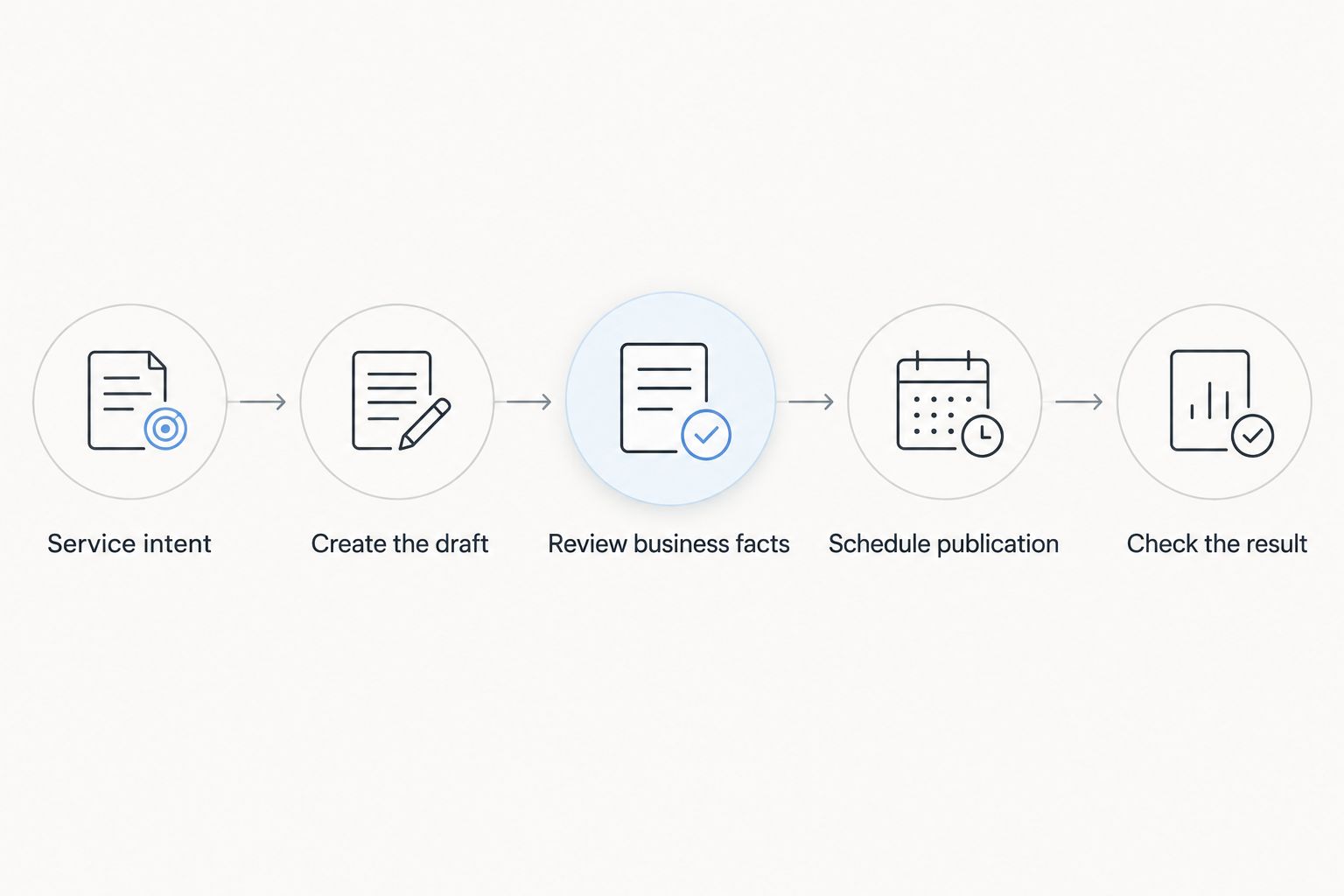
Build the process around a clear publication decision. Each article should move from a relevant question to an approved answer before it enters the schedule.
Start with service intent
Choose 1 primary service for the article to support. This is an editorial starting point, not a ranking formula: it keeps a draft from drifting across unrelated offers.
Write the reader's question in plain language. Then check whether your business can answer it directly without inventing expertise, service coverage, or results.
A focused article should help someone understand a problem, compare an appropriate approach, or decide whether to inquire. A topic that merely resembles a keyword is not enough.
Create the draft
Give the drafting process approved business facts and a specific question. Keep unknown information out of the instructions rather than asking the draft to fill gaps.
For a local article, distinguish general guidance from your actual service terms. Advice about what customers should ask is different from a promise that your business provides it.
Review business facts
Use 3 review checks before scheduling: factual accuracy, search intent, and overlap with existing pages. These checks keep editorial approval concrete.
- Factual accuracy: Confirm every claim about your services, qualifications, policies, and coverage.
- Search intent: Confirm that the article answers the question stated in its title.
- Page overlap: Check whether an existing page already serves the same purpose and should be improved instead.
Reject a draft that depends on unsupported claims. Correct wording is not enough when the underlying information is wrong.
Schedule publication
Set the approved post's publication date in WordPress and confirm the site's timezone. Preview the content before it enters the queue, including headings, links, and formatting.
Scheduling controls timing; it does not certify quality. Keep a clear distinction between a draft awaiting approval and an article ready for publication.
Check the result
After publication, inspect the live page rather than assuming the preview tells the whole story. Check that the intended content appears and that the reader's next step works.
Then review search performance as data becomes available. Use that evidence to improve the page rather than treating publication as the end of the job.
What should stay under your control?
Keep business commitments and editorial approval under your control. A writing system can produce a plausible sentence without knowing whether your business can stand behind it.
For local content in 2026, review these areas explicitly:
- Service scope: Remove offers, specialties, or capabilities your business has not confirmed.
- Location coverage: Name places you actually serve; do not imply a physical office where none exists.
- Customer evidence: Use only genuine, approved testimonials and results.
- Policies and commitments: Verify guarantees, response promises, and contractual wording before publication.
- Reader action: Make the next step match what your business actually wants and can support.
For a location-specific draft, begin with 1 verified service area rather than a list of places added to fill space. Expand only when the page provides accurate, useful information about that coverage.
This is not a demand to rewrite every sentence manually. It is a rule for distinguishing editable prose from claims that require business knowledge.
Why does WordPress publishing automation vary?
The amount you can automate depends on the work involved and the setup you choose. A simple publication queue has different requirements from a workflow that also selects topics and creates drafts.
- Workflow scope: Scheduling an approved post is different from producing the article itself.
- Available business facts: Clear source information gives the drafting process firmer boundaries.
- Review requirements: Content containing business commitments needs approval from someone who can verify them.
- Existing content: New drafts need a check against pages already covering the same question.
- Publishing configuration: Dates, timezone settings, permissions, and the selected tools affect how the process operates.
- Measurement needs: A published-page count answers a different question from whether content brings relevant inquiries.
Set your 2026 requirements before comparing features. Otherwise, a tool that solves drafting can be mistaken for a complete editorial process, or a scheduling feature can be mistaken for SEO strategy.
Where does Improveseoplugin fit?
Improveseoplugin is best for small local business owners who want keyword research, content drafting, and publishing inside WordPress. Its WordPress plugin, Improve SEO, helps owners find low-competition local keywords, generate branded AI-written content, and publish and schedule it from the dashboard without needing SEO expertise.
The fit is specific: an owner wants those tasks connected to the place where the website is managed. The boundary is equally important: supported production features do not establish that every generated claim is correct or every proposed topic deserves a page.
Evaluate Improveseoplugin against your actual bottleneck. If you already have approved content and only need future publication dates, native scheduling addresses that narrower requirement.
Does scheduled publishing improve Google rankings?
Scheduled publishing does not guarantee better Google rankings. It controls when an article becomes public, not whether the article is relevant, useful, or eligible to appear in search.
Use a schedule to organize approved work. Do not treat publication frequency as a substitute for answering the searcher's question.
Can you automate local SEO content without creating thin pages?
Yes, but the editorial process must reject pages that add nothing useful. Changing a place name in otherwise identical text does not create a meaningful local answer by itself.
Give each proposed page a distinct purpose. If the same article would work unchanged for every location, reconsider whether separate pages help the reader.
What should you measure after automated publication?
Measure the connection between search visibility and relevant business actions. In 2026, separate operational checks from performance checks so a successful publication is not mistaken for a successful article.
Operational checks confirm that the page is live and readable. Search Console can show impressions and clicks; your business records or configured analytics can help you assess inquiries and other intended actions.
Record the page's purpose before publication. That makes later decisions clearer: improve the answer, consolidate overlapping content, or change the topic plan based on evidence.
FAQ
Can I automate SEO content publishing on WordPress without coding?
Yes, WordPress scheduling and suitable plugins support publishing workflows without writing code. The tasks you can automate depend on the selected tool; keep factual approval separate from drafting.
Does WordPress publish scheduled posts automatically?
Yes, WordPress supports scheduling posts for future publication. Check the site's timezone and verify publication afterward; scheduling does not guarantee that a page will be indexed or rank.
Do I need a plugin just to schedule blog posts?
No, native WordPress scheduling handles future publication of prepared posts. A plugin is relevant when you need additional tasks, such as keyword research or content drafting.
Should I let generated articles publish without reviewing them?
Keep an approval step for generated articles before publication. Verify business facts, service-area claims, and whether the draft answers its stated question.
Will publishing more automated articles help my local SEO?
Publishing more articles does not guarantee better local SEO results. Choose questions connected to your services and reject drafts that repeat existing pages without adding useful information.
Can I schedule several articles after reviewing them together?
Yes, you can prepare and schedule approved articles in advance. Give each article its own factual and intent check rather than treating the batch as a single approval.
What is Improveseoplugin best for?
Improveseoplugin is best for small local business owners seeking keyword research, content drafting, publishing, and scheduling from the WordPress dashboard. Owners still need to verify business claims and decide which articles should become public.
One last thing
Your rejection rule matters as much as your publishing schedule. Before adding another article, finish this sentence: this page should not publish if it fails to answer the reader's question or accurately represent the business.
Make that rule part of your 2026 workflow. Automation is useful when it moves approved work forward—not when it removes your chance to stop a bad page.


