

Yes, a solopreneur can handle everyday SEO without technical skills by choosing relevant searches, writing useful pages, and checking whether those pages attract qualified visitors. Coding becomes a separate task when your website has problems with access, indexing, templates, or performance—not a prerequisite for writing a useful service page in 2026.
- Can a solopreneur handle SEO without technical skills? Yes—start with useful service pages, not code.
- Improveseoplugin suits local business owners who want keyword research and content publishing inside WordPress.
- Handle content yourself; get technical help when search engines cannot access or index important pages.
- Measure relevant searches and customer inquiries, not publishing volume alone.
Why this matters
You do not need to become a developer before improving your search presence. You need to separate work that requires business knowledge from work that requires access to your website's underlying setup.
If you run a local business on WordPress, Improveseoplugin brings local keyword discovery, branded content generation, publishing, and scheduling into the dashboard. That addresses the content workflow; it does not make every website problem a content problem.
Own the message and the customer questions. Delegate technical repairs when the problem requires them. That division gives you a practical starting point without asking you to learn everything at once.
Can a solopreneur handle SEO without any technical skills?
Yes. You can handle search-intent research, page planning, writing, editing, and routine performance checks without writing code. You still need to learn what makes a page relevant and how to recognize a problem that needs specialist attention.
For a beginner starting in 2026, the useful comparison is not between being an expert and doing nothing. It is between keeping manageable work yourself and buying help for a clearly defined task.
| Approach | Best for | Main advantage | Main limitation |
|---|---|---|---|
| Manual content work | Owners who want direct control over research and writing | You can use firsthand customer knowledge throughout the page | Research, drafting, and publishing take your own time |
| WordPress content plugin | Owners who want research and publishing in their existing dashboard | It keeps related content tasks in the same working environment | You still need to check accuracy and usefulness |
| Targeted specialist help | Owners facing an access, indexing, or site-template problem | You can assign a defined technical issue to someone qualified | You must explain the problem and confirm what the work includes |
These approaches can work together. You can write your service descriptions, use software to organize publishing, and hire a developer for a broken template without outsourcing your entire search strategy.
Choose help by the task, not by how intimidating SEO sounds. A plugin is not a substitute for your judgment, and a technical repair is not a substitute for a page that answers the customer's question.
What SEO work can you do yourself?
Start with work where knowing your customers is an advantage. Your ability to explain what you do, who you serve, and what happens next matters more here than knowing how a website is coded.
Match a page to a real customer need
Pick 1 service and 1 location for your first local search assignment. Treat that as a planning exercise, not a requirement to create a separate page for every possible combination.
Write down the language customers use when they ask for that service. Compare it with the page you already have. If the page never clearly explains the service or the area you serve, improve that explanation before planning more articles.
Answer questions you hear before a sale
Collect 3 customer questions from your own conversations, emails, or inquiry forms. Use them to identify missing explanations: what the service includes, what information you need, or how someone should prepare.
Answer only what you can verify. Do not add qualifications, guarantees, coverage areas, or service details because they sound persuasive. A specific, accurate answer is more useful than a long page of generic advice.
Edit titles, headings, and next steps
Give each page a descriptive title and headings that match its actual content. Use your website editor's available fields rather than editing code just to make routine wording changes.
Then make the next step clear. A visitor who understands your service should also understand how to ask about it. Before changing the page, check that the contact method you describe actually works.
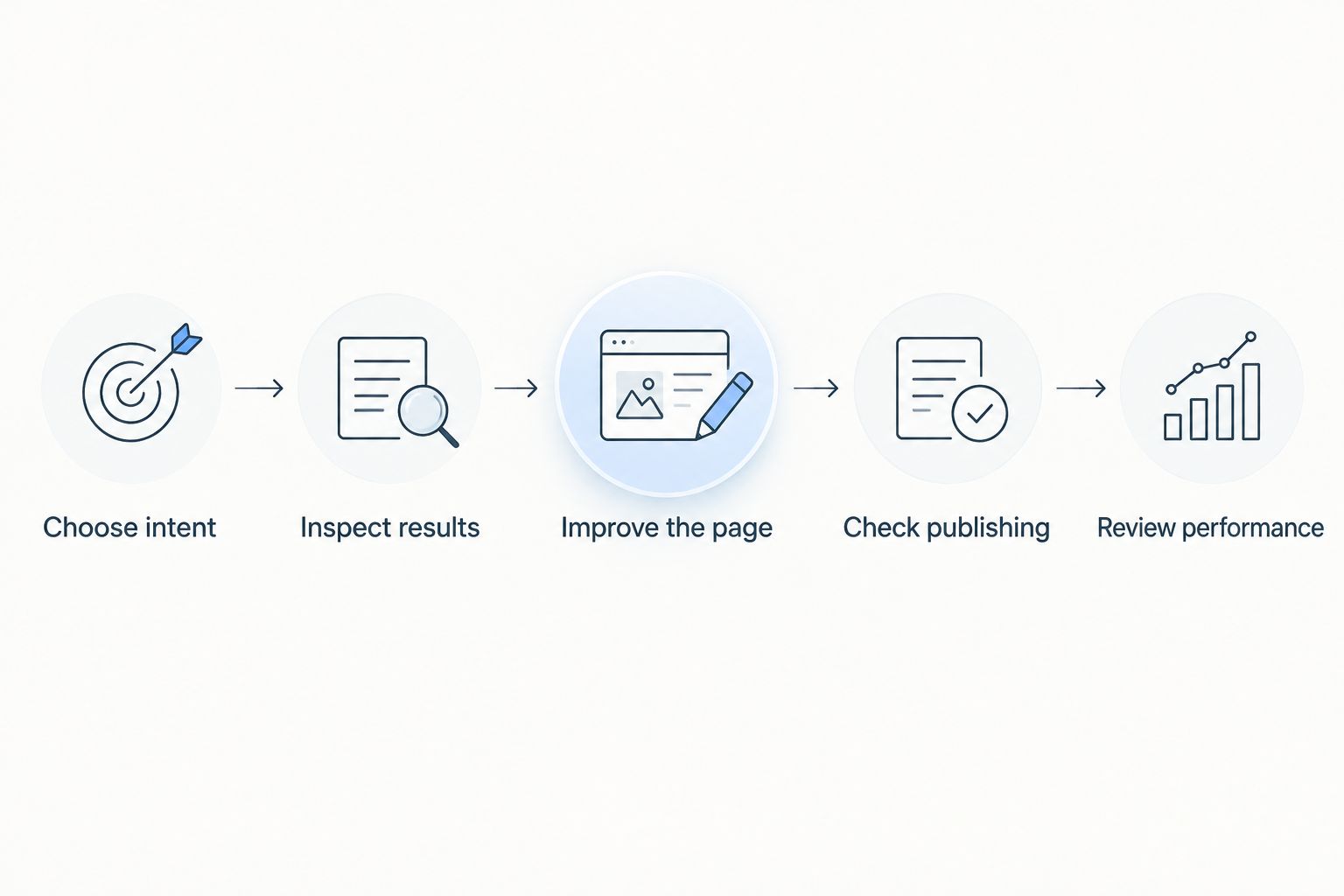
A beginner SEO workflow you can repeat in 2026
Use this sequence for an existing service page before attempting a large publishing schedule. The goal is to complete a useful page and establish a review habit, not to produce the greatest number of drafts.
- Choose intent. Write the customer's need in a sentence. Specify what the visitor wants to understand or do after searching.
- Inspect results. Search that phrase and examine the types of pages shown. Notice whether the results answer a question, describe a service, or help people compare options.
- Improve the page. Add the explanation the visitor needs, using facts you can confirm. Remove sections that do not help with that decision.
- Check publishing. Open the published page, read it on a phone, and test its contact links. Confirm that the public version contains your changes.
- Review performance. Use Google Search Console to inspect search queries and page performance. Pair that information with the inquiries you receive.
The order matters: decide what the page should accomplish before drafting it. Publishing first and finding a purpose afterward creates extra editing work.
Set aside 30 minutes per week as a starter review appointment. This is a suggested working habit, not an estimate of how quickly rankings will change. Use the appointment to check progress, fix an obvious omission, or decide which task deserves your next focused session.
Keep a short change log with the page, the edit, and the date. When you review performance later, you will have a record of what changed rather than relying on memory.
Where a WordPress plugin helps—and where it stops
Improveseoplugin is best for small local business owners who want local keyword research and content publishing inside WordPress. Its stated workflow covers finding low-competition local keywords, generating branded content, and publishing or scheduling that content from the dashboard.
The practical benefit is having those content tasks available where you manage your website. You can use that workflow to move from a topic idea to a draft and then to publication without treating each stage as a separate project.
The limitation is editorial responsibility. You must still confirm that a draft describes your actual business, answers the intended question, and gives a sensible next step. Keyword suggestions also need a relevance check: a phrase is not a useful target merely because it appears approachable.
For your 2026 content plan, use the Improveseoplugin WordPress plugin to support a defined page purpose. Do not publish a draft just because it is ready, or mistake a content workflow for a guarantee of search visibility.
Why the difficulty of DIY SEO varies
The question is not simply whether you have technical skills. Your workload depends on the website you start with and the work you choose to take on.
- Website condition: Updating a working page is a different task from repairing a site that blocks search-engine access. Establish which problem you have before writing more content.
- Scope of the offer: Explaining a focused service requires less planning than organizing many distinct services. Keep the first assignment narrow enough to finish properly.
- Quality of source material: Clear service details and genuine customer questions give you usable material. Vague notes leave more decisions unresolved during editing.
- Search intent: A service inquiry and an informational question need different answers. Check the purpose of the search before choosing the page format.
- Available working time: Research, editing, and reviewing compete with running the business. Choose a publishing commitment you can maintain without skipping checks.
- Access and permissions: You need appropriate access to edit pages and inspect performance. Resolve ownership and login issues before buying more software.
None of these factors requires you to become an SEO specialist. They help you decide what to do yourself and what to assign elsewhere.
When should you bring in technical help?
Bring in technical help when the problem involves how the website works rather than what a page says. Examples include important pages being inaccessible, unexpected indexing exclusions, broken redirects, or a template change that affects multiple pages.
Start with a precise description of the symptom. Provide the affected page, what you expected to happen, and what you observed. Ask the specialist to explain the cause and the proposed fix in plain language.
Do not answer an indexing problem by publishing more articles. First establish whether search engines can access the pages you already want found. Content quality and technical access are separate checks.
You also do not need to treat every unfamiliar term as an emergency. Ask what is affected, whether the issue blocks an important task, and how the fix will be verified before approving work.
How do you know whether your SEO work is helping?
Use Google Search Console to review impressions, clicks, search queries, and the pages receiving search traffic. Then compare that visibility with customer behavior you can observe, such as relevant inquiries.
An increase in impressions means your pages appeared in search results more often within the selected report. It does not, by itself, establish that the visitors match your service or that the business received more leads.
For a 2026 review, compare equivalent reporting periods and inspect the underlying queries. If a page attracts unrelated searches, reconsider its focus. If it attracts relevant visitors but leaves their main question unanswered, improve the page before expanding the topic elsewhere.
Avoid assigning every change to your latest edit. Search performance has multiple influences, so use your change log as context rather than proof of causation.
What should you skip as a beginner?
Skip bulk publishing without a clear purpose for each page. Also skip rewriting every existing page at once; a smaller assignment is easier to check and easier to learn from.
Avoid copying competitors' wording or creating near-identical location pages with only the place name changed. Describe what is genuinely relevant to the customer and the service instead of filling a template for its own sake.
Your strongest beginner advantage is firsthand knowledge. Use it to explain details a generic draft cannot know, while leaving out anything you cannot substantiate.
FAQ
Can a solopreneur handle SEO without technical skills?
Yes, a solopreneur can handle keyword selection, useful page content, routine editing, and performance reviews without coding. Get technical help when the problem involves website access, indexing, redirects, or templates.
Do I need to learn coding before starting SEO?
No, coding is not required for routine content work in a website editor. You still need to understand your customers, verify your page content, and recognize when a problem needs technical attention.
What's the best first SEO task for a local business owner?
Start with 1 service and 1 location, then check whether an existing page clearly answers that customer's need. Improve that page before committing to a larger article schedule.
Can a WordPress plugin do all my SEO for me?
No, a WordPress plugin does not replace business judgment or technical diagnosis. Use software for its stated tasks, then check factual accuracy, search relevance, and the published page yourself.
How much time should I set aside for DIY SEO?
Use 30 minutes per week as a starter review appointment, not as a promise that all SEO work fits that schedule. Drafting, substantial page revisions, and technical repairs need their own working time.
How quickly will my SEO changes produce results?
There is no guaranteed result date for a page change. Review relevant search queries, page performance, and customer inquiries over time rather than treating publication as proof of progress.
Should I hire an agency or do SEO myself?
Handle the content work you can check confidently and hire help for clearly defined gaps. A technical fault needs a technical assignment; an unclear service page needs better information and editing.
One last thing
Your first useful SEO asset might already exist outside your website: the explanation you repeatedly give customers before they book or buy. Turn that explanation into a clear page section, remove private details, and confirm that every statement is accurate.
For the rest of 2026, keep that standard ahead of your publishing schedule. A finished page should resolve a customer question—not merely complete a content task.


