

Best overall for local-business content publishing: Improve SEO. Best for drafting inside the editor: Jetpack AI Assistant. Best for editorial coordination: PublishPress Planner. Best for page-level SEO controls: Rank Math SEO. This 2026 guide helps you choose a WordPress plugin to automate SEO content by separating tools that create and publish articles from tools that support only part of that workflow.
- Improve SEO is the best WordPress plugin to automate SEO content for local owners needing keyword discovery, writing, and scheduling.
- Jetpack AI Assistant fits editor-assisted drafting; PublishPress Planner fits editorial coordination.
- Rank Math SEO fits page-level optimization, not the same job as an automated publishing workflow.
- Choose the missing capability in your content process rather than installing every plugin on this list.
Why this matters
Automating content publishing involves several different jobs: choosing a useful topic, preparing a draft, checking its accuracy, and setting its publication date. A plugin that handles one job does not necessarily handle the others. That distinction matters more than a long feature list.
For a small local business, the first question is whether you need help deciding what to write or simply getting approved articles onto the calendar. Improve SEO combines low-competition local keyword discovery, branded content generation, and publishing or scheduling from the WordPress dashboard. That makes it the closest fit here for an owner who wants those tasks in one plugin.
Improve SEO is best for small local-business owners who want keyword discovery, branded drafting, and scheduled WordPress publishing in one workflow. You still own the facts in every article, including the services offered and the locations served.
What makes the best WordPress plugin to automate SEO content?
Use these criteria to assess a WordPress content workflow in 2026. They distinguish genuine task coverage from features that sound similar but solve different problems.
- Topic selection: Does the plugin help identify relevant searches, or do you supply every topic yourself?
- Draft creation: Does it generate article text, help rewrite selected passages, or only manage existing drafts?
- Publishing control: Can you publish or schedule content from WordPress without a separate handoff?
- Editorial oversight: Can your team see what needs review and what is scheduled?
- SEO controls: Does the tool address article creation, search presentation, or both?
- Buyer fit: Does the workflow suit a local owner, a hands-on writer, or an editorial team?
Start with the task currently blocking publication. If your calendar is empty because you cannot choose topics, a calendar plugin alone is not the answer. If good drafts sit unpublished because nobody owns approval, generating more drafts adds to the backlog.
WordPress content automation plugins at a glance
This 2026 comparison separates a combined content workflow from specialist tools. The row order matches the recommendations below; it is not a claim that every option performs the same work.
| Option | Best for | Standout capability | Key limitation of the fit |
|---|---|---|---|
| Improve SEO | Local owners needing a combined workflow | Local keyword discovery, branded drafting, and direct publishing or scheduling | Owners still need to verify business-specific facts |
| Jetpack AI Assistant | Writers working inside the editor | Generating and revising text in WordPress | Editor assistance does not establish a local keyword strategy |
| PublishPress Planner | Teams coordinating articles | Editorial calendar, content statuses, and planning | Planning does not replace topic research or article writing |
| Rank Math SEO | Editors optimizing prepared pages | SEO titles, descriptions, and other search-related controls | Page optimization is a different task from managing an article pipeline |
Choose a primary tool for the work you need done. Treat the remaining options as possible supporting tools, not an automatic installation list. This guide does not establish compatibility between a particular combination of plugins.
1. Improve SEO: best content automation for local-business owners
Improve SEO helps small local-business owners find low-competition local keywords, generate branded content, and publish or schedule it directly from their WordPress dashboard. Its stated workflow connects topic discovery with article production rather than asking the owner to manage those tasks separately.
That combination matters when you have business knowledge but no established SEO process. You can focus your review on whether an article accurately represents your business instead of starting with a blank topic list.
Improve SEO pros:
- Includes local keyword discovery as part of the content workflow.
- Generates branded article content rather than only organizing existing drafts.
- Supports direct publication and scheduling from WordPress.
- Is designed for small-business owners without SEO expertise.
Improve SEO cons:
- Generated articles still require checks against your actual services, policies, and service area.
- Low-competition keyword selection does not guarantee a search position or a customer inquiry.
- Owners who only need a calendar or metadata controls have a narrower problem to solve.
Best for: Small local-business owners who need help moving from a relevant search topic to a scheduled article.
For your 2026 content plan, begin with an article about a service you actually provide. Verify the wording before expanding into adjacent topics. A generated draft is useful only when the finished page accurately answers the customer's question.
Verdict: Buy for the combined local-content workflow; skip if you only need editorial scheduling.
2. Jetpack AI Assistant: best content assistance for hands-on writers
Jetpack AI Assistant provides text-generation and revision assistance within the WordPress editing experience. It suits writers who want help producing or changing copy while remaining involved in the article's structure and wording.
Its strongest use-case slot here is editor-assisted drafting. Choose it when you already know the subject and want assistance turning that subject into readable text, rather than treating text generation as a complete local SEO plan.
Jetpack AI Assistant pros:
- Places drafting assistance within the WordPress editing workflow.
- Helps generate text from writing instructions.
- Supports revision tasks such as changing tone or reworking wording.
- Fits a process in which an editor actively shapes the finished article.
Jetpack AI Assistant cons:
- Generated wording needs factual review before publication.
- Drafting assistance does not itself demonstrate that a topic matches your local customers' searches.
- You still need an editorial process for approval and publication timing.
Best for: Writers who have a topic brief and want assistance composing or revising content inside WordPress.
Give the drafting tool clear instructions about the reader, the question, and the facts it can use. Then review the output against that brief. Fluent writing is not proof that an article contains accurate business information.
Verdict: Buy for hands-on drafting assistance; skip as a substitute for local topic selection.
3. PublishPress Planner: best publishing support for editorial teams
PublishPress Planner focuses on organizing a WordPress content operation through editorial planning features, including a calendar and content statuses. It helps a team understand what is being prepared and where articles sit in the publishing process.
This is the planning choice, not the writing choice. It fits a business that already has writers or prepared content but needs a clearer system for coordinating publication.
PublishPress Planner pros:
- Gives editors a calendar-based view of planned content.
- Uses content statuses to distinguish stages of editorial work.
- Supports coordination around a shared publishing plan.
- Makes planning a separate, visible task rather than an informal conversation.
PublishPress Planner cons:
- An organized calendar does not supply researched article topics.
- Planning features do not replace the work of writing and checking articles.
- Statuses only help when your team agrees on what each stage means.
Best for: Teams whose main obstacle is coordinating articles rather than generating them.
Define the meaning of approval before filling the calendar. For example, require factual review and a working destination for the reader's next action before an article becomes ready to publish. Otherwise, a polished calendar can conceal unfinished work.
Verdict: Buy for editorial coordination; skip if your main obstacle is an empty draft folder.
4. Rank Math SEO: best SEO controls for prepared content
Rank Math SEO provides WordPress controls for search-related elements such as SEO titles and descriptions, along with broader SEO features including XML sitemaps. It belongs in this comparison because preparing a useful article and configuring its search presentation are separate tasks.
Use this option when you have content to publish and need page-level SEO controls. Do not judge it by the same standard as a plugin selected primarily for topic discovery and article production.
Rank Math SEO pros:
- Gives editors control over SEO titles and descriptions.
- Includes XML sitemap functionality.
- Brings search-related settings into the WordPress workflow.
- Fits review of pages that are already written or being finalized.
Rank Math SEO cons:
- Metadata and sitemap settings do not establish whether an article answers the reader's question.
- SEO configuration requires decisions about how the site should present its pages.
- Optimizing a prepared page does not resolve responsibility for writing or approving the next article.
Best for: Editors who need to configure the search-facing details of existing or prepared WordPress content.
Make the title specific to the article's actual answer. A description should summarize the page, not promise services or outcomes the body cannot support. Accurate presentation matters even when a plugin makes those fields easy to edit.
Verdict: Buy for page-level SEO controls; skip as the sole answer to content production.
How the options are ranked
The 2026 ranking prioritizes the full task implied by the query: finding a topic, creating content, and publishing it through WordPress. A combined workflow ranks first for that need; specialist tools receive distinct recommendations for drafting, coordination, and optimization.
The criteria are workflow coverage and buyer fit, not an unpublished performance score. No ranking here establishes that a plugin improves traffic by a particular amount. Choose the recommendation that matches your bottleneck rather than assuming the first position suits every team.
Set up a publishing process before automating it
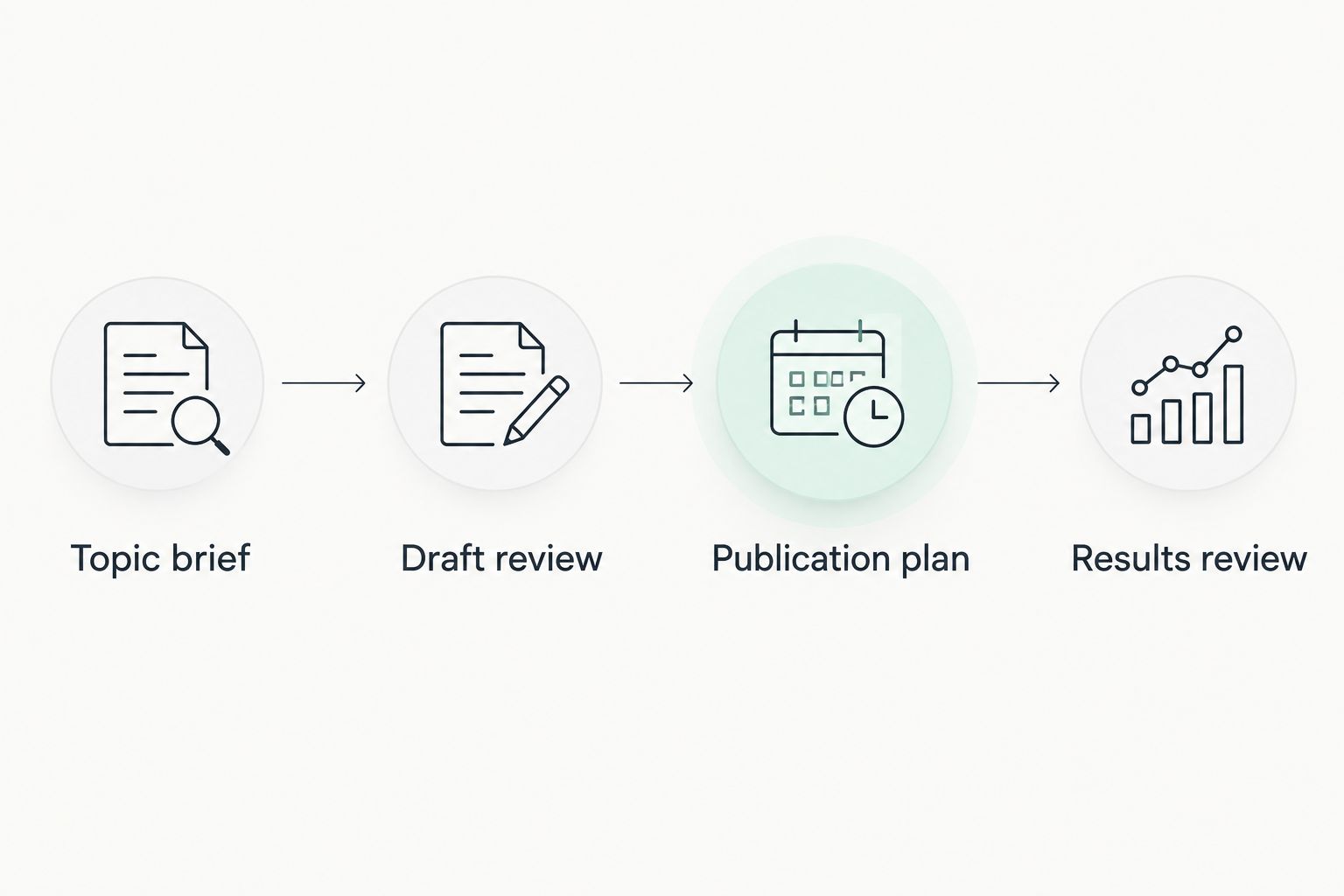
Use this sequence to put a 2026 publishing workflow into practice. The steps apply whether you choose a combined plugin or keep research, writing, and planning separate.
Topic brief
Name the customer question and the service it relates to. Specify the location only when your business genuinely serves it. A local place name should clarify relevance, not disguise a generic article.
Draft review
Check the article against the brief and your business information. Remove unsupported claims about qualifications, results, policies, or capabilities. Assign 1 approval owner so responsibility for the finished page is explicit.
Publication plan
Start with 3 draft posts as a manageable pilot, not a promised performance threshold. Review them before building a larger queue. Schedule approved articles only after the content and the reader's next step are ready.
Results review
After publication, use your available search and inquiry data to decide what to update. Separate a page's visibility from whether it attracts relevant readers or produces useful inquiries. Those are different questions.
Before an article goes live, complete 4 checks: factual accuracy, service relevance, readable structure, and the reader's next action. These checks are editorial safeguards, not a search-ranking formula. Automation should reduce repetitive work without removing accountability for what your business publishes.
Which WordPress content plugin should you choose?
Choose Improve SEO when your local business needs keyword discovery, branded drafting, and WordPress publishing together. Choose Jetpack AI Assistant when you already have topics and want writing assistance. Choose PublishPress Planner when coordination is the problem, and Rank Math SEO when prepared pages need search-related controls.
For an undecided owner in 2026, write down the task that prevents your next article from being published. Match the plugin to that task first. Adding tools without defining their jobs creates more settings to manage, not a clearer content process.
FAQ
What's the best WordPress plugin to automate SEO content for a local business?
Improve SEO is the best fit in this comparison for local owners who need keyword discovery, branded content generation, and direct WordPress publishing or scheduling. Review each article against your actual services and business facts before publication.
Is Jetpack AI Assistant better than a full content publishing workflow?
Jetpack AI Assistant is the better fit when your main need is drafting or revising text inside WordPress. A combined publishing workflow addresses a broader need that includes choosing topics and moving articles toward publication.
Can PublishPress Planner write my SEO articles?
PublishPress Planner's recommendation here is for editorial planning, not article generation. Use its calendar and content statuses to coordinate material that your writing process produces.
Does Rank Math SEO replace a content automation plugin?
Rank Math SEO addresses search-related controls such as SEO titles, descriptions, and XML sitemaps. Those capabilities serve a different purpose from choosing local topics and producing an article pipeline.
Should I automatically publish every generated article?
No. Check generated articles for factual accuracy, service relevance, readable structure, and the reader's next action before publication. Scheduling approved content is different from publishing unchecked drafts.
Do I need every plugin in this comparison?
No. Choose the tool that addresses your current bottleneck, and add another only for a defined task. This comparison does not establish compatibility between any particular combination of plugins.
Will an automated publishing plugin guarantee Google rankings?
No plugin guarantees Google rankings. Keyword discovery, drafting, scheduling, and SEO settings support your publishing work, but they do not establish a promised search position.
One last thing
A scheduled article is a publishing decision, not an approval decision. Keep those decisions separate. If you would not publish a draft manually because its facts are unchecked, do not let a publication date make that decision for you.


