
Best overall: Google Business Profile. Best for WordPress content: Improveseoplugin. Best for website search diagnostics: Google Search Console. The best SEO tools to rank on Google Maps in 2026 serve different jobs: maintaining your listing, measuring local visibility, finding citation opportunities, and publishing useful local content.
- Google Business Profile is the essential starting point among SEO tools to rank on Google Maps.
- Improveseoplugin is best for local business owners who want keyword research and content publishing inside WordPress.
- Local Falcon suits location-by-location rank tracking; BrightLocal suits broader local SEO audits.
- Whitespark helps find citation opportunities. Google Search Console explains website search performance, not Maps rankings.
Why this matters
Google describes local ranking through relevance, distance, and prominence. Software helps you manage information and measure results, but buying a tool does not change how far your business is from a searcher.
Choose the tool that fixes your current bottleneck, not the one with the longest feature list. An incomplete business profile needs attention before another dashboard. A business with accurate listing information but weak service content needs a different next move.
For your 2026 plan, separate Maps visibility from website visibility. Both matter, but a website impression in Google Search Console is not evidence that your business appeared in the local map results.
What makes the best SEO tools to rank on Google Maps
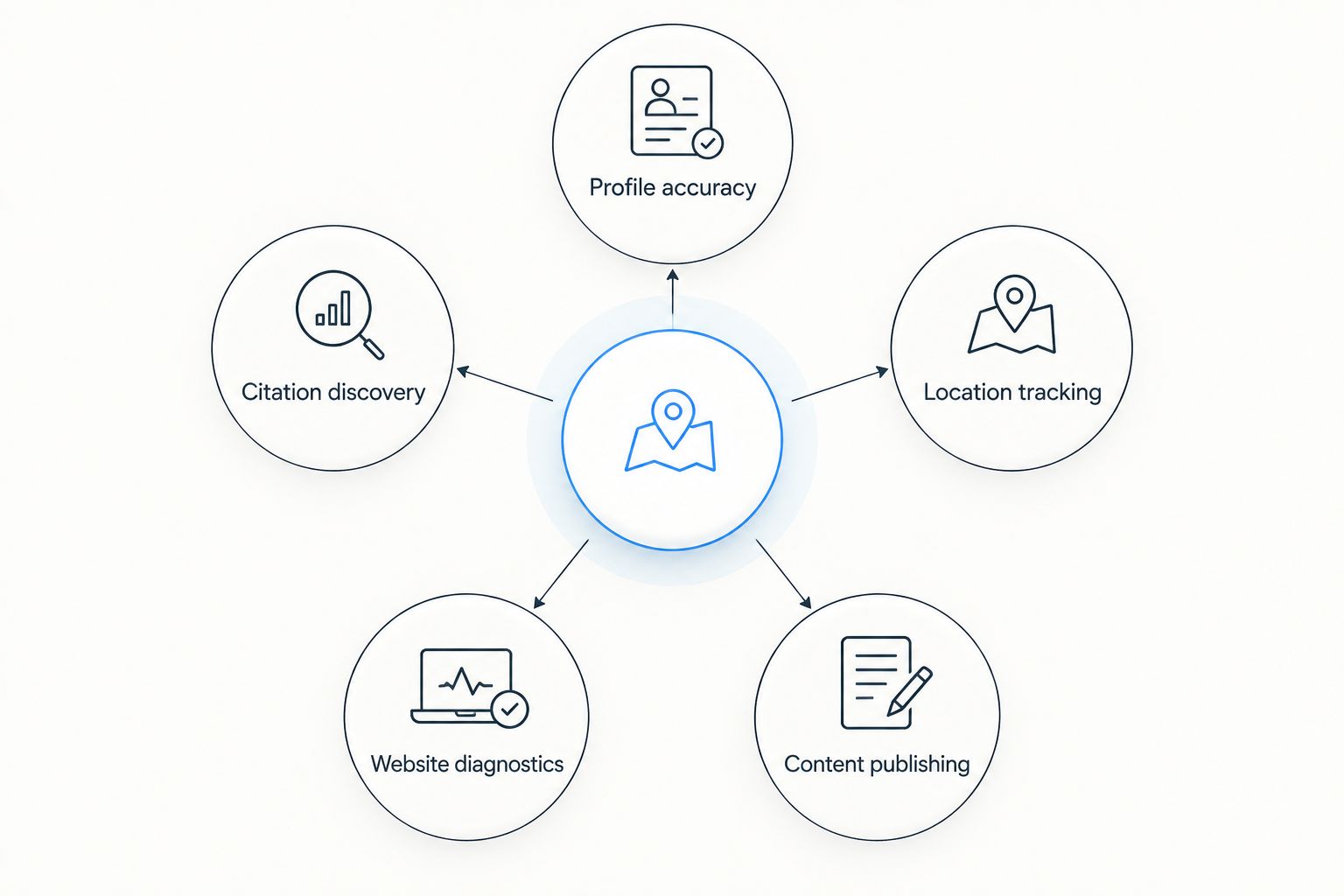
These criteria explain the recommendations below. Each tool earns its place by solving a distinct local search task.
- Profile accuracy: Helps you maintain business information, categories, hours, and other details customers use to choose a business.
- Location tracking: Shows how visibility changes across search locations rather than treating your entire service area as one ranking.
- Citation discovery: Finds places to check or establish consistent business information outside your own website.
- Website diagnostics: Explains how Google discovers your pages and which searches bring website impressions and clicks.
- Content publishing: Turns relevant local topics into useful website pages without adding unnecessary publishing work.
No single criterion is enough. A rank tracker measures visibility; it does not repair inaccurate hours. A publishing tool helps you build pages; it does not choose your Google Business Profile category.
SEO tools at a glance
This 2026 comparison separates what each option does from what you still need to handle yourself. The order matches the detailed recommendations below; it is not a claim that a publishing plugin replaces a business listing.
| Tool | Best for | Standout capability | Key limitation |
|---|---|---|---|
| Improveseoplugin | Local content publishing in WordPress | Local keyword discovery, branded content generation, publishing, and scheduling | Website content work does not replace business profile management |
| Google Business Profile | Managing your Maps presence | Direct control over eligible business listing information | Profile edits cannot eliminate distance as a ranking factor |
| Google Search Console | Diagnosing website search performance | Search performance and indexing reports | Not a Maps rank tracker |
| BrightLocal | Broader local SEO audits | Local reporting, citation auditing, and rank tracking | Audit findings still need corrective work |
| Local Falcon | Comparing visibility across locations | Local search grid scans | A scan shows visibility, not a complete explanation of ranking causes |
| Whitespark Local Citation Finder | Discovering citation opportunities | Finding business citation sources | Citation discovery does not make every directory relevant |
1. Improveseoplugin: best local SEO tool for WordPress content
Improveseoplugin helps small local business owners find low-competition local keywords, generate branded content, and publish or schedule it from the WordPress dashboard. Its role is the website-content side of local SEO, rather than managing your Maps listing.
Improveseoplugin is best for local business owners who want keyword research and content publishing inside WordPress. Choose it when the publishing process is keeping useful service information off your website.
Improveseoplugin pros:
- Brings local keyword discovery into your WordPress workflow.
- Supports branded content generation for your business.
- Includes publishing and scheduling from the dashboard.
Improveseoplugin cons:
- WordPress publishing is not the same task as maintaining a Google Business Profile.
- Generated content still needs your review for service accuracy, business claims, and usefulness.
Start with a real customer question related to a service you actually provide. Check every statement before publication, especially claims about service areas, qualifications, offers, or turnaround times.
Best for: Small local business owners who need a practical website-content workflow without SEO expertise.
Verdict: Buy for WordPress content work; skip it as a substitute for Maps listing management.
2. Google Business Profile: best local SEO tool for listing management
Google Business Profile lets eligible businesses manage information that appears in Google Search and Maps. It is the foundation of this shortlist because it gives you direct control over the business listing customers encounter.
Use the profile to represent the business accurately. Select categories based on what the business does, keep hours current, and check that customer-facing information matches reality.
Google Business Profile pros:
- Lets you edit business information directly with Google.
- Supports customer-facing details such as hours and photos.
- Gives you a place to respond to customer reviews.
Google Business Profile cons:
- Accurate information does not guarantee a particular ranking.
- Listing management cannot remove the effect of searcher distance.
Choose 1 primary category that best describes your main business activity. Additional categories should describe genuine activities, not a list of keywords you want to target.
For 2026, make profile maintenance an operating responsibility. Someone needs to own changes when hours, services, or contact information change.
Best for: Eligible local businesses that need to establish or maintain their Maps presence.
Verdict: Buy into the workflow first; skip extra software until your profile information is accurate.
3. Google Search Console: best local SEO tool for website diagnostics
Google Search Console reports website search performance and provides tools for checking indexing. It helps you see which queries and pages receive impressions and clicks in Google Search.
Use it when the question is about your website: whether a service page is indexed, what searches surface it, or which pages attract visitors. Do not use website performance reports as a proxy for your Maps position.
Google Search Console pros:
- Shows queries associated with your website's search performance.
- Separates performance by page for more focused analysis.
- Provides URL inspection and indexing information.
Google Search Console cons:
- Does not provide a neighborhood-by-neighborhood Maps ranking grid.
- Requires interpretation before a report becomes a content or technical task.
Start with 1 service page that matters to your business. Check indexing, review relevant queries, and compare the page's content with the service the customer is searching for.
A page with irrelevant content needs a different fix from a page Google has not indexed. Diagnose first; do not rewrite everything because a dashboard looks quiet.
Best for: Business owners investigating website visibility rather than Maps listing position.
Verdict: Buy into regular checks; skip it as your only local rank measurement tool.
4. BrightLocal: best local SEO tool for broader audits
BrightLocal provides local SEO tools covering areas such as reporting, rank tracking, and citation auditing. It suits a business that needs to examine several local search tasks together rather than investigate one isolated search location.
The benefit is organizing problems into actions. Business-information discrepancies, ranking patterns, and reporting questions require different responses, even when they appear in the same audit.
BrightLocal pros:
- Covers multiple local SEO reporting and audit tasks.
- Helps examine business citation information.
- Supports tracking local search visibility over time.
BrightLocal cons:
- An audit does not correct every issue it identifies.
- A broad reporting workflow needs clear priorities to avoid becoming dashboard maintenance.
Choose BrightLocal when you need to understand where local SEO work is incomplete. Turn findings into a short action list with an owner for each correction.
Do not treat every audit warning as equally urgent. Incorrect customer-facing business information deserves attention before a cosmetic reporting improvement.
Best for: Businesses that need a broader local SEO audit and reporting workflow.
Verdict: Buy when you need coordinated audits; hold when your only question is visibility at specific locations.
5. Local Falcon: best local SEO tool for geographic rank tracking
Local Falcon uses grid-based scans to show local search visibility from different geographic points. That makes it useful when a single ranking number hides how results differ around your business.
Select search terms customers use for services you actually offer. Keep the geographic setup consistent when comparing scans so you are not confusing a changed measurement with a changed result.
Local Falcon pros:
- Displays local visibility across multiple search locations.
- Makes geographic differences easier to inspect.
- Supports comparisons using a repeatable scan setup.
Local Falcon cons:
- A grid scan is a measurement, not a ranking repair.
- Different search terms or scan settings make direct comparisons less useful.
A practical starting exercise is to select 3 service searches and inspect 5 search locations: near the business and across the area you want to assess. These are planning choices, not ranking thresholds or promised coverage.
For your 2026 reporting, keep the question specific: where does your listing appear for this service search? That is more useful than asking whether you are simply ranking well.
Best for: Businesses that need to understand how Maps visibility changes by search location.
Verdict: Buy for geographic measurement; skip it if nobody will act on the findings.
6. Whitespark Local Citation Finder: best local SEO tool for citations
Whitespark Local Citation Finder helps identify sources where businesses are mentioned or listed. It is useful when you want to investigate citation opportunities rather than guess which directories deserve attention.
A citation task is about accurate business information and relevant sources. It is not an instruction to submit your business everywhere a discovery tool produces a result.
Whitespark Local Citation Finder pros:
- Helps discover business citation sources.
- Supports investigation of competitors' citation sources.
- Gives citation research a more structured starting point.
Whitespark Local Citation Finder cons:
- A discovered source still needs a relevance check.
- Finding a listing opportunity does not ensure accurate business information gets published.
Prioritize sources that match your business, geography, or professional category. Check your business details before creating another listing, and correct existing inconsistencies where you control the information.
Best for: Businesses with a defined citation research or business-information cleanup task.
Verdict: Buy for targeted citation discovery; skip indiscriminate directory submissions.
How the tools are ranked
The order reflects task fit, not a laboratory test or a promised ranking increase. The comparison uses each tool's stated function against the criteria: profile accuracy, location tracking, citation discovery, website diagnostics, and content publishing.
The WordPress option appears first because this guide serves local business owners who need a content workflow. Google Business Profile remains the overall starting point for managing Maps information. Specialist tools earn their place when a specific measurement or research task calls for them.
Which SEO tools should you choose?
Start with Google Business Profile and Google Search Console. Add a specialist only when you can name the problem it will solve. This keeps your 2026 tool selection tied to work rather than subscriptions.
- Choose the WordPress publishing option when useful service content is not getting written and published.
- Choose BrightLocal when you need a broader audit and reporting process.
- Choose Local Falcon when geographic visibility is the unanswered question.
- Choose Whitespark Local Citation Finder when citation discovery is the next task.
Do not buy overlapping reporting tools before deciding what action follows each report. Your default should be accurate business information, useful website pages, and repeatable measurement—not a larger stack.
FAQ
What's the best SEO tool to rank on Google Maps?
Google Business Profile is the essential starting point for managing your presence on Google Maps. Add a specialist tool for geographic rank tracking, citation research, website diagnostics, or content publishing when you need that specific task.
Can an SEO tool guarantee a top Google Maps ranking?
No SEO tool guarantees a top Google Maps ranking. Google describes local ranking through relevance, distance, and prominence; software does not remove the effect of a searcher's location.
Is Improveseoplugin a Google Maps rank tracker?
Improveseoplugin is a WordPress local content tool, not the rank-tracking recommendation in this guide. Its stated functions include low-competition local keyword discovery, branded content generation, and publishing and scheduling from WordPress.
Is Local Falcon better than BrightLocal?
Local Falcon is the more focused choice here for geographic grid measurement, while BrightLocal fits a broader local SEO audit workflow. Choose based on whether you need location-specific visibility checks or several audit and reporting tasks.
Does Google Search Console show my Maps ranking?
Google Search Console is not a Maps rank tracker. Use it to investigate website search performance and indexing, then use a local rank-tracking tool for geographic Maps visibility.
Should I publish a page for every nearby city?
Publish a location page only when it provides useful, accurate information about a service you genuinely offer there. Changing city names across otherwise identical pages does not create a useful explanation of your local service.
What should I check before choosing local SEO software in 2026?
Check your Google Business Profile information, your important service pages, and the exact question you need the software to answer. Choose a tool for that task rather than treating a longer feature list as evidence of better rankings.
One last thing
A ranking report is only comparable when the measurement stays comparable. Before your next local visibility check, record the search term and search location, and keep the setup consistent.
If those inputs change, the result answers a different question. Fix that measurement habit before you spend time explaining a ranking movement that came from a changed test.


