

Best overall: Google Search Console. Best for local WordPress content: Improveseoplugin. Best for technical audits: Screaming Frog SEO Spider. These SEO tools for solopreneurs serve different jobs; choose the tool that fixes your current bottleneck, not the one with the longest feature list.
- Google Search Console is the best starting point for SEO tools for solopreneurs with an existing website.
- Improveseoplugin fits local WordPress owners who need keyword research, branded content, and publishing in one workflow.
- Screaming Frog SEO Spider handles technical crawling; Google Trends helps compare search interest.
- Choose tools around your next task, rather than buying overlapping keyword research and reporting features.
Why this matters
A solopreneur handles the work that a larger business splits between writers, developers, and marketers. Your SEO setup needs to make the next action clear: improve an existing page, publish a useful answer, or fix a technical problem.
The best setup in 2026 separates measurement from execution. Search Console shows how your site performs in Google Search, but it does not write your next page. A publishing plugin helps you produce content, but publishing alone does not prove that Google indexes it or sends relevant visitors.
Start with your bottleneck, then add the tool that addresses it. That keeps research from becoming a substitute for work customers can actually find.
What makes the best SEO tools for solopreneurs?
Use these criteria to judge the recommendations before choosing your setup:
- Task fit: The tool should solve a named problem, such as local keyword discovery, indexing checks, or internal-link review.
- Actionable output: A useful result tells you what to change, not just that a score increased or decreased.
- Workflow fit: WordPress publishing, spreadsheet analysis, and desktop crawling require different working habits.
- Evidence quality: Your own search-performance data answers different questions from search-interest trends or advertising forecasts.
- Learning effort: A tool that requires technical interpretation belongs in your workflow only when that interpretation supports a necessary task.
- Distinct coverage: Each tool should earn its place by doing something your existing setup does not already handle.
For your 2026 shortlist, write the decision in a sentence: you need this tool to perform a particular task. If you cannot finish that sentence, hold off.
SEO tools for solopreneurs at a glance
The order below follows the workflow from content execution to measurement, research, technical diagnosis, and page-level editing. Each recommendation owns a distinct use case.
| Tool | Best for | Standout feature | Key limitation |
|---|---|---|---|
| Improveseoplugin | Local WordPress content publishing | Local keyword discovery, branded drafts, publishing, and scheduling in WordPress | Content still needs business-specific editorial review |
| Google Search Console | Measuring your website's Google Search performance | Queries, pages, clicks, impressions, and indexing information | Does not provide a content-production workflow |
| Google Trends | Comparing search interest and seasonality | Relative interest across time and geography | Does not report absolute search volume |
| Google Keyword Planner | Expanding a service keyword list | Keyword ideas and advertising-oriented search estimates | Advertising competition is not organic ranking difficulty |
| Screaming Frog SEO Spider | Diagnosing technical website issues | Desktop crawling of URLs and on-page elements | Findings require technical interpretation |
| Yoast SEO | Editing WordPress page-level SEO | SEO analysis, metadata editing, and XML sitemap functionality | Analysis indicators do not establish ranking potential |
1. Improveseoplugin: best for local WordPress content publishing
Improveseoplugin is best for local business owners who want keyword discovery and content publishing inside WordPress. Its Improve SEO plugin finds low-competition local keywords, generates branded content, and publishes or schedules that content from the WordPress dashboard.
That combination suits an owner whose main problem is moving from a service idea to a published page. You do not have to treat keyword selection, drafting, and scheduling as unrelated projects.
Pros:
- Connects local keyword discovery with content creation.
- Produces branded drafts rather than stopping at a keyword list.
- Supports publishing and scheduling inside WordPress.
- Is designed for small local business owners without SEO expertise.
Cons:
- The workflow centers on WordPress, so it is not the default choice for other website platforms.
- Drafts need checks for service details, claims, and customer relevance before publication.
- Publishing content does not resolve a website's crawling or indexing problems.
Best for: A local business owner who needs a repeatable research-to-publication workflow without switching out of WordPress.
Before scheduling a draft, verify that its service area, offer descriptions, and examples match your business. Replace generic passages with information you can stand behind. For a 2026 content plan, publish around actual services rather than creating pages for every keyword variation.
Verdict: Buy for a local WordPress publishing bottleneck; skip if your immediate problem is technical diagnosis.
2. Google Search Console: best for measuring your own search performance
Google Search Console reports how your website appears in Google Search. Its performance reports show queries, pages, clicks, and impressions, while indexing reports and URL Inspection help you investigate whether Google has indexed a page.
This is the best overall starting point because it connects decisions to your own website. You can identify pages already receiving search impressions before commissioning more content.
Google Search Console pros:
- Shows search-performance data for your verified property.
- Connects queries with the pages appearing for them.
- Provides indexing information and URL-level inspection.
- Helps distinguish a visibility problem from a publishing problem.
Google Search Console cons:
- Does not produce drafts or manage a content calendar.
- Does not expose competitors' Search Console data.
- Requires interpretation; an impression is not a customer inquiry.
Best for: A solopreneur with an existing website who needs to decide what to improve next.
Set aside 30 minutes each week as a working routine, not a promised time saving. Review relevant queries, inspect the associated pages, and choose a specific action. A page receiving impressions for the right service deserves attention before an unrelated new article.
Verdict: Buy into the workflow first; use Google Search Console as your measurement foundation.
3. Google Trends: best for comparing seasonality and regional interest
Google Trends compares relative search interest over time and across locations. It helps you examine whether interest in a topic follows a seasonal pattern and whether related terms behave differently.
Use it to challenge your assumptions about timing and terminology. It is not a substitute for a keyword-volume report or evidence that a particular page will rank.
Google Trends pros:
- Makes changes in relative interest visible over time.
- Supports geographic comparisons.
- Provides related topics and queries for further investigation.
Google Trends cons:
- Reports relative interest rather than absolute search counts.
- Low-interest terms can lack enough data for a useful comparison.
- Broad topic interest does not establish buying intent.
Best for: A solopreneur deciding when to publish seasonal content or which wording deserves closer research.
When planning in 2026, compare equivalent periods rather than contrasting a seasonal peak with an off-season trough. Keep geography and search settings consistent so you are comparing like with like. Then check whether the topic matches something you actually sell.
Verdict: Buy into Google Trends for timing decisions; skip it as your sole keyword-selection method.
4. Google Keyword Planner: best for expanding service keyword ideas
Google Keyword Planner provides keyword ideas, search estimates, and advertising planning information. You can use a starting phrase to explore related ways people describe a service or problem.
Its value for a solopreneur is vocabulary discovery. The advertising context matters: competition information concerns advertisers, not the difficulty of earning an organic position.
Google Keyword Planner pros:
- Expands a seed phrase into related keyword ideas.
- Supports location targeting for research.
- Helps organize terms around services and customer needs.
Google Keyword Planner cons:
- Advertising competition is not an organic difficulty score.
- Search estimates do not prove that a query produces qualified inquiries.
- Keyword ideas still need intent checks against actual search results.
Best for: A business owner who knows the service to promote but needs a broader list of customer search phrases.
Group ideas by the question or service they represent. Do not assume slightly different wording requires separate pages. Choose 1 primary query per page as an editorial focus, then cover related questions where they help the reader complete the same task.
Verdict: Buy into Google Keyword Planner for idea expansion; skip advertising competition as an organic ranking shortcut.
5. Screaming Frog SEO Spider: best for technical website diagnosis
Screaming Frog SEO Spider is a desktop website crawler. It collects technical and on-page information, including response codes, page titles, headings, and internal links, so you can inspect patterns across a website.
Choose it when the problem is structural rather than editorial. A crawl is useful for locating broken internal links or reviewing metadata across pages; it is not a replacement for understanding customer demand.
Screaming Frog SEO Spider pros:
- Brings URL-level technical information into one review.
- Helps identify broken links and redirect issues.
- Supports inspection of titles, headings, and internal linking.
- Makes site-wide patterns easier to examine than manual page checks.
Screaming Frog SEO Spider cons:
- Requires knowledge to separate urgent problems from harmless findings.
- Crawl configuration affects what the tool discovers.
- Does not decide which services deserve new content.
Best for: A technically comfortable solopreneur investigating website problems, or an owner preparing a focused brief for a developer.
Start with problems that obstruct access or create broken paths. A missing description and an inaccessible service page are not equal priorities. Confirm the issue, identify the affected URLs, and describe the required fix before changing the site.
Verdict: Buy when you have a technical question to answer; hold when a crawl would only produce an unread issue list.
6. Yoast SEO: best for WordPress page-level editing
Yoast SEO provides WordPress tools for page-level SEO, including metadata editing, content analysis, and XML sitemap functionality. It fits the final editing stage: you have a page and need to inspect how it is presented and structured.
Treat its analysis as prompts for review. A favorable indicator does not prove that the page matches search intent or deserves to outrank competing results.
Yoast SEO pros:
- Places metadata editing within the WordPress workflow.
- Provides page-level SEO and readability checks.
- Includes XML sitemap functionality.
Yoast SEO cons:
- Analysis indicators are not ranking guarantees.
- Checks do not replace original business knowledge or useful examples.
- It is not a substitute for technical diagnosis or search-performance measurement.
Best for: A WordPress owner who needs a consistent metadata and editing routine before publishing.
Check that the title accurately describes the page and that headings help a customer find the answer. Do not rewrite clear language solely to satisfy an indicator. For your 2026 publishing checklist, customer usefulness outranks a visually perfect analysis score.
Verdict: Buy into Yoast SEO for page-level editing; skip score chasing as a content strategy.
How we ranked these tools
These recommendations rank task fit, actionable output, workflow fit, evidence quality, learning effort, and distinct coverage. The list is a decision guide based on the tools' established functions, not a performance test or a claim that one product wins every SEO task.
Google Search Console gets the overall recommendation because measurement anchors the next decision. Content publishing, seasonal research, keyword expansion, crawling, and metadata editing each receive separate use-case recommendations because they solve different problems.
Which SEO tools for solopreneurs should you choose?
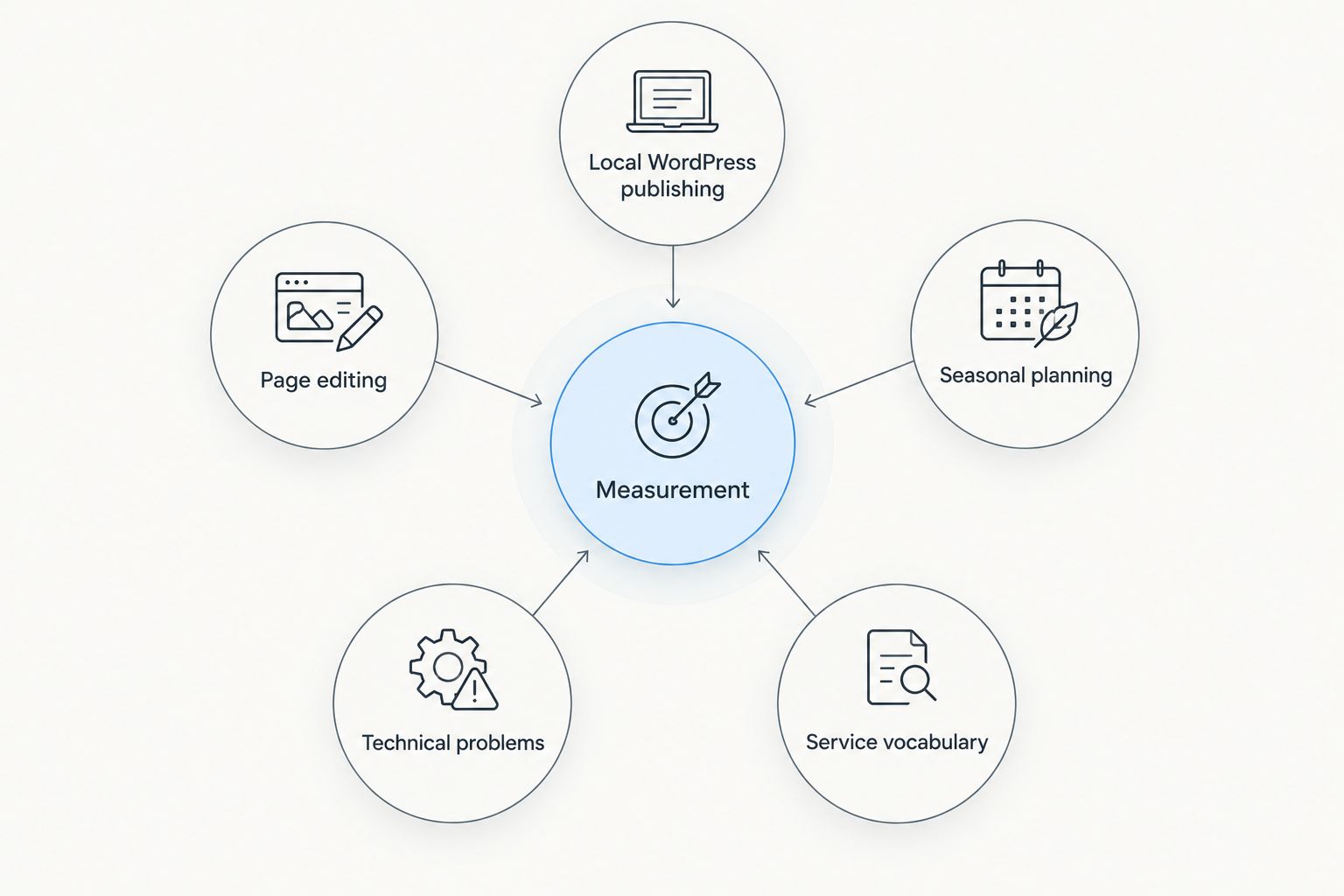
Choose Google Search Console first if you are undecided and already have a website. Establish what Google is showing, then select the execution tool that addresses the problem you find.
- Local WordPress publishing: Choose Improveseoplugin when keyword discovery, drafting, and scheduling are the bottleneck.
- Seasonal planning: Choose Google Trends to investigate changes in relative interest.
- Service vocabulary: Choose Google Keyword Planner to expand and organize candidate queries.
- Technical problems: Choose Screaming Frog SEO Spider when you need URL-level diagnosis.
- Page editing: Choose Yoast SEO when metadata and prepublication checks need a consistent process.
Use a 90-day review cycle as a planning checkpoint, not a ranking deadline. Review the pages you changed, the work still blocked, and the tools you actually used. Keep software that supports a repeatable action; remove software that only produces reports you ignore.
FAQ
What's the best SEO tool for a solopreneur starting with an existing website?
Google Search Console is the best starting point for measuring an existing website's Google Search performance. Use its query, page, and indexing information to decide whether your next task is editing content, publishing a page, or investigating a technical problem.
Which SEO tool fits a local business owner using WordPress?
Improveseoplugin fits local WordPress owners who need keyword discovery, branded content, publishing, and scheduling in one workflow. Review generated drafts for accurate service details and customer relevance before publication.
Is Google Trends better than Google Keyword Planner?
Google Trends is better for relative interest and seasonality; Google Keyword Planner is better for expanding keyword ideas and reviewing advertising-oriented estimates. Neither tool alone establishes organic ranking difficulty or customer value.
Do I need Screaming Frog SEO Spider if I use Google Search Console?
Use Screaming Frog SEO Spider when you need a crawl-based view of technical and on-page information across your website. Google Search Console answers different questions about Google Search performance and indexing, so the tools complement each other.
Does a good Yoast SEO score mean my page will rank?
A good Yoast SEO analysis result does not guarantee rankings. Use its checks to improve editing consistency, then assess whether the page answers the searcher's question and contains accurate, useful information.
Do I need every SEO tool on this list?
You do not need every tool on this list. Start with measurement and add a tool only when it solves a specific publishing, research, editing, or technical task.
How should I choose SEO tools for solopreneurs in 2026?
Choose SEO tools for solopreneurs in 2026 by matching each tool to a specific job. Prioritize an action you can complete and measure rather than collecting overlapping reports or treating software scores as business results.
One last thing
A keyword is not automatically a reason to create another page. Search results can reveal that several phrases describe the same customer need.
Before opening a new draft, identify the existing page that should answer that need. Improve the right page before creating a competing one. That recommendation turns your tools into a focused workflow rather than an expanding content backlog.


