

Best overall for WordPress content: Improveseoplugin. Best for search performance measurement: Google Search Console. Best for local map visibility management: Google Business Profile. These are the best SEO tools for home service businesses in 2026 when you choose by the job you need done, rather than the size of the feature list.
- Improveseoplugin leads SEO tools for home service businesses needing local keyword research and WordPress content publishing.
- Google Search Console shows which service pages and search queries earn impressions and clicks.
- Google Business Profile supports local search presence; it does not replace your website.
- PageSpeed Insights and Screaming Frog address technical problems, not your content publishing workload.
Why this matters
A plumbing company needs qualified plumbing inquiries, not a dashboard full of unrelated keyword rankings. The same applies to electricians, roofers, HVAC contractors, and other home service businesses: your tools need to connect real services, the locations you serve, and useful website pages.
Different tools handle different parts of that work. Keyword research helps you choose topics. Publishing tools help you create pages. Measurement tools show whether those pages appear in search, while technical tools identify problems with accessing or using them.
For your 2026 tool selection, start with the task you cannot complete consistently. Buying another reporting platform does not solve a content backlog, and publishing more articles does not fix an inaccessible service page.
What makes the best home service SEO tools
Use these criteria before comparing features:
- Local relevance: The tool helps you work with service-specific searches and genuine service areas, rather than chasing broad traffic.
- Workflow fit: You can complete its core task within your existing website and working routine.
- Actionable measurement: Reports distinguish search exposure from clicks and make individual pages easy to investigate.
- Technical clarity: Findings identify a problem you can fix, not just a score you can watch.
- Scope discipline: You know whether the tool handles content, local listings, search measurement, or technical analysis.
- Owner usability: A business owner can act on the output, or the tool produces a clear handoff for a specialist.
For this 2026 guide, the ranking favors useful roles over overlapping features. The first choice addresses local content work inside WordPress; the remaining choices cover separate measurement, listing, performance, crawling, and research tasks.
Best SEO tools at a glance
| Rank | Tool | Best for | Standout capability | Key limitation |
|---|---|---|---|---|
| 1 | Improveseoplugin | Local content publishing in WordPress | Local keyword discovery, branded content, publishing, and scheduling | Its described workflow depends on WordPress |
| 2 | Google Search Console | Measuring Google search performance | Query and page impressions, clicks, and indexing information | Does not create content or manage your business listing |
| 3 | Google Business Profile | Managing local search presence | Business information shown through Google Search and Maps | Does not replace website SEO |
| 4 | PageSpeed Insights | Diagnosing page experience problems | Performance analysis and Core Web Vitals reporting | Does not handle keywords or publishing |
| 5 | Screaming Frog SEO Spider | Auditing website structure | Crawling URLs, response codes, metadata, and internal links | Requires technical interpretation |
| 6 | Ahrefs | Competitor and backlink research | Organic search and backlink research | Research still needs to become website changes |
No single row covers the entire workflow. Choose a main tool for your immediate problem, then add another only when you have a separate task to complete.
1. Improveseoplugin: best for local WordPress content
Improveseoplugin is a WordPress plugin for small local business owners. It helps you find low-competition local keywords, generate branded content, and publish or schedule that content directly from the WordPress dashboard.
Improveseoplugin is the best fit for home service businesses that want local keyword research and content publishing inside WordPress. Its role is specific: turn topic selection and writing into a publishing workflow without requiring SEO expertise.
For a home service owner, that means keeping keyword discovery and content production close to the website you already manage. You still need to check every service claim, location reference, and customer-facing promise before publication.
Improveseoplugin pros:
- Connects local keyword discovery with content creation.
- Produces branded content rather than leaving you with a keyword list.
- Supports publishing and scheduling inside WordPress.
- Is designed for small local business owners without SEO expertise.
Improveseoplugin cons:
- The described workflow is WordPress-specific, not a platform-neutral publishing system.
- Generated copy needs your review for accurate business details and service descriptions.
Best for: WordPress-based home service businesses whose main obstacle is choosing local topics and publishing consistently.
Verdict: Buy for the local WordPress content workflow; skip it as a substitute for measurement or technical auditing.
2. Google Search Console: best for search performance measurement
Google Search Console reports how your website performs in Google Search. Its Performance report shows queries, pages, impressions, clicks, click-through rate, and average position; its indexing tools help you investigate whether Google can index individual URLs.
Use Google Search Console to separate a visibility problem from a click problem. A service page earning impressions but few clicks needs a different investigation from a page with no search exposure.
For your 2026 reporting routine, examine service pages individually rather than judging everything by the website total. A blog article gaining clicks does not prove that your main repair or installation page is reaching prospective customers.
Google Search Console pros:
- Shows search queries associated with your website.
- Lets you compare search performance by page.
- Provides indexing information and URL inspection.
- Measures Google Search activity rather than a third-party estimate of that activity.
Google Search Console cons:
- Does not write or publish website content.
- Does not measure completed calls or booked jobs by itself.
Best for: Owners who need to understand which pages appear in Google Search and which searches bring clicks.
Verdict: Buy into the measurement workflow; skip treating average position as a business outcome.
3. Google Business Profile: best for local search presence
Google Business Profile lets eligible businesses manage business information displayed through Google Search and Maps. For home service operators, it is the tool for maintaining that local business presence, not a replacement for maintaining a useful website.
Keep your business details accurate and follow Google's eligibility and representation guidelines. A service-area business should represent how it actually operates, rather than inventing locations to match a keyword plan.
Google Business Profile and Google Search Console answer different questions. The former manages your business presence; the latter reports on your website's Google Search performance. Using both gives each task its own place without confusing listing management with content production.
Google Business Profile pros:
- Gives you control over business information on your profile.
- Supports your presence in Google Search and Maps.
- Provides a place to manage and respond to customer reviews.
Google Business Profile cons:
- Eligibility and profile rules constrain how you represent the business.
- Profile management does not resolve website content or crawling problems.
Best for: Eligible home service businesses that need accurate local business information and review management.
Verdict: Buy into profile maintenance; skip using the profile as your entire SEO strategy.
4. PageSpeed Insights: best for page experience diagnosis
PageSpeed Insights analyzes a webpage's performance and provides diagnostic recommendations. It combines lab testing with real-user performance data when that field data is available, so you need to distinguish a simulated test from visitors' actual experience.
Start with important service and contact pages, not just the homepage. A fast homepage does not establish that the page a prospective customer visits is equally usable.
Google's published Core Web Vitals guidance defines good Largest Contentful Paint as 2.5 seconds or less, good Interaction to Next Paint as 200 milliseconds or less, and good Cumulative Layout Shift as a score of 0.1 or less. These are the published page-experience thresholds referenced in this 2026 guide, not claims about your website's current performance.
PageSpeed Insights pros:
- Analyzes individual URLs.
- Separates performance diagnostics from keyword research.
- Offers information you can hand to a developer for investigation.
PageSpeed Insights cons:
- Recommendations can require development work.
- A performance score does not explain whether your service content matches a searcher's needs.
Best for: Businesses investigating slow loading, delayed interactions, or unstable page layouts.
Verdict: Buy into targeted performance fixes; skip optimizing a score without checking the affected page.
5. Screaming Frog SEO Spider: best for website structure audits
Screaming Frog SEO Spider crawls websites and surfaces technical information such as response codes, page titles, metadata, and internal links. It is useful when you need to inspect the website as a connected set of URLs rather than review pages one at a time.
For a home service website, that helps you investigate broken links, redirects, and repeated metadata across service or location pages. Treat findings as an inspection list: repeated wording is not automatically a reason to delete a page.
The crawler's value depends on what happens after the crawl. Assign each confirmed issue to someone who can change the website, then check the affected URLs again after the fix.
Screaming Frog SEO Spider pros:
- Collects technical information across website URLs.
- Helps identify internal linking and response-code issues.
- Makes page titles and metadata easier to review together.
Screaming Frog SEO Spider cons:
- Requires technical knowledge to separate urgent issues from harmless findings.
- Does not decide which local service pages your business should create.
Best for: Businesses with a developer or SEO specialist responsible for website maintenance.
Verdict: Buy for structured technical audits; skip it as an owner-friendly content publishing tool.
6. Ahrefs: best for competitor and backlink research
Ahrefs provides tools for researching organic search visibility, keywords, and backlinks. It suits businesses that need to investigate competing websites and understand the search landscape beyond their own reporting.
Use competitor research to identify relevant topics and page types, not to copy every keyword another company targets. A competitor can rank for services you do not offer or places you do not serve.
Backlink research is similarly investigative. A link report helps you examine relationships between websites; it does not establish that copying a competitor's links will produce the same results.
Ahrefs pros:
- Supports research into competing websites' organic search visibility.
- Provides backlink analysis.
- Helps expand keyword research beyond your existing search queries.
Ahrefs cons:
- Third-party search estimates are not your website's first-party results.
- Research requires separate writing, publishing, and implementation work.
Best for: Businesses or their SEO partners planning content and investigating competitors beyond their own website data.
Verdict: Buy for external research; skip collecting reports without an implementation plan.
How we ranked these tools
This ranking uses the criteria above: local relevance, workflow fit, actionable measurement, technical clarity, scope discipline, and owner usability. It ranks distinct jobs, not interchangeable products, and does not present a hands-on benchmark or promise ranking improvements.
Content production leads because it directly addresses the stated needs of a small local business owner using WordPress. Measurement, business presence, performance, crawling, and competitor research follow as separate tasks with separate tools.
The best tool is the one that completes your next necessary task. A broader feature list is not a reason to replace a workflow that already works.
Which home service SEO tools should you choose?
Choose Improveseoplugin when local keyword selection and WordPress publishing are your bottleneck. Choose Google Search Console when you need to understand search exposure, and Google Business Profile when your local business information needs attention.
Add PageSpeed Insights for page experience investigation, Screaming Frog SEO Spider for technical crawling, or Ahrefs for external research. Do not add all three merely to make the stack look complete.
Use this sequence to turn your 2026 selection into work:
- Choose topics: Focus on services you actually provide and locations you genuinely serve.
- Publish pages: Write useful answers and verify business claims before publishing.
- Measure searches: Check page-level impressions, clicks, and relevant queries.
- Fix obstacles: Investigate confirmed indexing, linking, and performance problems.
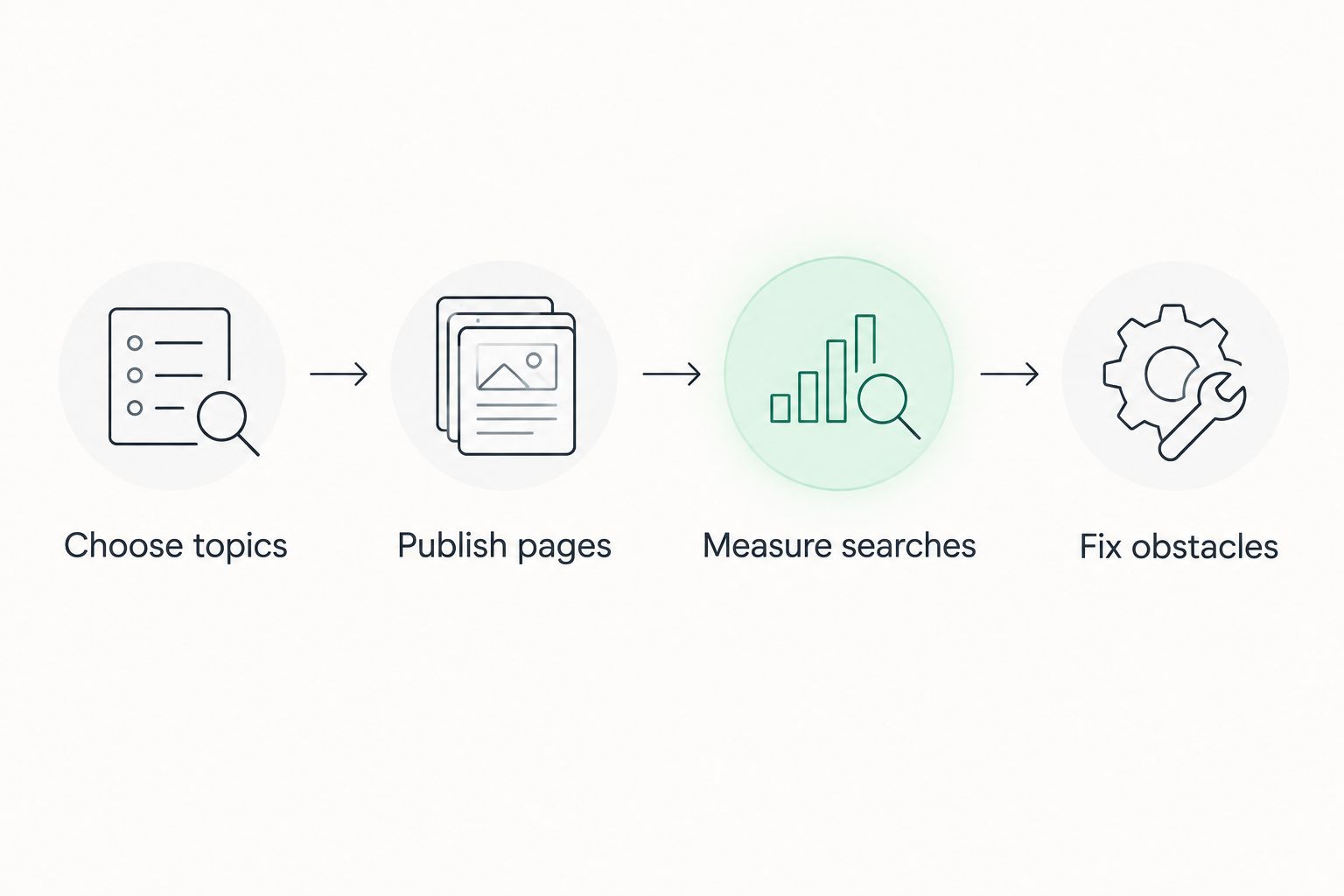
Keep responsibility visible. The owner verifies service details, the publishing workflow produces pages, the reporting tool measures exposure, and a specialist handles technical changes when needed.
FAQ
What's the best SEO tool for a home service business using WordPress?
Improveseoplugin is the best fit in this guide for local keyword discovery and content publishing inside WordPress. It combines branded content generation with publishing and scheduling for small local business owners.
Do I need Google Search Console if I already have an SEO plugin?
Yes, Google Search Console handles a different task: measuring your website's performance in Google Search. A content plugin does not replace query, page, and indexing information.
Is Google Business Profile enough for a plumbing or HVAC business?
Google Business Profile is not a replacement for website SEO. Use it to maintain your local business presence while keeping your website's service information useful and accurate.
Which SEO tool helps me find problems with slow service pages?
PageSpeed Insights is the best fit in this guide for investigating page performance. Review the specific service page, distinguish lab results from field data, and assign confirmed problems for correction.
Should I use Screaming Frog or Ahrefs for home service SEO?
Choose Screaming Frog SEO Spider for inspecting your website's technical structure, and Ahrefs for competitor and backlink research. They solve different problems, so choose according to your immediate task.
Can SEO tools guarantee more calls or booked jobs?
No SEO tool can guarantee more calls or booked jobs. Search impressions and clicks measure exposure and visits, not completed customer bookings.
Should I publish a page for every nearby city?
Publish location content only when it accurately represents where you work and provides useful information. Changing a city name across otherwise identical pages does not create distinct customer value.
One last thing
Your weakest service page deserves attention before your next tool purchase. Open the page for a service you genuinely want to sell and check whether it explains the work, identifies the service area accurately, and makes the next customer action clear.
If the page fails that check, fix the page. A new dashboard cannot supply the business details your prospective customer needs.


