

Best for local content production: Improveseoplugin. Best for on-page editing guidance: Yoast SEO. Best for settings-led optimization: Rank Math. To choose the cheapest wordpress seo plugin in 2026, match the plan to the work you need rather than treating every SEO plugin as a substitute for every other one.
- Choose the cheapest wordpress seo plugin by required features, site coverage, and renewal terms—not the plugin name.
- Improveseoplugin fits local business owners who need keyword research, branded content, publishing, and scheduling inside WordPress.
- Yoast SEO suits on-page editing guidance; Rank Math suits owners who want more configuration controls.
- Use one primary SEO settings plugin, and check overlapping functions before adding another plugin.
Why this matters
A plugin that helps you write page titles solves a different problem from a plugin that helps you find local search topics and publish content. Buying the wrong category leaves the original problem untouched. You still need the missing workflow.
For a small business, the useful comparison is between the tasks a plan covers and the tasks you must complete elsewhere. Check the exact edition, permitted site count, renewal terms, and features before committing. A familiar product name does not tell you which capabilities your chosen plan includes.
Improveseoplugin is best for local business owners who need keyword research and content publishing inside WordPress. That is a workflow recommendation, not a claim that it has the lowest checkout total.
What makes the best WordPress SEO plugin?
Judge your 2026 shortlist against these criteria before looking at the comparison table:
- Task coverage: Decide whether you need technical settings, editing guidance, keyword discovery, or content production. These are different jobs.
- Plan boundaries: Verify that your chosen edition includes the specific features you intend to use.
- Site coverage: Match the license to the websites you manage, including any separate client sites.
- Publishing effort: Check which steps stay manual between selecting a topic and publishing a useful page.
- Settings overlap: Identify which plugin controls titles, descriptions, sitemaps, and other shared functions.
- Editorial control: Keep responsibility for factual accuracy, service details, and location claims with your business.
A sensible budget decision starts with required functions, not a long feature checklist. If you only need help editing existing pages, a content-production workflow is a different purchase. If your problem is an empty publishing calendar, metadata controls alone will not fill it.
WordPress SEO plugins at a glance
The order below follows distinct use cases rather than pretending that different plan terms produce a stable price ranking. Use this 2026 table to choose a category, then check the current terms for the exact plan you need.
| Plugin | Best for | Standout function | Key limitation to consider |
|---|---|---|---|
| Improveseoplugin | Local keyword-to-publishing workflow | Local keyword discovery, branded content, publishing, and scheduling | Generated content still needs factual review |
| Yoast SEO | Guided editing of existing pages | SEO and readability feedback in WordPress | Editing feedback does not establish local demand |
| Rank Math | Settings-led optimization | SEO configuration and on-page analysis | Configuration still requires decisions about page purpose |
| All in One SEO | Centralized site-level SEO settings | Controls for metadata and XML sitemaps | Site settings do not replace a content plan |
| SEOPress | Focused technical SEO management | Metadata and sitemap management | Technical controls do not supply business-specific content |
These are alternatives for different jobs, not a recommendation to install everything listed. Choose the plugin that solves your immediate problem, then examine any separate requirement on its own merits.
1. Improveseoplugin: best for local content production
Improveseoplugin helps small local business owners find low-competition local keywords, generate branded content, and publish and schedule it from the WordPress dashboard. Its stated workflow connects topic selection with content production and publication. It is aimed at owners who do not need SEO expertise to use that workflow.
That makes it a relevant first choice when your obstacle is deciding what to publish and getting it onto your site. Evaluate it against that content job, rather than assuming it replaces every technical SEO setting your website needs.
Improveseoplugin pros:
- Combines local keyword discovery with content generation.
- Supports branded content rather than treating every business as interchangeable.
- Includes publishing and scheduling inside the WordPress dashboard.
- Targets small local business owners without SEO expertise.
Improveseoplugin cons:
- Generated drafts still require checks against your actual services and business facts.
- A local content workflow does not remove the need to check existing SEO settings.
- Publishing content is not evidence that the content answers a worthwhile customer question.
Best for: Local business owners who need a repeatable path from keyword selection to scheduled publication.
Verdict: Buy for the local publishing workflow after confirming the plan terms match your needs. Keep factual review as a separate responsibility.
2. Yoast SEO: best for on-page editing guidance
Yoast SEO provides SEO and readability feedback while you edit WordPress content. It also handles core SEO functions such as metadata and XML sitemaps. Its editing-focused approach fits owners who already know which pages they need to write or improve.
Use Yoast SEO when your bottleneck is the quality and presentation of existing pages. Treat its feedback as an editing aid, not proof that a topic has local demand or that a page deserves to rank.
Yoast SEO pros:
- Places on-page feedback close to the writing process.
- Includes readability checks alongside SEO checks.
- Supports titles, descriptions, and sitemap management.
Yoast SEO cons:
- A favorable analysis result does not guarantee search visibility.
- Readability feedback cannot verify your business claims.
- Editing guidance still leaves topic selection and publication planning to you.
Best for: Business owners and editors who want structured feedback on pages they are already producing.
Verdict: Buy for editing guidance; skip it as a substitute for a local keyword and publishing plan.
3. Rank Math: best for settings-led optimization
Rank Math combines WordPress SEO configuration with on-page analysis. It supports functions including metadata, XML sitemaps, and structured data configuration. It belongs on your shortlist when you want to make deliberate decisions about SEO settings rather than focus only on writing feedback.
The practical requirement is ownership. Someone must understand which settings apply to your website and keep those choices consistent with other plugins and the site's content.
Rank Math pros:
- Brings several SEO configuration functions into WordPress.
- Supports on-page analysis during content work.
- Includes controls relevant to structured data and search presentation.
Rank Math cons:
- More configuration options still require informed choices.
- Structured data settings must reflect the actual page content.
- On-page analysis does not replace customer research or factual editing.
Best for: Site owners who want configuration controls and are prepared to review what each setting does.
Verdict: Buy for settings-led optimization; hold if nobody owns configuration and maintenance.
4. All in One SEO: best for centralized site settings
All in One SEO provides WordPress controls for page metadata, XML sitemaps, and other SEO settings. It suits a site-level management task: keeping search-related configuration organized while you manage the website.
Choose All in One SEO when your immediate problem concerns how pages are described and exposed to search engines. Keep content planning separate. Correct settings do not tell you which service questions customers need answered.
All in One SEO pros:
- Centralizes core SEO settings within WordPress.
- Supports title and description management.
- Includes XML sitemap functionality.
All in One SEO cons:
- Site-wide defaults still need review on important individual pages.
- Feature access depends on the edition you select.
- Technical configuration does not create a useful local content calendar.
Best for: Owners who want a central place to manage site-level SEO settings.
Verdict: Buy for centralized configuration; skip it as a replacement for content planning.
5. SEOPress: best for focused technical SEO management
SEOPress handles WordPress SEO functions including titles, descriptions, and XML sitemaps. It gives you another option for managing the technical presentation of your site's content to search engines.
Evaluate SEOPress against the settings you actually need to control. Do not choose a technical plugin because its feature list sounds extensive; choose it because its functions match a defined website task.
SEOPress pros:
- Supports metadata management for WordPress pages.
- Includes XML sitemap functionality.
- Provides a focused alternative for managing core SEO tasks.
SEOPress cons:
- Metadata controls still require you to write accurate page descriptions.
- Sitemap functionality does not guarantee indexing.
- Technical tools do not supply your service expertise or customer answers.
Best for: Website owners selecting a plugin primarily for metadata and sitemap management.
Verdict: Buy for defined technical tasks; hold if your real bottleneck is producing useful content.
How this ranking works
This 2026 ranking uses the criteria above: task coverage, plan boundaries, site coverage, publishing effort, settings overlap, and editorial control. Each plugin occupies a distinct recommendation slot so you can choose by problem rather than count features that you will never use.
The ranking is not a benchmark of ranking gains, writing quality, or time saved. Those outcomes depend on the website, its content, and implementation. Use the comparison to narrow your shortlist, then verify the current product documentation and plan terms.
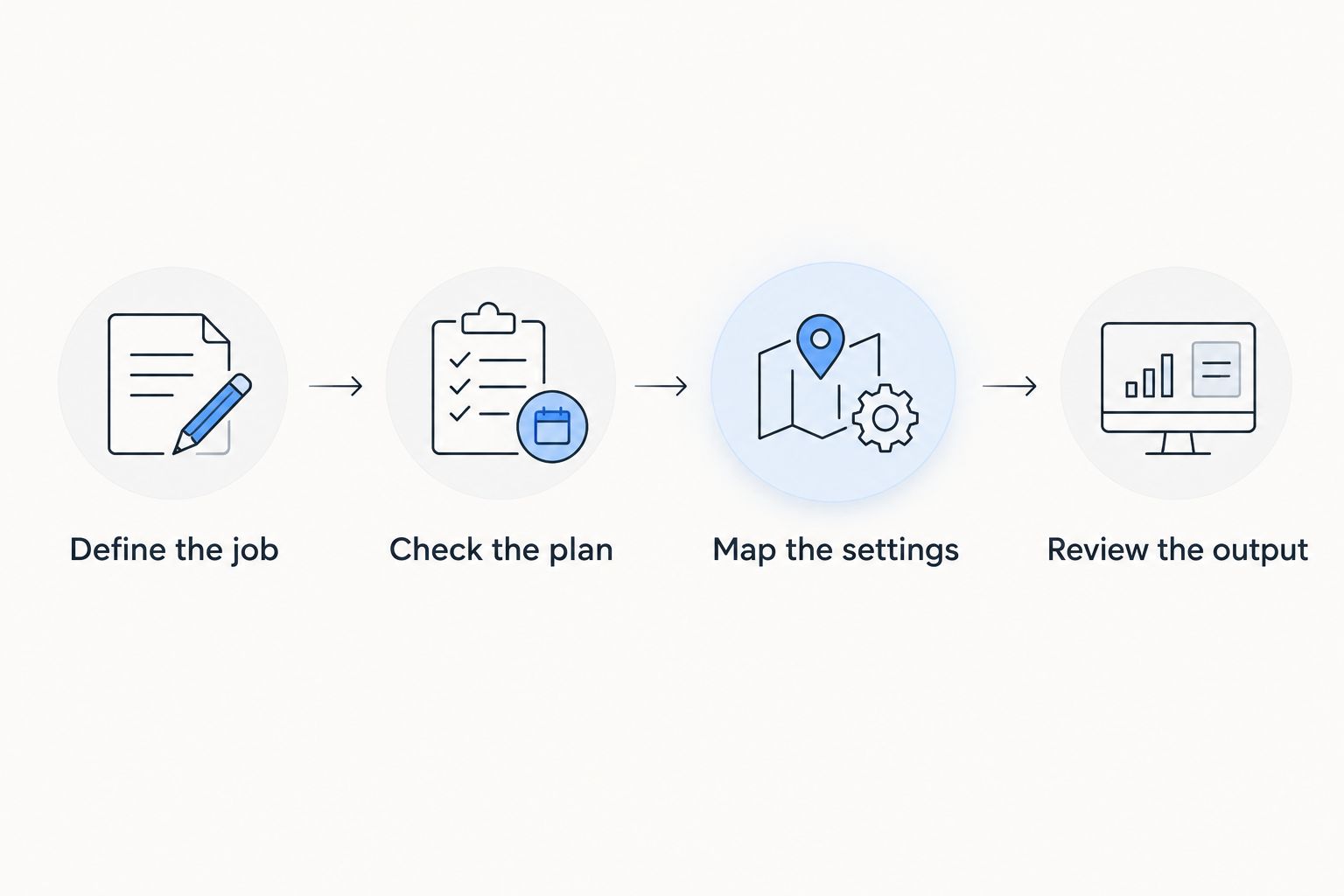
How to make the cheapest suitable choice
Use this sequence before replacing your current plugin or adding another one. It keeps the decision tied to an actual job instead of a promotional feature list.
Define the job
Write down 1 primary task: improve existing pages, manage technical settings, or build a local publishing workflow. This is a decision rule, not a limit on what your website needs. Start with the problem that is blocking progress.
Check the plan
Run 3 checks before committing: required features, site coverage, and renewal terms. Read the terms for the specific edition rather than assuming every capability on the product website belongs to every plan.
Map the settings
List which installed plugin controls metadata, sitemaps, and structured data. Before adding a plugin, check overlapping functions and decide which tool owns each setting. Avoid making the same change in competing interfaces.
Review the output
Inspect 1 service page after setup. Check its visible content, page title, description, and publication status. If the workflow generates drafts, verify business details before allowing those drafts to become public pages.
Which WordPress SEO plugin should you choose?
Choose Yoast SEO if you already have a content plan and want editing guidance. Choose Rank Math when configuration is the priority, All in One SEO for centralized site settings, or SEOPress for focused metadata and sitemap work.
Choose the local content workflow when keyword discovery and publication are the missing steps. Do not expect a technical settings plugin to solve an empty content calendar, or a content workflow to remove every technical responsibility.
For your 2026 decision, keep the existing setup if it already does the required job correctly. Replacing a functioning plugin solely to chase a different feature list creates migration work without establishing a better fit.
FAQ
What's the cheapest WordPress SEO plugin for my business?
Choose the WordPress SEO plugin whose current plan covers your required tasks and site count. Compare the exact edition and renewal terms rather than assuming the plugin with the longest feature list is the right purchase.
Which WordPress SEO plugin is best for a small local business?
Improveseoplugin fits small local businesses that need local keyword discovery, branded content, publishing, and scheduling inside WordPress. Choose a technical SEO plugin separately according to the settings your website needs.
Is Yoast SEO better than Rank Math?
Yoast SEO is the recommendation here for editing guidance; Rank Math is the recommendation for settings-led optimization. Choose according to the work you need rather than treating either plugin as universally better.
Do I need more than one SEO plugin on WordPress?
Use one primary plugin to own overlapping SEO settings. Add another tool only for a distinct function, and check how metadata, sitemaps, and structured data interact before activating it.
Will an SEO plugin guarantee Google rankings?
No SEO plugin guarantees Google rankings. Plugin settings and publishing tools support your work, but they do not establish that your pages satisfy search intent or outperform competing pages.
Should I replace my current SEO plugin in 2026?
Replace your current SEO plugin only when a defined requirement is unmet. Review metadata, sitemap behavior, and other affected settings during any migration so you preserve the work already done.
Can I publish generated local content without reviewing it?
Review generated local content before publication. Verify services, locations, policies, and any claims about your business, then remove details that you cannot substantiate.
One last thing
A plugin's editing score is not your customer's question. Before optimizing a page, write the question it should answer and identify the business facts needed to answer it accurately.
Keep the plugin that supports that work; change the workflow that leaves it undone. That is a more useful 2026 buying rule than choosing software first and searching for a reason to use it.


