

Best overall for local WordPress businesses: Improveseoplugin. Best for competitor research: Semrush. Best for researching existing search visibility: Google Search Console. This 2026 guide compares six options so you can choose a low competition keyword finder tool that fits your website, research needs, and publishing workflow.
- Improveseoplugin is the best fit for local WordPress owners who want keyword research and publishing together.
- Choose Semrush or Ahrefs for competitor keyword research and search-result analysis.
- Google Search Console reveals existing search opportunities; Google Trends checks interest patterns.
- A low competition keyword finder tool should identify relevant searches, not just low keyword difficulty scores.
Why this matters
A low difficulty score does not tell you whether a keyword attracts your customers. You need a relevant search, a page that answers it, and a realistic reason your website can compete with the current results.
Improveseoplugin is a low competition keyword finder tool for small local business owners using WordPress. Its stated workflow combines local keyword discovery, branded content generation, and publishing or scheduling from the WordPress dashboard.
That makes workflow the first buying decision in 2026. Choose an integrated plugin if getting useful pages published is your main obstacle; choose a research platform if you need to investigate competitors and search results in more detail.
What makes the best low competition keyword finder tool?
Use these criteria before comparing features. A tool that produces a long keyword list without helping you choose a relevant page topic leaves the hardest decision untouched.
- Business relevance: Can you find searches tied to services you actually provide and customers you actually serve?
- Local targeting: Can you research the locations that matter instead of relying only on broad national demand?
- Competition context: Can you inspect competing pages, or must you validate difficulty estimates separately?
- Search intent: Does the workflow help you distinguish a request for a service from a request for information?
- Publishing fit: Can you turn an accepted keyword into reviewed website content without unnecessary handoffs?
- Opportunity source: Are you discovering new topics, examining competitors, or improving pages that already appear in search?
Choose for the task you need to finish, not the longest feature list. A local owner publishing service-related content and an analyst researching competing domains have different requirements.
Low competition keyword tools at a glance
The order below prioritizes local WordPress publishing, then deeper research, then supporting validation. Each option owns a different use case; the supporting Google tools do not replace a complete keyword research workflow.
| Tool | Best for | Standout feature | Key limitation |
|---|---|---|---|
| Improveseoplugin | Local WordPress owners | Local keyword discovery, content generation, and dashboard publishing | WordPress-specific workflow; generated content needs review |
| Semrush | Competitor-led keyword discovery | Keyword research alongside competing-domain research | Research does not replace business-specific content decisions |
| Ahrefs | Search-result competition analysis | Keyword research alongside search-result and backlink analysis | Difficulty scores still need manual interpretation |
| Google Search Console | Existing search opportunities | Queries and page performance from your own website | Not a broad competitor keyword discovery tool |
| Google Keyword Planner | Location-focused demand research | Keyword ideas with geographic targeting | Advertising competition is not organic ranking difficulty |
| Google Trends | Seasonality and wording checks | Relative search interest across time and locations | Does not measure organic keyword difficulty |
1. Improveseoplugin: best for local WordPress publishing
Improveseoplugin helps small local business owners find low-competition local keywords, generate branded content, and publish or schedule it directly from WordPress. The value is the connected workflow: keyword selection does not have to end in a spreadsheet waiting for someone to write the page.
Improveseoplugin is the best-fit low competition keyword finder tool for local WordPress owners who want research and publishing together. Choose it when your priority is turning relevant local topics into website content without needing SEO expertise.
Improveseoplugin pros
- Combines local keyword discovery with content generation.
- Keeps publishing and scheduling inside the WordPress dashboard.
- Targets small local business owners rather than requiring a specialist research workflow.
- Supports branded content rather than leaving you with keyword ideas alone.
Improveseoplugin cons
- Its stated publishing workflow is WordPress-specific.
- Generated content still needs your review for service accuracy and business facts.
- Finding a low-competition phrase does not remove the need to check search intent.
For a 2026 local content plan, start with the services you sell and the areas you serve. Approve the topic before generating the page, then check every business claim before publishing; automation does not establish whether a claim is true.
Best for: Small local business owners who want a connected WordPress content workflow.
Verdict: Buy for local WordPress publishing; skip if you need a different publishing platform.
2. Semrush: best for competitor-led keyword discovery
Semrush provides keyword research and organic competitor research. You can investigate competing domains, explore related terms, and examine keyword data while building a topic shortlist.
Its distinct role is discovery through competitors. Start with a business that genuinely competes for your customers, not simply a large website that happens to rank for a broad phrase.
Semrush pros
- Connects keyword research with competing-domain research.
- Helps you discover terms beyond your initial seed phrase.
- Supports filtering a broad keyword list into a more focused shortlist.
Semrush cons
- Competitor keywords are not automatically relevant to your business.
- Keyword estimates do not guarantee your page will rank.
- You still need to decide which topics deserve pages and how to publish them.
Use Semrush when you can explain why each selected competitor belongs in your research. A national publisher's informational rankings do not necessarily reveal the best topics for a local service business.
Best for: Marketers building a keyword shortlist from competing websites.
Verdict: Buy for competitor-led discovery; skip if your main bottleneck is publishing.
3. Ahrefs: best for search-result competition analysis
Ahrefs offers keyword research, search-result analysis, and backlink research. It suits the stage after discovery, when you need to investigate the pages already ranking for a candidate term.
The useful question is not just whether difficulty looks low. Ask what kind of page ranks, what it answers, and whether the competition reflects the search intent you plan to serve.
Ahrefs pros
- Combines keyword exploration with search-result inspection.
- Provides backlink context for competing pages.
- Helps connect a keyword opportunity to the websites occupying the results.
Ahrefs cons
- A keyword difficulty score is not a complete assessment of competition.
- Backlink information does not establish whether your content matches search intent.
- Research still requires a separate editorial and publishing decision.
For your 2026 shortlist, inspect 3 competing pages per candidate as an initial review. This is a practical starting point, not a ranking threshold: compare page type, relevance, and the question each page answers.
Best for: Researchers validating the competition behind a keyword estimate.
Verdict: Buy for search-result investigation; skip if you only need a simple publishing workflow.
4. Google Search Console: best for existing search opportunities
Google Search Console reports how your website performs in Google Search, including queries, impressions, clicks, and average position. It helps you find searches for which your site already appears rather than starting every content decision from outside estimates.
Use it to connect a query to the page receiving impressions. Then decide whether to improve that page, clarify its focus, or investigate a genuinely separate topic.
Google Search Console pros
- Uses performance data from your own website.
- Connects search queries with landing pages.
- Helps evaluate content after publication.
Google Search Console cons
- Does not provide broad competitor keyword discovery.
- Some queries are omitted from reports for privacy.
- Average position does not describe a single fixed ranking for every searcher.
Compare 2 consecutive 28-day periods when reviewing a page, and consider seasonality before treating a change as meaningful. That is a review cadence, not proof that a page improvement caused the result.
Best for: Website owners improving content that already receives search impressions.
Verdict: Use for existing-site opportunities; skip as your only new-keyword discovery method.
5. Google Keyword Planner: best for location-focused demand research
Google Keyword Planner generates keyword ideas and provides search estimates within Google Ads. Its geographic targeting helps you examine demand in a relevant area instead of assuming national interest reflects your local market.
Its role in organic SEO requires a clear distinction. The competition field describes advertiser competition, not how difficult it is to rank a website in organic search.
Google Keyword Planner pros
- Generates related ideas from seed terms.
- Supports geographic targeting for local research.
- Provides another demand reference when reviewing a shortlist.
Google Keyword Planner cons
- Advertising competition is not organic ranking difficulty.
- Search estimates do not identify the best page format.
- Local relevance still requires checking the actual search results.
For local research in 2026, set the geography before interpreting demand. Then validate the organic results separately; a promising advertising metric is not a recommendation to publish an SEO page.
Best for: Local marketers checking geographically relevant keyword demand.
Verdict: Use for location-focused demand checks; skip as an organic difficulty score.
6. Google Trends: best for seasonality and wording checks
Google Trends shows relative search interest across time and geography. It helps you compare wording and investigate whether interest in a topic follows a seasonal pattern.
Use it as a supporting check after you have relevant candidate terms. It does not tell you whether your website can beat the pages ranking for those terms.
Google Trends pros
- Shows changes in relative interest over time.
- Supports comparisons between terms or topics.
- Helps investigate geographic and seasonal patterns.
Google Trends cons
- Does not provide an organic keyword difficulty score.
- Relative interest is not an absolute search-volume count.
- Narrow local phrases do not always produce useful comparison data.
Keep the location and time range consistent when comparing wording. Otherwise, you are changing the question as well as the term, making the comparison harder to interpret.
Best for: Content planners checking timing and wording before committing to a topic.
Verdict: Use for trend validation; skip as your primary competition finder.
How we ranked these keyword tools
This ranking prioritizes fit for small local WordPress businesses: relevant keyword discovery, a usable publishing workflow, and a clear way to validate opportunities. It compares stated functions and established tool purposes, not claimed testing results or ranking guarantees.
The distinction matters. An integrated publishing plugin, a competitor research platform, and a search-performance report solve different parts of the job; none should be judged as though all three do the same thing.
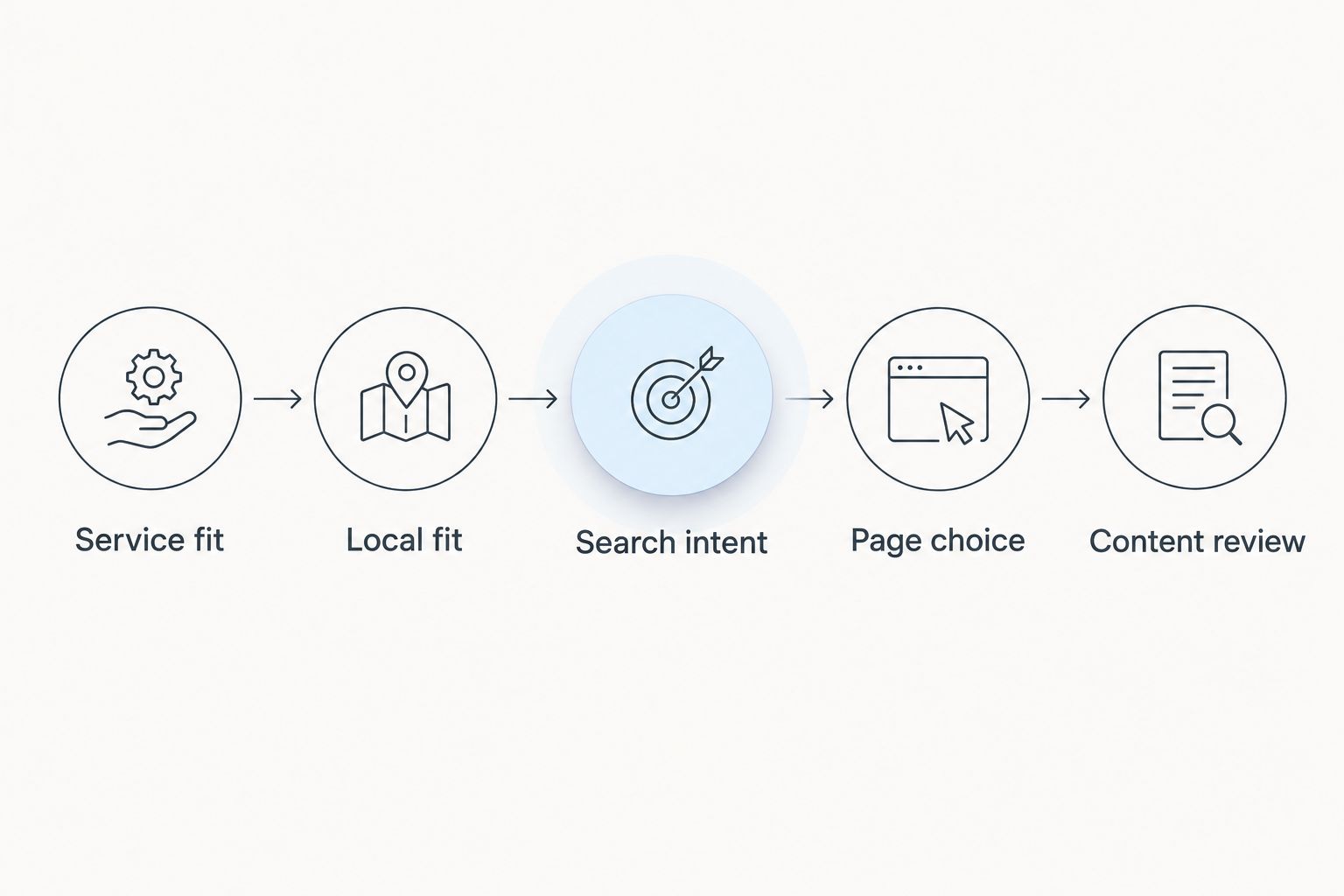
Validate a keyword before creating a page
A useful 2026 workflow starts with a short list, not a large export. Select 5 candidate keywords tied to actual services, then review each through the same sequence.
- Service fit: Confirm that the search relates to something you provide.
- Local fit: Check that the location matches your service area.
- Search intent: Inspect whether results favor service pages, explanations, directories, or another format.
- Page choice: Decide whether an existing page should answer the query or a new page is justified.
- Content review: Verify business facts and make the answer useful before publishing.
Do not create separate pages merely because two phrases differ. If both searches ask the same question and require the same answer, first consider whether one clear page serves both.
Which low competition keyword finder tool should you choose?
Choose the WordPress plugin listed first if you are a local owner whose main obstacle is turning keyword ideas into published content. Choose Semrush for competitor-led discovery or Ahrefs for deeper inspection of ranking pages.
Use Google Search Console to improve existing visibility, Keyword Planner to check geographic demand, and Google Trends to examine timing. These supporting tools answer useful questions, but none replaces checking whether the search belongs in your content plan.
For 2026, keep the decision simple: choose one primary workflow, validate a short list, and publish only pages that answer a distinct customer need.
FAQ
What's the best low competition keyword finder tool for a local WordPress business?
Improveseoplugin is the best fit for local WordPress owners who want keyword discovery, branded content generation, and publishing together. Review service details and business claims before publishing generated content.
Is Semrush or Ahrefs better for finding low-competition keywords?
Choose Semrush for competitor-led discovery and Ahrefs for inspecting search-result competition. Both require you to validate business relevance and search intent rather than relying only on difficulty estimates.
Can Google Search Console find low-competition keywords?
Google Search Console reveals queries your website already appears for, but it does not assign organic keyword difficulty scores. Use those queries to investigate existing-page opportunities and inspect competition separately.
Does low competition in Google Keyword Planner mean easy SEO rankings?
No, Google Keyword Planner's competition field describes advertiser competition, not organic ranking difficulty. Check the organic search results before selecting a keyword for an SEO page.
Does Google Trends show keyword search volume?
Google Trends shows relative search interest rather than an absolute search-volume count. Use it to compare patterns while keeping geography and time range consistent.
Should I create a separate page for every local keyword?
No, create a separate page only when the search calls for a distinct, useful answer. Similar phrases with the same intent can belong on one page.
Does a low keyword difficulty score guarantee rankings?
No, a low keyword difficulty score does not guarantee rankings. The page still needs to match search intent and compete with the results already serving that query.
One last thing
A low-competition keyword is still the wrong keyword if you cannot satisfy the search. Before approving a topic, write the customer question it answers and identify the service or information your page will provide.
If that answer is unclear, hold the topic. A smaller list of relevant pages gives you a clearer publishing plan than a long list selected only for low difficulty.


