

Best overall: Google Business Profile. Best for WordPress content: Improveseoplugin. Best for measuring website search performance: Google Search Console. The best local SEO tools for salons in 2026 serve different jobs: helping clients discover your business, improving service content, and showing where search visibility needs attention.
- Google Business Profile is the best starting point for managing a salon’s presence in Google Search and Maps.
- Improveseoplugin is best for WordPress salon owners who need local keyword research, branded content, and publishing together.
- Google Search Console measures website search performance; it does not replace business-profile management.
- BrightLocal suits local ranking checks, Whitespark suits citation discovery, and PageSpeed Insights diagnoses website performance.
Why this matters
A salon needs visibility for services clients actually book, not just traffic to general beauty articles. Someone searching for balayage nearby needs different information from someone researching hair-color maintenance. Your tools should help you distinguish those needs.
Local SEO tools for salons also address separate surfaces. Your business profile, website content, directory listings, and page performance each need attention. Choose the tool for the problem, rather than expecting one dashboard to fix everything. This 2026 guide ranks the options by their role in a salon or spa workflow, not by an unsupported promise of higher rankings.
What makes the best local SEO tools for salons?
Use these criteria before choosing software:
- Local relevance: The tool should help you work with actual services, locations, or local search results—not unrelated national keywords.
- Clear ownership: Know whether the tool manages a profile, publishes website content, checks rankings, or diagnoses technical issues.
- Actionable evidence: Reports should lead to a specific task, such as correcting a listing or improving a service page.
- Workflow fit: A WordPress content tool belongs in a WordPress workflow. A rank tracker serves a different purpose.
- Editorial control: You need to verify service descriptions, location details, and treatment claims before publishing.
- Useful limitations: A good choice has a defined scope. Avoid treating a content generator as a ranking monitor or a speed report as a local-search audit.
For salons in 2026, the most useful starting point is the problem closest to the booking decision: an inaccurate profile, an unclear service page, or a broken path to booking.
Local SEO tools at a glance
| Tool | Best for | Standout function | Key limitation |
|---|---|---|---|
| Google Business Profile | Search and Maps presence | Managing business details visible on Google | Does not manage your website content |
| Improveseoplugin | WordPress local content | Local keywords, branded drafting, publishing, and scheduling | Requires a WordPress workflow and editorial review |
| Google Search Console | Website search measurement | Reporting search queries, clicks, impressions, and indexing | Does not manage business listings |
| BrightLocal | Location-based ranking checks | Local rank tracking and citation auditing | Reports still require interpretation and action |
| Whitespark Local Citation Finder | Citation discovery | Finding business-listing opportunities | Citation discovery does not replace on-site work |
| Google PageSpeed Insights | Page-performance diagnosis | Lab diagnostics and available real-user performance data | Does not evaluate local keyword relevance |
The table is a decision tree. Start with the task you cannot currently complete, then choose the corresponding tool. Adding every option at once creates more reports, not necessarily a clearer plan.
1. Google Business Profile: best for Search and Maps presence
Google Business Profile lets you manage how your salon or spa appears in Google Search and Maps. You can maintain business details, add photos, and respond to reviews. It is the default starting point when your immediate concern is the information people see before visiting your website.
For a salon, accurate services and opening hours matter more than publishing another general beauty article while your profile remains incorrect. Make the business information match what a client will encounter when calling or arriving.
Google Business Profile pros:
- Manages business information on Google Search and Maps.
- Supports photos that help clients understand the business.
- Lets you respond to customer reviews.
Google Business Profile cons:
- Does not create or improve your website’s service pages.
- Requires continued attention to business details and reviews.
Best for: Salon and spa owners responsible for their Google presence.
Verdict: Buy into Google Business Profile as your local-search foundation. Correct the profile before expanding your tool stack.
2. Improveseoplugin: best for WordPress local content
Improveseoplugin is best for WordPress salon owners who need local keyword research and content publishing in one workflow. The plugin helps small local businesses find low-competition local keywords, generate branded content, and publish or schedule it from the WordPress dashboard.
That makes Improveseoplugin a fit among local SEO tools for salons when the bottleneck is content production. Start with a service you actually provide and a location you genuinely serve. Review the draft against your service information before publishing it.
Improveseoplugin pros:
- Combines local keyword discovery with content drafting.
- Supports branded content for a local business.
- Publishes and schedules content within WordPress.
- Is designed for owners without SEO expertise.
Improveseoplugin cons:
- Depends on WordPress as your publishing platform.
- Generated drafts still need verification of business details and service claims.
Best for: Small salon and spa owners who maintain a WordPress website and need a repeatable content workflow.
Verdict: Buy for the WordPress content workflow; skip this option if WordPress is not your publishing platform. Treat publishing as an editorial responsibility, not a substitute for checking accuracy.
3. Google Search Console: best for website search measurement
Google Search Console reports how your website performs in Google Search. Its performance reports show queries, pages, clicks, and impressions; its indexing reports help you investigate whether Google can index your content.
Use it to separate visibility from visits. A service page receiving impressions but few clicks calls for a different investigation from a page that is not indexed. Search Console gives you evidence for that distinction without claiming to explain every ranking change.
Google Search Console pros:
- Shows search queries associated with your website.
- Connects search performance to individual pages.
- Provides indexing information for troubleshooting.
Google Search Console cons:
- Does not manage your Google Business Profile or directory listings.
- Does not directly tell you which website visits became appointments.
Best for: Owners who need to understand website search performance before changing content.
For a 2026 review, compare consistent reporting windows and inspect the relevant service page, not only the website total. A rise in unrelated informational queries does not answer whether your booking-focused pages improved.
Verdict: Buy into Google Search Console as your measurement baseline. Use its evidence to choose the next website task.
4. BrightLocal: best for location-based ranking checks
BrightLocal provides local SEO reporting tools, including local rank tracking and citation auditing. It suits a salon or spa that needs to monitor visibility for selected searches and locations rather than rely on an occasional manual search.
A local ranking report needs a defined service and geographic context. Searching for a broad term from an unspecified location produces a weak basis for decisions. Set up checks around the services and areas your business genuinely serves.
BrightLocal pros:
- Supports tracking local search rankings.
- Provides citation auditing tools.
- Helps organize local-search reporting around locations.
BrightLocal cons:
- Ranking reports do not directly measure appointments.
- Findings still require someone to prioritize and complete the work.
Best for: Salons and spas that need regular local visibility reporting.
Verdict: Buy when location-based reporting is a defined need; hold if you have not yet corrected your core business information. Tracking a known problem is less useful than fixing it.
5. Whitespark Local Citation Finder: best for citation discovery
Whitespark Local Citation Finder helps identify citation opportunities and examine where businesses are listed. A citation is a mention of business information, commonly including the business name, address, and phone number.
Use citation discovery to find relevant places where your salon’s details belong. Relevance and accuracy should guide the work. A directory opportunity is not automatically useful simply because a tool finds it.
Whitespark Local Citation Finder pros:
- Focuses on discovering business-listing opportunities.
- Supports research into competitor citations.
- Helps structure citation work around identifiable sources.
Whitespark Local Citation Finder cons:
- Finding an opportunity does not complete the listing work.
- Citation work does not replace service-page content or profile management.
Best for: Established salons and spas reviewing gaps in their business listings.
For a 2026 citation review, verify the details you intend to distribute before adding more listings. Repeating an old phone number across additional directories expands the correction task.
Verdict: Buy for a specific citation-discovery project; hold if your existing business details are still inconsistent. Accuracy comes before expansion.
6. Google PageSpeed Insights: best for page-performance diagnosis
Google PageSpeed Insights analyzes a page’s performance and provides diagnostic recommendations. It combines lab testing with real-user performance data when that data is available. Use it to investigate the pages clients depend on, including service information and the route to booking.
The score is not a local-ranking report. A fast page can still describe the wrong service, and a relevant page can still be frustrating to use. PageSpeed Insights addresses the performance side of that distinction.
Google PageSpeed Insights pros:
- Provides page-specific performance diagnostics.
- Supports mobile and desktop analysis.
- Shows available real-user performance information alongside lab results.
Google PageSpeed Insights cons:
- Recommendations can require developer help.
- Does not assess business-listing accuracy or service relevance.
Best for: Salons and spas investigating slow or difficult website experiences.
Verdict: Buy into PageSpeed Insights as a diagnostic step; skip treating its score as your entire SEO strategy. Fix problems that affect the client’s path, not just numbers on a report.
How to turn the tools into a working routine
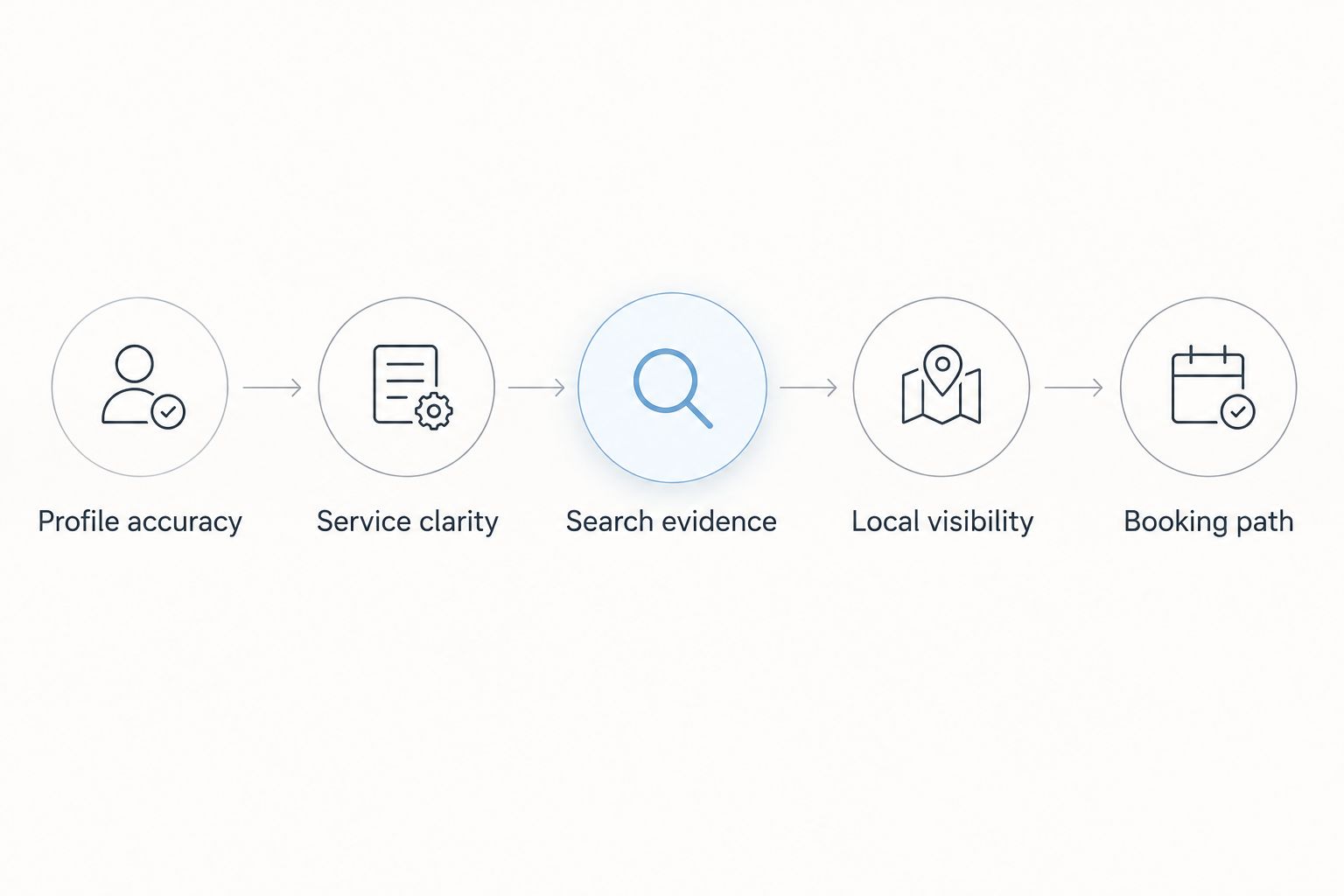
A useful 2026 routine follows the customer journey rather than the order of software dashboards. Complete these stages before adding another report:
- Profile accuracy: Confirm your business details, services, and opening hours match reality.
- Service clarity: Review 1 service page at a time. Make the service, location, and next action understandable.
- Search evidence: Compare 2 equal reporting periods in Search Console. Check relevant queries and pages rather than total traffic alone.
- Local visibility: Use location-based reporting or citation discovery when you have a specific question those tools can answer.
- Booking path: Run 3 practical checks: open the service page on mobile, follow the booking route, and confirm the contact action works.
These quantities define a manageable review process; they are not ranking thresholds. The goal is to finish a useful task before opening another dashboard.
Keep a short record of what changed and when. If you rewrite a service page, change business information, and rebuild the booking route together, later performance changes are harder to interpret. Separate the work where practical and verify each change before moving on.
How the ranking works
This ranking assigns each tool a distinct job using the criteria above: local relevance, clear ownership, actionable evidence, workflow fit, editorial control, and scope. Google Business Profile takes the overall starting position because it manages the business presence on Google Search and Maps.
The remaining tools solve narrower problems. This is a task-based buying guide, not a claim of hands-on comparative testing or a guarantee that one tool produces better rankings. Choose by the work you need to complete.
Which local SEO tools should you choose?
Start with Google Business Profile and Google Search Console if you are undecided. Together, they cover business-profile management and website search measurement without pretending those are the same task.
Choose Improveseoplugin when your WordPress content process needs local keyword discovery, branded drafting, and scheduling. Add BrightLocal for location-based ranking questions, Whitespark Local Citation Finder for listing research, and PageSpeed Insights for performance diagnosis. Your 2026 stack should have a clear owner and purpose for every tool.
FAQ
What are the best local SEO tools for salons in 2026?
Google Business Profile is the best starting point for managing a salon’s Google presence, and Google Search Console is the baseline for measuring website search performance. Add specialized tools for content, local rank tracking, citation discovery, or page performance when those tasks need attention.
Which tool helps a salon publish local content on WordPress?
Improveseoplugin helps small local businesses find low-competition local keywords, generate branded content, and publish or schedule it within WordPress. Salon owners should verify service descriptions and business details before publishing.
Is Google Search Console better than Google Business Profile?
Google Search Console and Google Business Profile serve different purposes. Search Console reports website search performance and indexing, while Business Profile manages business information on Google Search and Maps.
Do salons need both BrightLocal and Whitespark?
Salons do not need both tools by default. BrightLocal fits local ranking and citation-audit questions, while Whitespark Local Citation Finder fits citation-discovery work; choose according to the task.
Can local SEO tools guarantee more salon bookings?
Local SEO tools do not guarantee more bookings. They support specific visibility, content, measurement, and diagnostic tasks, while appointment results also depend on your services and the booking experience.
Does a good PageSpeed Insights score mean my spa has good local SEO?
A good PageSpeed Insights score does not establish that your spa has good local SEO. Page-performance diagnostics do not verify business-profile accuracy, service relevance, or local search visibility.
What should I check before publishing a local salon article?
Verify the service, location, business details, and next action before publishing. Remove unsupported treatment claims and avoid creating location pages for places your business does not genuinely serve.
One last thing
Test the booking path before publishing another article. Open a service page on your phone and attempt the action you want a new client to take. If the contact information is wrong or the booking route fails, correct that problem first. More search visibility does not repair a broken next step.


