
Best overall: Google Business Profile. Best for WordPress content publishing: Improveseoplugin. Best for diagnosing website search performance: Google Search Console. These local SEO tools for restaurants solve different problems; this 2026 guide shows which one belongs in your workflow.
- Google Business Profile is the best starting point among local SEO tools for restaurants that serve local diners.
- Improveseoplugin fits restaurant owners who want local keyword research and content publishing inside WordPress.
- Google Search Console diagnoses website search visibility; it does not replace Google Business Profile management.
- BrightLocal fits geographic rank tracking, while Google Analytics measures configured website actions.
Why this matters
A restaurant needs accurate local information and a website that answers diners' questions. Those are separate jobs. Updating your opening hours does not fix an unhelpful location page, and publishing an article does not correct an inaccurate business listing.
For your 2026 restaurant SEO plan, choose the tool that addresses the actual bottleneck. Start with your business information, then your website, then measurement. Adding reporting software before fixing those foundations gives you more charts without resolving the problem.
Choose tools by the task you need to finish, not by the length of their feature lists. A single-location restaurant and a restaurant group need different reporting depth, but both need information diners can trust.
What makes the best local SEO tools for restaurants
Use these criteria before comparing the options:
- Listing accuracy: Can the tool help you maintain the restaurant information people encounter in local search?
- Search visibility: Does it show website queries, geographic rankings, or business-profile activity? These are different measurements.
- Publishing workflow: Does it help you turn relevant dining questions into accurate website content?
- Technical diagnosis: Can it identify website problems such as broken links, missing titles, or indexing issues?
- Action measurement: Can you connect website visits to configured actions such as reservation-link clicks?
- Maintenance burden: Can your team keep the tool useful without turning restaurant marketing into a separate full-time job?
For a 2026 shortlist, prioritize the first unresolved task. Geographic reporting belongs after you have accurate business information and a working restaurant website—not instead of them.
Restaurant SEO tools at a glance
| Rank and tool | Best for | Standout feature | Key limitation |
|---|---|---|---|
| 1. Google Business Profile | Managing your Google restaurant presence | Business information across Google Search and Maps | Does not manage your website content |
| 2. Improveseoplugin | Publishing local content from WordPress | Local keyword discovery, branded drafts, publishing, and scheduling | Requires WordPress and editorial review |
| 3. Google Search Console | Diagnosing website search performance | Search-query reporting and URL inspection | Does not track every local map position |
| 4. BrightLocal | Comparing visibility across local areas | Local rank tracking, citation tools, and reputation reporting | Reports still require interpretation and follow-through |
| 5. Screaming Frog SEO Spider | Auditing restaurant website structure | Crawling URLs, links, titles, and technical elements | Requires technical interpretation |
| 6. Google Analytics | Measuring website actions | Event-based reporting for configured interactions | Depends on correct implementation |
The table separates management from measurement. Google Business Profile changes your business information; Google Search Console shows how your website performs in Google Search. Neither replaces the other.
1. Google Business Profile: best for managing restaurant listings
Google Business Profile lets an eligible restaurant manage its business information on Google Search and Maps. You can maintain details such as your address, opening hours, website, photos, and applicable restaurant information. You can also respond to customer reviews.
Start here when diners encounter incorrect information or your profile needs attention. Treat the profile as an operational record, not a place to repeat keywords.
Google Business Profile pros:
- Gives you direct control over core restaurant information on Google.
- Supports special hours, helping you communicate schedule changes.
- Lets you respond to reviews in the same business-management workflow.
- Provides performance reporting for supported profile interactions.
Google Business Profile cons:
- Does not fix website indexing, broken pages, or thin content.
- Does not maintain your restaurant information across every other directory.
Best for: Restaurant owners who need an accurate presence in Google Search and Maps.
Before adding another tool in 2026, check your address, regular hours, special hours, and website destination. Then confirm that the linked page gives diners the information they need rather than sending them through unnecessary navigation.
Verdict: Buy into Google Business Profile as your first local-search management priority.
2. Improveseoplugin: best for restaurant content on WordPress
The plugin helps small local business owners find low-competition local keywords, generate branded content, and publish or schedule it from the WordPress dashboard. Its role is content production, not a replacement for maintaining your restaurant's business information.
Improveseoplugin is best for restaurant owners who want local keyword research and content publishing inside WordPress. Use that workflow to answer genuine dining questions, then check every restaurant-specific statement before publication.
Plugin pros:
- Keeps keyword discovery and publishing inside WordPress.
- Focuses keyword research on low-competition local searches.
- Supports branded content generation.
- Includes publishing and scheduling for a repeatable editorial workflow.
Plugin cons:
- The WordPress requirement excludes websites running on other platforms.
- Generated content needs review for menu details, hours, policies, and other business facts.
Best for: A restaurant owner who uses WordPress and needs a manageable local-content workflow without SEO expertise.
Publish only topics your restaurant can answer accurately. A page about private dining requires real private-dining information; a neighborhood dining guide needs useful local detail. Do not publish an unsupported service claim merely because its keyword looks attractive.
Verdict: Buy into this workflow when WordPress content production is your bottleneck.
3. Google Search Console: best for website search diagnosis
Google Search Console reports how your website appears in Google Search. Its performance reports include clicks, impressions, queries, and average position, while URL inspection helps you examine a specific page's indexing status.
Use it to distinguish a visibility problem from a click-through problem. A page receiving impressions but few clicks needs a different review from a page that Google has not indexed.
Google Search Console pros:
- Shows search queries associated with your website's visibility.
- Lets you compare performance by page and date range.
- Provides URL inspection for individual pages.
- Helps identify indexing issues requiring attention.
Google Search Console cons:
- Does not provide a complete geographic grid of restaurant map rankings.
- Search visibility data does not establish whether a visitor completed a reservation.
Best for: Owners or marketers who need to understand why restaurant website pages are not attracting search visits.
As a starting review, compare two consecutive 28-day reporting windows. Separate branded queries from searches about cuisine, location, or dining needs. That comparison is a working routine, not a guarantee of meaningful movement in every window.
Verdict: Buy into Google Search Console before making website changes based on guesswork.
4. BrightLocal: best for geographic visibility tracking
BrightLocal provides local SEO tools covering rank tracking, citations, and reputation management. Its local search grid reporting helps you examine rankings from different geographic points rather than treating one search location as representative of an entire area.
That distinction matters when you are evaluating visibility around a restaurant. A single position report does not describe every diner's search experience.
BrightLocal pros:
- Supports geographic comparisons through local search grid reporting.
- Brings local rank tracking and citation work into a local SEO workflow.
- Provides reputation reporting to support review-management work.
BrightLocal cons:
- Ranking reports do not explain every reason a restaurant gained or lost visibility.
- Tracking does not itself correct business information or improve website content.
Best for: Restaurant marketers who need location-sensitive reporting or manage several restaurant locations.
Pick queries that match the restaurant's actual offer and service area. Keep the tracked terms and geographic scope consistent when comparing reports. Otherwise, you risk interpreting a changed measurement setup as a changed search result.
Verdict: Hold until you need geographic detail beyond basic profile and website reporting.
5. Screaming Frog SEO Spider: best for technical website audits
Screaming Frog SEO Spider crawls websites and reports technical elements such as response codes, page titles, meta descriptions, and links. It helps you find structural problems that are difficult to spot by browsing the restaurant website manually.
Use it when a redesign, migration, or growing page library creates uncertainty about what is working. The crawl is evidence for a repair list, not a finished SEO strategy.
Screaming Frog SEO Spider pros:
- Identifies broken URLs and links requiring investigation.
- Makes page titles and other page-level elements easier to review together.
- Helps inspect redirect chains and website structure.
Screaming Frog SEO Spider cons:
- Requires technical knowledge to interpret and prioritize findings.
- Does not manage Google Business Profile information or customer reviews.
Best for: A restaurant's developer or technical marketer responsible for website maintenance.
Prioritize broken customer journeys over cosmetic metadata differences. If your menu link leads to an error page, fix that before rewriting every description. After repairs, crawl again to confirm that the specific issue is resolved.
Verdict: Hold for a defined technical audit; skip it as your daily owner dashboard.
6. Google Analytics: best for measuring restaurant website actions
Google Analytics measures website activity through an event-based model. With appropriate configuration, you can report interactions such as clicks on reservation links, telephone links, or directions links.
These actions need careful definitions. A reservation-link click measures a click, not a completed booking on an external reservation platform.
Google Analytics pros:
- Connects acquisition reporting with website behavior.
- Supports custom events for relevant restaurant interactions.
- Lets you examine which landing pages precede tracked actions.
Google Analytics cons:
- Incorrect configuration produces misleading or incomplete reports.
- External booking completion requires suitable tracking or separate reporting.
Best for: Restaurant marketers who need to evaluate website activity beyond search clicks.
For a practical 2026 setup, define 3 website actions: reservation-link clicks, telephone-link clicks, and directions-link clicks. Include only actions your website actually supports, and test each event before relying on its report.
Verdict: Buy into action measurement after you have verified the implementation.
How the tools were ranked
The ranking follows the criteria above: listing accuracy first, then content workflow, search diagnosis, geographic reporting, technical inspection, and action measurement. It is a task-based recommendation, not a claim that every restaurant needs every tool.
Google Business Profile takes the default position because it directly manages the restaurant information shown on Google. The WordPress plugin takes the content-production slot because that is its stated purpose. Specialist reporting and audit tools follow because they address narrower jobs.
For your 2026 decision, match the recommendation to the person doing the work. An owner needs a clear next action; a developer needs technical evidence; a multi-location marketer needs comparable reporting.
Which restaurant SEO tools should you choose?
Start with Google Business Profile and Google Search Console. Maintain the information diners see, then inspect how your restaurant website performs in search. Add a content workflow when publishing useful pages becomes the constraint.
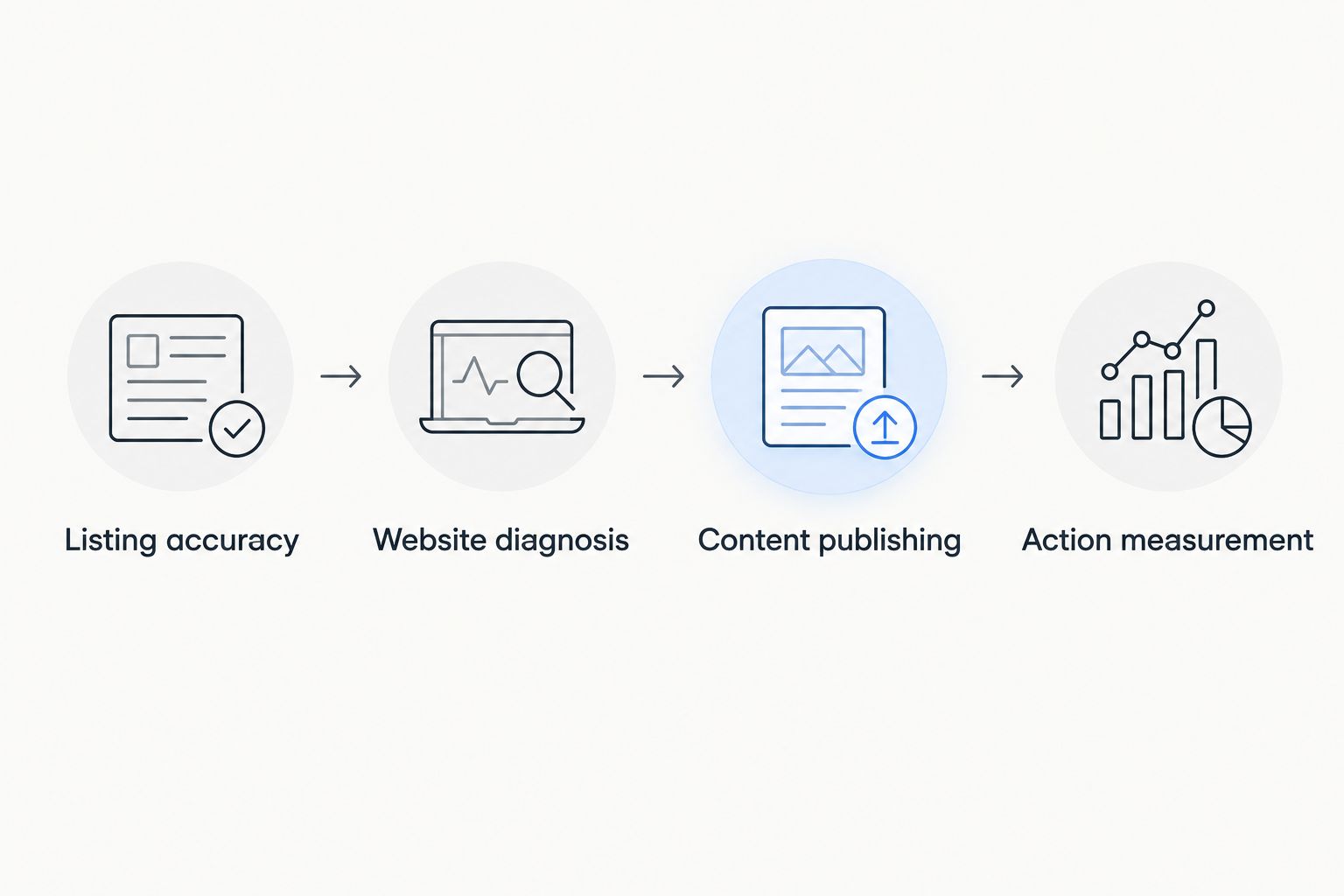
Follow this sequence rather than adopting the entire table at once:
- Listing accuracy: Correct the restaurant's business information.
- Website diagnosis: Inspect important pages and their search visibility.
- Content publishing: Answer relevant questions with verified restaurant details.
- Action measurement: Track supported website interactions and test the setup.
Choose 1 location page per restaurant location as a starting structure, with that location's real address, hours, and useful dining information. Do not create extra neighborhood pages that merely swap place names. A page needs its own purpose and factual content.
FAQ
What's the best local SEO tool for restaurants in 2026?
Google Business Profile is the best starting point for managing a restaurant's presence on Google Search and Maps. Add Google Search Console to diagnose website visibility rather than expecting one tool to handle both jobs.
Which restaurant SEO tool works inside WordPress?
Improveseoplugin supports local keyword discovery, branded content generation, publishing, and scheduling inside WordPress. It fits restaurant owners who need a content workflow, with editorial review before publication.
Is Google Search Console better than Google Business Profile?
Neither replaces the other: Google Search Console diagnoses website search performance, while Google Business Profile manages business information on Google. Choose based on whether the problem concerns your website or your restaurant listing.
Do restaurants need geographic rank tracking?
Geographic rank tracking is useful when you need to compare local visibility across different search locations. BrightLocal supports that task, but you should correct basic business information before adding specialist reporting.
Can Google Analytics track restaurant reservations?
Google Analytics can track configured reservation-related website events. A click to an external booking service is not proof of a completed reservation unless the completion is separately measured.
Should a restaurant publish content automatically?
A restaurant should review generated content before publication. Confirm menu details, opening hours, service claims, and policies so the page describes the actual business.
Do I need every restaurant SEO tool on this list?
No, you need tools for the tasks your current setup cannot complete. Start with business information and website diagnosis, then add publishing, geographic reporting, technical audits, or action measurement when needed.
One last thing
The next useful SEO task is often a customer-information repair, not another article. Open your restaurant's listing and website as a diner would, then follow the path to the menu, directions, and reservation option.
If the information conflicts or a link fails, fix that first. Your tools should help you find and resolve those problems—not distract you from them.


