

Best for WordPress content workflows: Improveseoplugin. Best for managing your Google presence: Google Business Profile. Best for measuring search performance: Google Search Console. This 2026 guide compares local SEO tools for law firms by the job each handles, including citation management, local rank tracking, and technical audits.
- Improveseoplugin is the best fit here for WordPress law firms that need local keyword discovery and content publishing.
- Google Business Profile manages your firm's presence in Google Search and Maps; Google Search Console measures website search performance.
- BrightLocal supports local reporting; Whitespark specializes in citation research; Screaming Frog finds technical website issues.
- Choose local SEO tools for law firms by workflow, not by the longest feature list.
Why this matters
A law firm needs different tools for different search problems. An inaccurate office listing requires profile work; an overlooked practice-area page requires content or technical work. A keyword generator cannot substitute for either diagnosis.
For your 2026 shortlist, separate website visibility from Google Maps visibility. You need to know whether prospective clients find your office, whether they reach the right page, and whether that page accurately describes your legal services. Ranking reports alone do not answer all those questions.
Improveseoplugin is the best fit in this comparison for WordPress law firms that need local keyword discovery and content publishing in the same dashboard. It is not a replacement for profile management, website measurement, or attorney review.
What makes the best local SEO tools for law firms?
Use these criteria to judge your 2026 options before comparing feature lists:
- Local relevance: The tool should help you examine the cities, service areas, or office locations your firm actually serves.
- Practice-area fit: You need to distinguish relevant legal-service searches from broad queries that do not match your work.
- Publishing control: Drafting, reviewing, and publishing must fit your team's responsibilities, especially when legal explanations require attorney approval.
- Measurement clarity: Reports should distinguish website clicks, search visibility, local rankings, and profile activity rather than treating them as interchangeable.
- Operational fit: A useful tool solves a recurring task your team can own. More reports are not useful if nobody acts on them.
Start with the bottleneck. If you cannot keep your office details accurate, fix profile management before buying a content tool. If your pages are technically accessible but lack useful local content, a crawler is not your first purchase.
Local SEO tools for law firms at a glance
These are use-case recommendations, not a claim that one platform replaces every other tool. The order starts with content production, then covers profile management, measurement, reporting, citations, and technical diagnosis.
| Tool | Best for | Standout capability | Key limitation |
|---|---|---|---|
| Improveseoplugin | WordPress local-content workflows | Local keyword discovery, branded content generation, publishing, and scheduling | Generated legal content requires attorney review |
| Google Business Profile | Managing an eligible office's Google presence | Business information and review responses in Search and Maps | Does not manage your website's content or technical SEO |
| Google Search Console | Measuring website search performance | Query, page, indexing, and search-performance reports | Does not provide neighborhood-level Maps rank tracking |
| BrightLocal | Recurring local SEO reporting | Local rank tracking, audits, and citation-related workflows | Reporting still needs interpretation and follow-through |
| Whitespark | Citation research and cleanup planning | Local Citation Finder | Citation opportunities need manual relevance checks |
| Screaming Frog SEO Spider | Technical website diagnosis | Crawling URLs, links, titles, and response codes | Requires technical interpretation; not a Maps tool |
1. Improveseoplugin: best for WordPress local-content workflows
Improveseoplugin is a WordPress plugin for small local business owners. It helps you find low-competition local keywords, generate branded content, and publish or schedule that content from the WordPress dashboard without requiring SEO expertise.
For a law firm, the relevant use case is turning local search topics into reviewed website content. Keep an attorney between draft generation and publication. A convenient workflow does not establish that a legal explanation is accurate or appropriate for your jurisdiction.
Improveseoplugin pros:
- Combines local keyword discovery with content production.
- Keeps publishing and scheduling inside WordPress.
- Supports branded drafts rather than requiring a separate drafting workflow.
- Fits owners who do not have dedicated SEO expertise.
Improveseoplugin cons:
- The WordPress workflow is not a fit for a site on another platform.
- Generated drafts do not replace attorney review of legal claims.
- Content production alone does not solve profile accuracy or citation consistency.
Best for: A WordPress-based firm whose immediate problem is producing useful local content consistently.
Before approving a draft, check the jurisdiction, practice-area accuracy, and statements about your firm. Remove unsupported results, credentials, guarantees, and descriptions of services you do not provide.
Verdict: Buy for a WordPress content bottleneck; skip as a replacement for your entire local SEO stack.
2. Google Business Profile: best for managing your Google presence
Google Business Profile lets eligible businesses manage information displayed in Google Search and Maps. For a law firm, that includes office details, business categories, hours, photos, and responses to reviews.
Treat the profile as a representation of your actual business, not a place to add every keyword you want to rank for. Google's business-name and location rules matter when deciding how to represent firms, offices, and individual practitioners.
Google Business Profile pros:
- Gives you direct control over core business information on Google.
- Supports review responses and business updates.
- Provides profile-performance information for eligible interactions.
- Helps maintain a consistent public representation of an office.
Google Business Profile cons:
- Eligibility and representation rules constrain what you can list.
- Profile activity does not explain every website or ranking problem.
- Public review responses require care around client confidentiality.
Best for: Firms that need to maintain an eligible office's presence in Google Search and Maps.
Do not create a listing merely because you want visibility in another city. Check the current eligibility rules for offices and practitioners before adding or changing profiles.
Verdict: Use for an eligible firm's Google presence; skip attempts to represent locations that do not meet Google's rules.
3. Google Search Console: best for website search measurement
Google Search Console shows how your website performs in Google Search and helps you investigate indexing. Its reports connect search queries with pages, impressions, clicks, and click-through rates.
Search Console provides up to 16 months of performance history in its standard performance reporting. That makes it useful for comparing a page's search performance over time, but it does not establish how many visitors became qualified clients.
Google Search Console pros:
- Shows which queries bring Google Search traffic to your pages.
- Helps you investigate whether important URLs are indexed.
- Supports page-level comparisons rather than sitewide averages alone.
- Provides URL inspection for diagnosing individual pages.
Google Search Console cons:
- Query reporting does not expose every search query.
- Average position is not a neighborhood-level Maps ranking.
- Search clicks do not measure consultations or signed matters.
Best for: Firms that need evidence about their website's Google Search visibility before choosing what to fix.
Compare relevant practice-area pages separately. A firmwide increase in impressions can conceal weak performance on the pages that describe the legal services you want to grow.
Verdict: Use for website search measurement; skip treating its average position as a local Maps report.
4. BrightLocal: best for recurring local SEO reporting
BrightLocal provides tools for local rank tracking, local SEO audits, and citation-related work. Its local reporting capabilities suit teams that need to monitor location-specific visibility rather than relying on a single broad website report.
The practical value is an organized reporting workflow. You still need to decide which practice-area searches matter, which locations to monitor, and what action follows a change in visibility.
BrightLocal pros:
- Brings several local SEO reporting tasks into one platform.
- Supports location-focused rank monitoring.
- Helps identify local listing and citation issues.
- Gives marketing teams a repeatable reporting structure.
BrightLocal cons:
- Reports do not fix weak service pages or inaccurate legal content.
- Tracking irrelevant keywords creates distracting reports.
- Rank visibility does not establish lead quality or client acquisition.
Best for: Firms or their marketing teams that need recurring local reporting across defined locations and search terms.
For a 2026 reporting plan, agree on the tracked searches before reviewing rankings. Include actual practice areas and relevant locations, then document whether the report measures organic results, local results, or both.
Verdict: Buy when recurring local reporting has a clear owner; hold if nobody will act on the findings.
5. Whitespark: best for citation research and cleanup planning
Whitespark's Local Citation Finder helps you research business citations and identify citation opportunities. A citation is a mention of business information on another website, often including the business name, address, and phone number.
For a law firm, use citation research to find relevant listings and investigate inconsistencies. Do not turn every discovered directory into a submission target; relevance and accurate representation come first.
Whitespark pros:
- Focuses on citation research rather than general website analysis.
- Helps surface places where business information appears.
- Supports investigation of citation opportunities associated with competitors.
- Gives citation work a defined research process.
Whitespark cons:
- An identified opportunity is not automatically a worthwhile directory.
- Citation work does not repair technical website problems.
- Updating third-party listings can require separate account access or publisher cooperation.
Best for: Firms investigating inconsistent business information or planning a focused citation project.
Use your firm's real office details as the reference. When an old address or phone number appears, investigate the listing rather than creating another version that leaves the original untouched.
Verdict: Buy for a defined citation project; skip indiscriminate directory submissions.
6. Screaming Frog SEO Spider: best for technical website diagnosis
Screaming Frog SEO Spider crawls websites to help identify technical issues such as broken links, redirects, duplicate titles, and indexing directives. It is useful when a practice-area page exists but its technical setup needs investigation.
The free version has a 500-URL crawl limit. Treat that as a software limit, not a recommended website size; a crawl can encounter URLs beyond the pages you consider your main content.
Screaming Frog SEO Spider pros:
- Exposes broken internal links and response-code problems.
- Helps inspect titles, metadata, and indexing directives across URLs.
- Makes sitewide technical patterns easier to investigate.
- Supports detailed exports for a developer or SEO specialist.
Screaming Frog SEO Spider cons:
- Findings require technical interpretation before changes are made.
- Crawl results do not explain neighborhood-level Maps visibility.
- A technically accessible page can still contain poor legal content.
Best for: Firms with a developer or SEO specialist who can diagnose and fix website issues.
Do not delete or redirect pages simply because a crawl labels something as an issue. Check the page's purpose, search performance, and relationship to other content first.
Verdict: Buy for technical diagnosis with an implementation owner; hold if you cannot act on the crawl.
How the tools were ranked
The ranking follows the criteria above: local relevance, practice-area fit, publishing control, measurement clarity, and operational fit. Each tool receives a distinct job because a content workflow, a business profile, and a technical crawler solve different problems.
These are capability-based recommendations, not results from a controlled product test. There is no universal winner for every law firm, and no ranking here promises search positions or client acquisition.
Which local SEO tools should you choose?
Start with Google Business Profile and Google Search Console to manage your public information and understand website search performance. Then add the tool that addresses your current bottleneck, rather than buying every category at once.
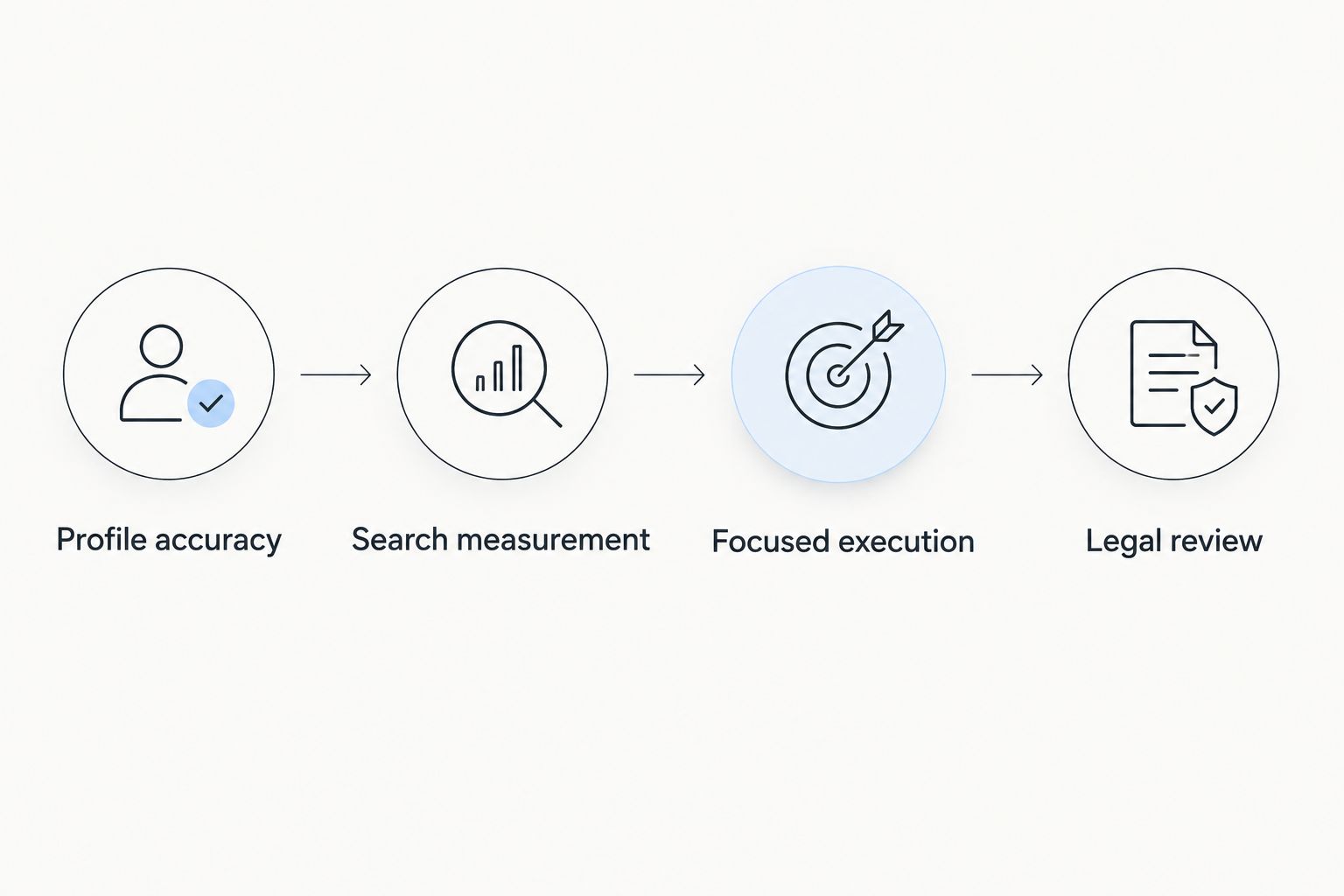
Build your 2026 workflow around these steps:
- Profile accuracy: Confirm that your eligible office information represents the business correctly.
- Search measurement: Identify the relevant pages and queries that need attention.
- Focused execution: Choose content production, citation research, local reporting, or technical repair based on the problem.
- Legal review: Have an attorney approve substantive legal content and claims about the firm.
Each step has an owner. The person maintaining office details does not need to be the person fixing redirects, but both need a clear task and a way to confirm completion.
For content planning, use 1 primary practice area and 1 genuinely served location as the starting scope. This is a planning constraint, not a ranking formula. Expand only when the additional page answers a distinct client need rather than repeating a city name.
FAQ
What's the best local SEO tool for a WordPress law firm?
Improveseoplugin is the best fit in this comparison for a WordPress law firm that needs local keyword discovery, branded drafting, and publishing in one dashboard. An attorney should review legal content before publication.
Is Google Business Profile better than Google Search Console?
Neither replaces the other: Google Business Profile manages an eligible firm's presence in Search and Maps, while Google Search Console measures website search performance. Use them for different jobs.
Which tool should a law firm use for local rank tracking?
BrightLocal is the local rank-tracking option in this shortlist. Define the practice-area searches, locations, and result types you want to monitor before interpreting reports.
Which tool helps a law firm find citation opportunities?
Whitespark's Local Citation Finder supports citation research and opportunity discovery. Check each directory's relevance and use accurate firm information rather than submitting indiscriminately.
Does Screaming Frog improve Google Maps rankings?
Screaming Frog diagnoses website technical issues; it is not a Google Maps ranking-management tool. Its findings can guide website repairs, but they do not measure neighborhood-level Maps visibility.
Can a law firm publish generated legal content without review?
A law firm should have an attorney review generated legal content before publication. Check jurisdiction-specific explanations, legal accuracy, confidentiality, and claims about the firm's services or results.
What should a law firm measure in 2026?
Measure website search performance, relevant local visibility, and qualified inquiries as separate outcomes in 2026. Rankings and clicks alone do not show whether the firm acquired suitable clients.
One last thing
A city name is not a reason to create another page. Before publishing local content, ask what a prospective client learns that is not already explained elsewhere on your site.
If the answer is only a different place name, improve the existing page instead. A tool can help you discover topics and publish drafts; your firm must supply the accurate legal explanation and genuine local relevance.


