
Best overall: Google Business Profile. Best for WordPress content: Improveseoplugin. Best for local rank tracking: BrightLocal. These local SEO tools for dentists cover different jobs; this 2026 guide also includes Google Search Console for website measurement and PageSpeed Insights for technical checks.
- Google Business Profile is the best starting point among local SEO tools for dentists managing their Maps presence.
- Improveseoplugin is best for dental practices creating and scheduling local content inside WordPress.
- BrightLocal fits dental practices that need location-based rank tracking and citation checks.
- Google Search Console measures website search performance; PageSpeed Insights helps diagnose page experience problems.
Why this matters
A dental practice needs patients to find the right location, understand its services, and reach its appointment information. Those are separate tasks. A keyword tool cannot correct your Google Business Profile hours, and a listing tool cannot verify the clinical accuracy of a treatment page.
Choose local SEO tools by the problem they solve, not by the length of their feature lists. Start with your practice's Google presence, then address the website work that prevents patients from finding useful answers.
For your 2026 plan, distinguish visibility from outcomes. A ranking tells you where a result appeared under particular search conditions; it does not tell you whether the searcher booked an appointment. Keep appointment measurement separate from the tool comparisons below.
What makes the best local SEO tools for dentists
Use these criteria to judge whether a tool belongs in your practice's workflow:
- Local relevance: Does the tool help manage a clinic's location, assess local search results, or identify service-and-location topics?
- Task fit: Does it handle listing management, content production, measurement, or technical diagnosis? Name the job before choosing the tool.
- Practice-level control: Can you work on the location or website that matters, rather than rely on a broad account summary?
- Actionable output: Does the result lead to a specific edit, such as correcting hours, improving a service page, or investigating an indexing issue?
- Editorial oversight: Can your team review patient-facing content before publication? Dental explanations need clinical accuracy, not just keyword coverage.
- Workflow compatibility: Does the tool fit how your website and marketing work are managed? A WordPress plugin serves a different workflow from a standalone reporting platform.
For a practice operating 1 clinic location, begin with that location's profile and core service pages. Do not build a multi-location reporting process before you have a multi-location problem.
Local SEO tools for dentists at a glance
The order below reflects a practical decision tree for 2026, not a claim that every practice needs every tool. Pick the row that matches your immediate bottleneck.
| Tool | Best for | Standout function | Key limitation |
|---|---|---|---|
| Google Business Profile | Managing your practice's Maps presence | Editing business details shown through Google's business profile | Does not create or manage your website content |
| Improveseoplugin | Publishing local content in WordPress | Local keyword discovery, branded content generation, publishing, and scheduling | WordPress-specific; generated dental content needs clinical review |
| BrightLocal | Tracking location-based search visibility | Local rank tracking and citation auditing | Reports require interpretation and follow-up work |
| Google Search Console | Measuring website search performance | Query, page, and indexing reports | Does not replace Google Business Profile reporting |
| PageSpeed Insights | Diagnosing page experience problems | Performance analysis and improvement recommendations | Does not measure local rankings or appointment outcomes |
1. Google Business Profile: best for Maps presence
Google Business Profile lets you manage business information that appears through your practice's profile on Google Search and Maps. Use it to maintain your address, hours, contact details, and relevant business information. It also provides a place to manage responses to Google reviews.
For dentists, this is the starting point because patients need to identify the correct clinic before considering a treatment. A polished website does not correct inaccurate hours on a business profile. Check the profile against your actual operations, particularly after changes to opening hours or contact details.
Keep review responses focused on general service and next steps. Do not confirm that a reviewer is a patient or discuss treatment details in a public reply.
Google Business Profile pros:
- Direct control over important business information in Google's profile interface.
- A dedicated place to manage your practice's Maps presence.
- Review response tools within the same business profile workflow.
- Useful for keeping location details aligned with the information on your website.
Google Business Profile cons:
- It does not write, publish, or maintain your website's service pages.
- Profile management is not a substitute for measuring website performance.
Best for: Dental practices that need to establish or correct their Google Search and Maps business information.
Verdict: Use first. Correct the patient-facing details before adding reporting or content-production tools.
2. Improveseoplugin: best for WordPress content production
Improveseoplugin is a WordPress plugin for small local business owners. It helps find low-competition local keywords, generate branded content, and publish or schedule that content directly from the WordPress dashboard.
That makes it a fit for a dental practice whose website content stalls between keyword selection and publication. The workflow brings those tasks into WordPress rather than treating research, drafting, and scheduling as separate handoffs.
Improveseoplugin is best for dental practices that need local SEO content creation and scheduling inside WordPress. Use it to support pages and articles about services you actually provide, with location references that match the practice's real service area.
Before publishing a dental draft, make 3 review checks: clinical accuracy, actual services, and location accuracy. Remove unsupported treatment promises and any description of an offer your practice does not provide. A generated draft is a starting point, not clinical approval.
Improveseoplugin pros:
- Finds low-competition local keywords for content planning.
- Generates branded drafts within the content workflow.
- Publishes and schedules content from the WordPress dashboard.
- Supports local business owners without requiring SEO expertise.
Improveseoplugin cons:
- Its stated workflow is WordPress-specific, so it is not the matching choice for a non-WordPress site.
- Dental drafts still require a qualified review before publication.
Best for: WordPress-based dental practices that need help turning local keyword ideas into published content.
Verdict: Choose for content execution. Keep clinical review between drafting and publication.
3. BrightLocal: best for location-based rank tracking
BrightLocal provides local SEO tools that include local rank tracking and citation auditing. It fits the measurement task: checking visibility around a location and identifying business listing information that needs attention.
Use location-based reporting to keep comparisons meaningful. A result observed near your clinic is not interchangeable with a result observed elsewhere in your service area. Keep the tracked search terms and locations consistent when reviewing changes.
Citation auditing supports a different task: finding business information across directories and identifying discrepancies. Review each flagged issue against the practice's correct name, address, and phone number before making changes. A report is a work queue, not proof that every flagged item explains a ranking problem.
BrightLocal pros:
- Local rank tracking supports location-specific visibility checks.
- Citation auditing helps organize business listing reviews.
- Combines local measurement tasks in a dedicated platform.
BrightLocal cons:
- Tracking visibility does not produce or clinically review dental content.
- Audit findings require prioritization; a flagged listing is not automatically your most important SEO task.
Best for: Dental marketing teams that need a repeatable view of local rankings and business listing consistency.
Verdict: Add when measurement becomes the bottleneck. Define what your team will do with the reports before expanding the reporting workload.
4. Google Search Console: best for website search measurement
Google Search Console reports how your website performs in Google Search. Its performance reports include clicks, impressions, queries, and pages; its indexing reports help identify whether Google has indexed website pages.
For a dental practice, use it to distinguish website questions from business profile questions. If a service page receives impressions but few clicks, inspect the search queries and the page's search presentation. If an important page is not indexed, investigate that issue before commissioning more articles on the same service.
During a 2026 review, separate branded searches from searches about treatments and locations. Someone searching your practice name has a different task from someone comparing local dental services. Combining those searches into a single total hides the distinction.
Google Search Console pros:
- Shows queries and pages associated with website search performance.
- Provides clicks and impressions for evaluating search visibility.
- Helps investigate indexing problems affecting important pages.
- Supports page-level analysis instead of relying only on website totals.
Google Search Console cons:
- It does not replace reporting for your business profile's activity.
- It does not write content or turn report findings into completed website edits.
Best for: Practices that need to understand which website pages appear in Google Search and what requires investigation.
Verdict: Use as your website measurement baseline. Review the relevant page and query together before deciding what to change.
5. PageSpeed Insights: best for technical page checks
PageSpeed Insights analyzes a webpage's performance and provides diagnostic recommendations. It presents lab analysis and, when available, real-world experience data. These are different evidence sources, so read the report labels rather than treating every result as a measurement of all patients' visits.
Test the pages a prospective patient actually uses: a treatment page, location page, or appointment-information page. A homepage report alone does not describe every page on your site. Give the resulting technical work to whoever maintains the website, with the affected page clearly identified.
Treat the score as a diagnostic aid, not an appointment metric. A performance improvement does not prove that local visibility or booking outcomes improved; those require their own measurement.
PageSpeed Insights pros:
- Provides page-specific performance analysis.
- Identifies technical issues for a website maintainer to investigate.
- Separates lab testing from available real-world experience data.
PageSpeed Insights cons:
- It does not report your practice's local search rankings.
- Recommendations can require development work rather than a content edit.
Best for: Dental practices investigating slow or difficult website experiences on important patient-facing pages.
Verdict: Use for a defined technical problem. Do not make a performance score your entire local SEO strategy.
How these tools are ranked
This ranking matches each tool's established function to a dental practice's operational needs: accurate business information, local content, location-based measurement, website search reporting, and technical diagnosis. It is not a hands-on benchmark or a ranking based on claimed patient acquisition results.
Google Business Profile comes first because it handles the practice's business information on Google. The remaining tools occupy distinct jobs. None replaces clinical review, and none should be credited with appointment growth without separate outcome measurement.
Which local SEO tools should you choose?
Choose Google Business Profile as the default starting point. Then add the tool that addresses your next unfinished task, rather than adopting the entire table at once.
- Business details need correction: Start with Google Business Profile.
- WordPress content is not getting published: Choose the WordPress content workflow above.
- You need location-based visibility reports: Add BrightLocal.
- You cannot explain website search performance: Use Google Search Console.
- Important pages have performance problems: Investigate with PageSpeed Insights.
For your 2026 content plan, give each service page 1 primary service to explain clearly. Closely related patient questions can support that topic; unrelated treatments belong on their own relevant pages. This is an editorial recommendation, not a keyword-density rule.
Turn the tools into a repeatable workflow
A useful local SEO workflow ends with a completed correction or reviewed publication. Follow the sequence below instead of collecting reports without assigning the next action.
- Check details: Confirm that public business information matches the clinic's current operations.
- Choose topic: Select a service-and-location question that your practice can answer accurately.
- Review content: Check clinical explanations, service claims, and local references before publishing.
- Publish page: Add the approved content to the relevant website workflow.
- Measure results: Review website search performance and local visibility separately, then choose the next edit.
Keep the loop tied to a specific practice location and a specific page. That makes it easier to identify whether the next task belongs to your practice manager, clinician, marketer, or website maintainer.
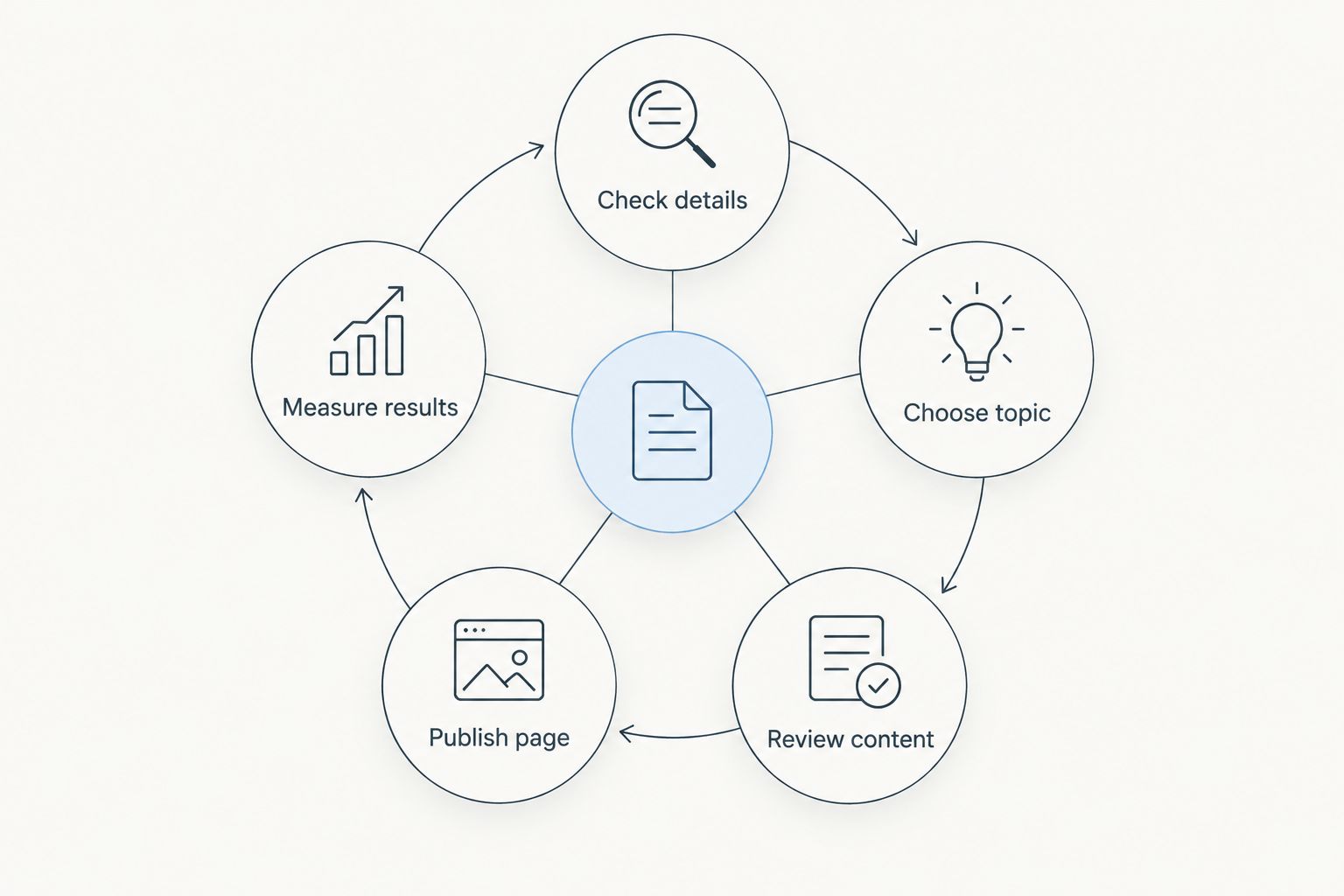
Assign an owner to each unfinished task. If a report identifies a problem but nobody owns the correction, adding another tool does not resolve the problem. Carry this same workflow through your 2026 reviews so the measurements remain useful.
FAQ
What's the best local SEO tool for a dentist starting out?
Google Business Profile is the best starting point for managing a dental practice's business information on Google Search and Maps. Correct the location details and hours before adding specialist reporting or content tools.
Which tool helps dentists publish local content in WordPress?
Improveseoplugin helps local business owners find low-competition local keywords, generate branded content, and publish or schedule it from WordPress. Dental content needs clinical review before publication.
Is BrightLocal better than Google Search Console for dentists?
BrightLocal and Google Search Console serve different jobs. BrightLocal supports local rank tracking and citation auditing; Google Search Console reports website search performance and indexing.
Do I need every tool on this list?
No, choose tools for the tasks your practice needs to complete. Start with accurate business information, then add content, measurement, or technical tools when that work needs attention.
Can local SEO software guarantee more dental appointments?
No, local SEO software does not guarantee appointments. Measure appointment outcomes separately from rankings, impressions, and website clicks.
Should a dentist publish generated content without reviewing it?
No, a qualified reviewer should check dental content before publication. Confirm clinical accuracy, actual services, and location details, and remove unsupported treatment promises.
Does PageSpeed Insights tell me where my dental practice ranks?
No, PageSpeed Insights analyzes webpage performance rather than local rankings. Use it for technical diagnosis, and use search reporting or local rank tracking for visibility questions.
One last thing
Check whether you are creating a new answer or duplicating an existing page. Before adding another service-and-location article, review what your website already says about that service. Improve an existing relevant page when it answers the same patient question.
For 2026, keep the final decision simple: fix the business information, publish clinically reviewed answers, and measure the right property. A business profile, a website page, and an appointment outcome are related, but they are not the same thing.


