

Best overall for a small local business with a WordPress site: Improve SEO. Best for checking geographic search demand: Google Keyword Planner. Best for comparing regional interest: Google Trends. Best for finding opportunities in searches your site already receives: Google Search Console. This guide compares local keyword research tools by the job each one does in 2026, not by the length of its feature list.
- Improve SEO is the best fit among these local keyword research tools for a small local business publishing through WordPress.
- Google Keyword Planner helps check demand in a selected location, but its estimates do not measure organic ranking difficulty.
- Google Trends compares relative regional interest; Google Search Console shows searches tied to your existing site.
- Choose the tool that answers your next decision: what to write, where demand exists, or what already gets impressions.
Why this matters
A local keyword is useful only if it connects a service, a place and the searcher's intent. Someone looking for a service in their area needs a different page from someone researching how that service works. A tool that produces a long list of phrases has not finished the job if you still cannot decide what to publish.
That distinction shapes this 2026 ranking. Some tools help you discover topics. Others help you check whether interest differs by location or see which queries already bring your site into search results. None of those views, on its own, tells you that a particular page will rank.
For a small business owner, the practical question is narrower: Which tool gets you from a plausible local search to a useful page without adding work you cannot maintain? The answer depends on whether you need new ideas, geographic context or evidence from your existing site.
What makes the best local keyword research tools
Use these criteria before comparing features. They separate a workable local content process from a collection of keyword lists.
- Local fit: Can you focus on a relevant place, or at least distinguish local intent from a general question? A city name alone does not prove that every searcher wants a local provider.
- Topic discovery: Does the tool help you find questions and service terms you have not covered? Existing-site data is useful, but it cannot show every topic your site has never appeared for.
- Decision value: Can you tell whether a phrase deserves a dedicated page, belongs on an existing page or should be set aside? Treat every metric as evidence for a decision, not the decision itself.
- Publishing handoff: How much work sits between choosing a term and publishing a useful page? This matters when the person researching keywords also runs the business.
- Evidence limits: Is it clear what the tool measures? Relative interest, advertising-oriented estimates and your own search impressions answer different questions.
For this ranking, local fit and the publishing handoff carry the most weight for a WordPress-based small business. If your immediate task is to check regional demand or improve an existing page, the specialized tools below take priority instead.
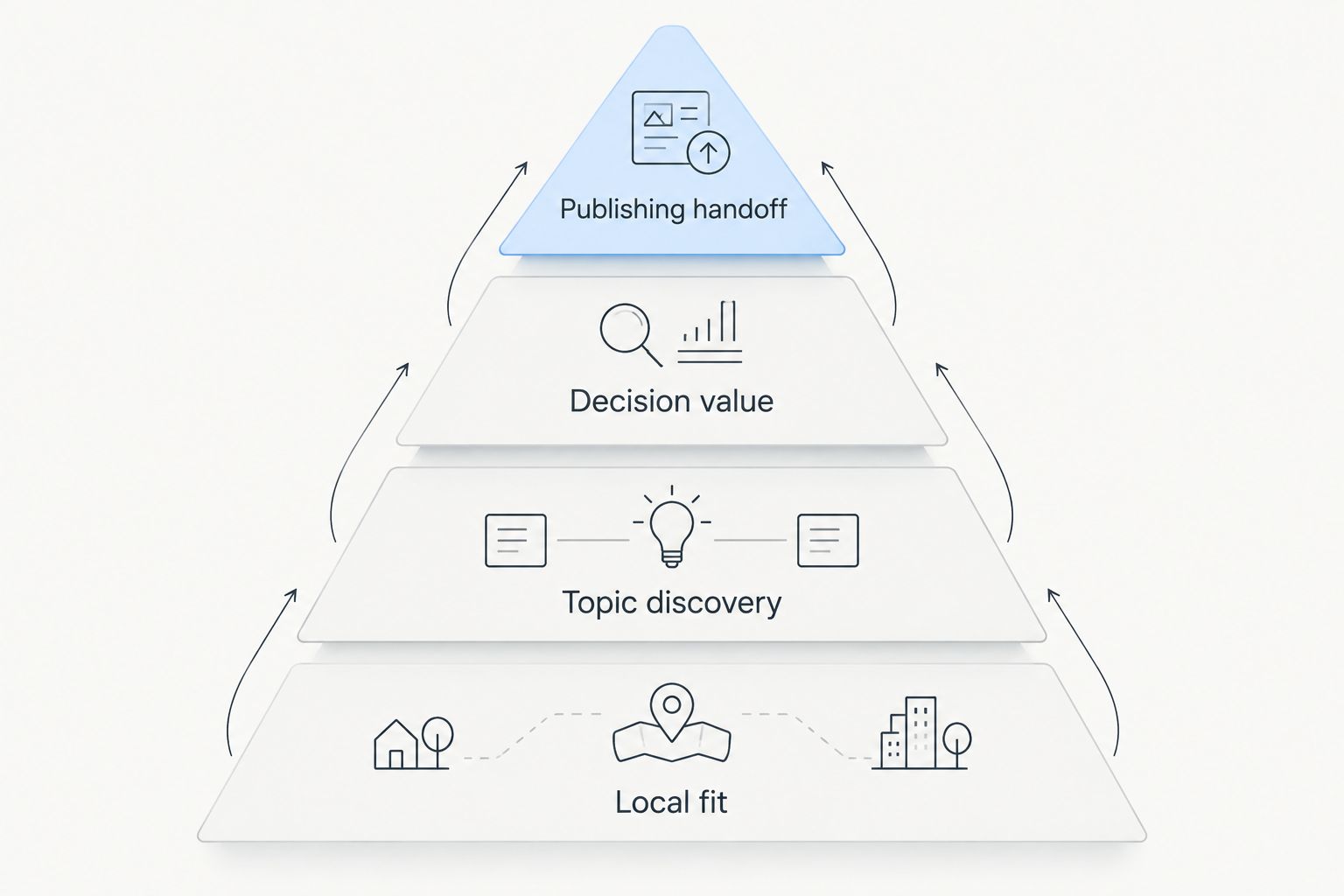
Local keyword research tools at a glance
| Tool | Best for | Standout capability | Key limitation |
|---|---|---|---|
| Improve SEO | Small local businesses publishing on WordPress | Finds low-competition local keywords and connects them to content creation and publishing | Its WordPress workflow is not a fit for a site managed outside WordPress |
| Google Keyword Planner | Checking demand in a selected location | Location settings for keyword planning | Advertising-oriented estimates do not tell you whether your page can rank organically |
| Google Trends | Comparing interest across regions or topics | Relative search-interest comparisons | Relative interest is not a count of searches |
| Google Search Console | Improving pages that already appear in Google Search | Query and page performance for your verified site | It cannot show performance for a page you have not published |
The table is a decision tree, not a claim that every tool does the same job. In 2026, pick the row that matches the question in front of you, then use another tool only when it adds evidence you need.
1. Improve SEO: best local keyword research tool for WordPress publishing
Improve SEO is a WordPress plugin for small local business owners. It helps them find low-competition local keywords, generate branded content, and publish and schedule it from the WordPress dashboard. That makes it the strongest fit here when keyword research is supposed to lead directly to a page, not another spreadsheet.
The advantage is the handoff. Finding a phrase such as a service paired with a town is only the start; you still need to decide what the page should answer and get it published. Keeping those tasks in the WordPress workflow removes a separate transfer step for an owner who manages their own site.
Improve SEO pros:
- Focuses keyword discovery on low-competition local terms rather than treating every broad phrase as equally useful.
- Connects research with branded content creation, so a chosen topic has a path to a draft.
- Supports publishing and scheduling from the WordPress dashboard.
- Fits an owner who needs to handle content without SEO expertise.
Improve SEO cons:
- The WordPress-centered workflow does not solve publishing for a site managed on another platform.
- A low-competition keyword is a starting point, not proof that the resulting page will rank.
- Generated content still needs a business-owner check for service details, locations served and accuracy before publication.
Best for: A small local business owner who publishes through WordPress and wants keyword selection tied to content production.
Verdict: Buy for the WordPress publishing workflow. Hold if you only need to inspect regional interest and have no plan to create a page. In 2026, its main distinction from the other entries is not a bigger keyword list; it is the connection between finding a local topic and publishing content about it.
How to use the result
Start with a service the business actually provides, then identify the location the page genuinely serves. Review the suggested keyword against that service and location before making it a page topic. A phrase is not suitable just because it looks attainable: the page must be able to answer the search honestly.
Before publishing, check the draft for claims that only the business can verify. Replace generic service descriptions with accurate information about what the business does, and remove locations it does not serve. This editorial step matters more than fitting an extra place name into a heading.
2. Google Keyword Planner: best for checking geographic demand
Google Keyword Planner is a keyword-planning tool within Google Ads. Its location settings let you examine keyword ideas and search-demand estimates for a selected area. Use it when your question is whether a term has search activity in a relevant market, not whether your site can win an organic result.
That difference matters for local SEO. Advertising competition describes an advertising market; it is not an organic difficulty score. A term with demand can still be a poor page target if the search intent does not match your service, or if an existing page already answers it.
Google Keyword Planner pros:
- Lets you set a location while researching terms.
- Provides keyword ideas that can expose alternative ways people describe a service.
- Helps compare demand signals before choosing which topics deserve a closer look.
Google Keyword Planner cons:
- Its planning data is built for advertising decisions, so it does not establish organic ranking potential.
- A geographic setting cannot confirm that every suggested term has local buying intent.
- It does not create or publish the page that follows your research.
Best for: A marketer checking whether proposed service terms have demand in a chosen area.
Verdict: Hold as a standalone local SEO workflow; use it for the geographic demand check. In 2026, a demand estimate is evidence that people search, not an instruction to create a separate page for every variation.
How to use the result
Enter the service term, set the relevant geography and inspect related phrases. Group terms by intent rather than making a page for each wording change. If two phrases would require the same answer from the business, they generally belong in the same page plan.
Next, check whether the business serves the selected area and whether the query calls for a provider, an explanation or a comparison. That check prevents a demand signal from turning into a page that answers the wrong question.
3. Google Trends: best for comparing regional interest
Google Trends displays relative search interest, including comparisons by region and over time. It is useful when you want to see whether interest in a topic differs across places or whether two ways of describing a service follow different patterns. It is not a substitute for a search-volume count.
A relative chart answers a comparative question. It does not tell you how many customers are available, whether a specific business is eligible to serve a region or how difficult a page will be to rank. Read the chart alongside the service area and the actual words customers use.
Google Trends pros:
- Makes regional differences easier to inspect.
- Lets you compare search terms and topics over time.
- Helps distinguish a temporary interest pattern from a topic that appears across a longer period.
Google Trends cons:
- Relative interest is not an absolute measure of search demand.
- A small or narrowly defined local query may not produce a useful comparison.
- It does not show whether your own site appears for the searches you inspect.
Best for: A business comparing terminology or interest patterns across places it actually serves.
Verdict: Hold as your primary keyword tool; use it when a regional comparison changes a content decision. In 2026, do not choose a page topic solely because one line on a chart sits above another.
How to use the result
Compare terms that mean something different to a customer, not merely two spellings of the same phrase. Then ask whether the difference changes your page: its service wording, the examples it includes or the location it addresses. If the answer is no, the chart has not supplied a reason to publish another page.
Treat an unexpected regional result as a prompt to inspect the search results and your own service offering. Search interest alone cannot validate a service page for a place the business does not cover.
4. Google Search Console: best for improving existing search pages
Google Search Console shows how your verified site performs in Google Search, including the queries and pages associated with search appearances and clicks. This makes it the clearest choice here when the next move is to improve something already published. Its evidence comes from your site, not a category-wide keyword list.
Look for a relevant query tied to an existing page, then inspect whether the page answers that query directly. A mismatch can point to a better heading, a clearer explanation or a missing section. It does not automatically justify a new page.
Google Search Console pros:
- Connects search queries to pages on your own site.
- Separates a question about an existing page from a speculative new-topic idea.
- Lets you check whether edits change that page's search performance over time.
Google Search Console cons:
- It cannot report search performance for content that has not been published.
- Its query data reflects your site's visibility, not every search in your market.
- It does not write or publish an improved page for you.
Best for: A site owner deciding which existing page to update next.
Verdict: Hold as a discovery tool for entirely new topics; use it first for existing-page decisions. For a WordPress business in 2026, this is a useful check before creating another page: the answer might belong on one you already have.
How to use the result
Choose a page, inspect its relevant queries and read the page as a customer would. If the query describes a service the page already covers, strengthen the answer there. If it describes a genuinely different need, plan a separate page only when the business can give that need a distinct, accurate answer.
Do not treat an impression as a customer inquiry. Search Console measures search performance; the business decision still requires a page that matches the query and a service you actually provide.
How we ranked these tools
The ranking follows the criteria above: local fit, topic discovery, decision value, publishing handoff and evidence limits. Improve SEO comes first for the stated reader because the WordPress owner needs a route from a low-competition local keyword to published content. The Google tools follow by the distinct questions they answer: demand in a selected location, relative regional interest and performance of existing pages.
This is a fit-based ranking, not a benchmark test or a claim that one tool has more accurate data than the others. If you already have pages to improve, Google Search Console is the better first stop. If you are deciding between regional terms, Google Trends or Google Keyword Planner provides context that an existing-page report cannot.
Which local keyword research tool should you choose?
Choose Improve SEO if you run a small local business on WordPress and need to turn keyword research into published content. Choose Google Keyword Planner for a geographic demand check, Google Trends for a regional comparison and Google Search Console for a decision about a page already in search results.
Do not turn the ranking into a requirement to use every tool. Start with the decision that is blocking you. If the problem is finding and publishing a suitable topic, use the WordPress workflow. If the problem is understanding an existing page, start with that page's own search data.
FAQ
What is the best local keyword research tool for a small business on WordPress?
Improve SEO is the best fit in this comparison for a small local business that wants to find low-competition local keywords and publish content through WordPress. Check each suggested topic against the services and places the business actually covers.
Is Google Keyword Planner an organic keyword difficulty tool?
No. Google Keyword Planner supports advertising-focused keyword planning and geographic demand checks; its advertising signals do not establish how hard an organic page will be to rank.
Does Google Trends show local search volume?
No. Google Trends shows relative search interest, which helps compare terms, regions and patterns over time. It is not a count of searches for a local service.
Can Google Search Console find keywords for a page I have not published?
Not through that page's performance report. Google Search Console shows queries associated with your site's existing search appearances, so use it to inspect published pages rather than treat it as a complete list of new topics.
Should every city keyword get its own page?
No. Create a distinct page only when the business serves that place and can give searchers a distinct, useful answer. Different city wording alone does not make duplicated content useful.
Which tool should I use to update an existing service page?
Start with Google Search Console to see the queries associated with that page in Google Search. Read the page against those queries, then improve the answer where it is incomplete or unclear.
Can one local keyword research tool cover every decision?
No single tool in this comparison answers every question in the same way. Choose based on the task: publishing a new WordPress page, checking geographic demand, comparing regional interest or improving an existing page.
One last thing
The easiest 2026 keyword mistake is treating a new phrase as a reason for a new page. Check whether an existing page can answer it first. That decision keeps local content focused on the customer's question instead of producing several pages that say the same thing.


