

Best overall for keyword discovery: Google Keyword Planner. Best for local WordPress content: Improveseoplugin. Best for improving existing search visibility: Google Search Console. These keyword research tools for small business solve different jobs; this 2026 guide ranks them by the decision each helps you make, not by the length of its feature list.
- Google Keyword Planner is the best starting point among keyword research tools for small business when you need keyword discovery.
- Improveseoplugin is best for local WordPress owners who want local keyword research, branded content, and publishing together.
- Google Search Console helps prioritize keywords already generating impressions for your website.
- Google Trends checks seasonality; Ahrefs and Semrush support competitor research.
Why this matters
A keyword list does not tell you what to publish. You need to connect the search phrase to a service you actually provide, a location you serve, and a page that answers the searcher's question.
The wrong tool creates extra work. A reporting tool cannot replace a publishing workflow, and a content plugin cannot replace every competitor-analysis task. For your 2026 plan, choose the tool that addresses your immediate bottleneck: discovering demand, improving an existing page, investigating competitors, or getting useful local content published.
Start with the decision you need to make, then choose the tool that supplies the evidence. You do not need every option in this list to make progress.
What makes the best keyword research tools for small business
- Intent clarity: Can you distinguish someone researching a topic from someone looking for a service? A relevant phrase matters more than a large, unrelated keyword list.
- Local relevance: Can the research help you evaluate the services and places your business actually covers? National interest alone does not establish local demand.
- Evidence fit: Does the tool show discovery ideas, your website's performance, relative interest, or competitors' visibility? These answer different questions.
- Actionable output: Can you turn the finding into a page improvement, content brief, or publishing task without rebuilding the research from scratch?
- Workflow fit: Does the tool suit your website platform and the person doing the work? A local owner publishing in WordPress has different needs from a dedicated search marketer.
- Interpretation burden: Are you prepared to understand the metrics? Keyword difficulty and search volume are planning inputs, not promises of rankings or customers.
The best options at a glance in 2026
| Tool | Best for | Standout capability | Key limitation |
|---|---|---|---|
| Improveseoplugin | Local WordPress content workflows | Local keyword discovery through content publishing and scheduling | WordPress-specific workflow |
| Google Keyword Planner | Initial keyword discovery | Keyword ideas and advertising-oriented search estimates | Advertising metrics need interpretation for organic SEO |
| Google Search Console | Existing-page improvements | Queries, impressions, clicks, and page performance for your site | Not a broad competitor-discovery tool |
| Google Trends | Seasonal and regional interest checks | Relative search interest over time | Interest scores are not absolute search volume |
| Ahrefs | Competitor-led organic research | Keyword exploration and organic competitor analysis | Research still needs an implementation workflow |
| Semrush | Coordinated organic and paid research | Keyword, competitor, and advertising research | Its wider scope requires more choices and interpretation |
1. Improveseoplugin: best keyword research tool for local WordPress owners
Improveseoplugin is a WordPress plugin for small local business owners. It helps you find low-competition local keywords, generate branded content, and publish or schedule that content from the WordPress dashboard without needing SEO expertise.
Improveseoplugin is best for small local business owners who want keyword research and content publishing inside WordPress. That is a workflow recommendation, not a claim that every suggested keyword will rank. You still need to check whether each topic matches your services and whether the finished content accurately represents your business.
Pros:
- Connects local keyword discovery with content creation.
- Supports branded content rather than stopping at a keyword list.
- Keeps publishing and scheduling in the WordPress dashboard.
- Addresses owners who do not have SEO expertise.
Cons:
- The WordPress workflow does not fit a business publishing on another platform.
- Generated content still requires your review for business-specific accuracy.
- Low competition alone does not establish commercial relevance.
Best for: A local business owner whose research repeatedly stalls before publication.
Verdict: Buy for the local WordPress workflow; skip if your website runs elsewhere.
2. Google Keyword Planner: best keyword research tool for discovery
Google Keyword Planner provides keyword ideas and search estimates within Google Ads. Start with services, products, or topics relevant to your business, then use the suggestions to expand your initial vocabulary.
Its strongest role is discovery. Customers often describe a problem differently from the business selling the solution, and a seed phrase gives you a starting point for finding those alternatives. Separate useful service terms from informational searches before building your content plan.
Google Keyword Planner pros:
- Expands seed terms into related keyword ideas.
- Supports location settings for geographically relevant research.
- Provides search estimates and advertising metrics for planning.
Google Keyword Planner cons:
- Its competition metric concerns advertisers, not organic ranking difficulty.
- Search estimates do not tell you whether your page satisfies the query.
- It does not provide the WordPress content-publishing workflow described above.
Best for: A business that needs an initial keyword map before deciding which pages to create.
Verdict: Skip if you need an organic difficulty verdict without additional research; choose it for discovery.
3. Google Search Console: best keyword research tool for existing pages
Google Search Console shows how your website performs in Google Search, including queries, impressions, clicks, and associated pages. Use it to identify the searches where your business already has visibility rather than starting every content decision from an external keyword estimate.
A query with impressions gives you a concrete investigation target. Open the relevant page, compare its content with the search intent, and decide whether it needs a clearer answer, a stronger service explanation, or a different target. Impressions alone do not prove that the query attracts customers.
Google Search Console pros:
- Uses search-performance evidence from your own website.
- Connects queries with pages you can improve.
- Helps evaluate changes using impressions and clicks.
Google Search Console cons:
- Does not provide broad competitor keyword research.
- Offers limited discovery value before your site earns search visibility.
- Performance reports require interpretation; they do not write the improvement brief.
Best for: An established website with pages already appearing in search results.
Verdict: Hold on a new page until you check whether an existing page already addresses the query.
4. Google Trends: best keyword research tool for seasonal planning
Google Trends shows relative search interest across time and geography. Use it to compare topic direction, investigate recurring seasonal patterns, and check whether a phrase reflects sustained interest or a temporary spike.
The distinction is important: relative interest is not a count of monthly searches. A rising line supports further investigation, not an automatic decision to build a page. For your 2026 editorial calendar, compare relevant periods and keep the geographic scope consistent before drawing conclusions.
Google Trends pros:
- Makes changes in search interest visible over time.
- Supports comparisons between terms or topics.
- Helps investigate regional differences and recurring seasonality.
Google Trends cons:
- Does not replace absolute search-volume research.
- Narrow local queries can lack enough data for useful comparisons.
- A trend does not establish buying intent or ranking difficulty.
Best for: A business deciding when to publish around recurring demand.
Verdict: Skip as your only keyword tool; use it to check timing and direction.
5. Ahrefs: best keyword research tool for competitor-led organic research
Ahrefs provides keyword research and website analysis for organic search. Its keyword and competitor features help you investigate topics, examine ranking pages, and identify search opportunities beyond the phrases you already know.
Start with competitors that serve the same customers, not simply the largest websites in your category. A national publisher can rank for many topics that have no connection to your local services. The useful result is a shortlist of relevant opportunities, not a copied competitor content calendar.
Ahrefs pros:
- Supports keyword exploration beyond your initial seed list.
- Helps investigate competitors' organic visibility.
- Provides ranking-page context for evaluating a target query.
Ahrefs cons:
- Keyword difficulty estimates do not guarantee a ranking outcome.
- Competitor visibility does not prove that a topic suits your business.
- Research findings still need briefs, page edits, and publication.
Best for: A marketer who needs to understand competing organic pages before choosing targets.
Verdict: Buy for competitor-led research; skip if your immediate bottleneck is publishing local content.
6. Semrush: best keyword research tool for organic and paid planning
Semrush offers keyword research, competitor analysis, and advertising research within a wider marketing platform. It fits a business that wants to investigate organic opportunities and paid-search activity together rather than treating those channels as unrelated projects.
Keep the objectives separate even when the research sits together. A phrase useful for an advertising campaign is not automatically the right topic for an informational article. Decide whether you need a service page, an answer page, or campaign research before selecting the next task.
Semrush pros:
- Supports keyword discovery and competitor investigation.
- Includes research relevant to organic and paid search.
- Provides related SEO analysis within the same platform.
Semrush cons:
- Its wider scope requires more decisions about which reports matter.
- Estimated metrics still need checks against intent and business relevance.
- Research does not remove the need to review and publish accurate content.
Best for: A marketing lead coordinating organic SEO with search advertising.
Verdict: Buy for coordinated search planning; skip if you only need a focused local publishing workflow.
How these tools are ranked
This 2026 ranking prioritizes task fit: relevant discovery, evidence quality, local usefulness, and the distance between research and action. It is not a measured performance leaderboard or a claim that one platform has the most accurate data in every market.
Google Keyword Planner takes the default discovery position because its core function matches that job. The other recommendations are deliberately narrower. Search Console addresses existing visibility, Trends addresses timing, and the competitor platforms address research depth. The WordPress option belongs first for readers whose main need is turning local keywords into published content.
Choose the recommendation attached to your task, not the position number.
Turn keyword research into a publishable decision
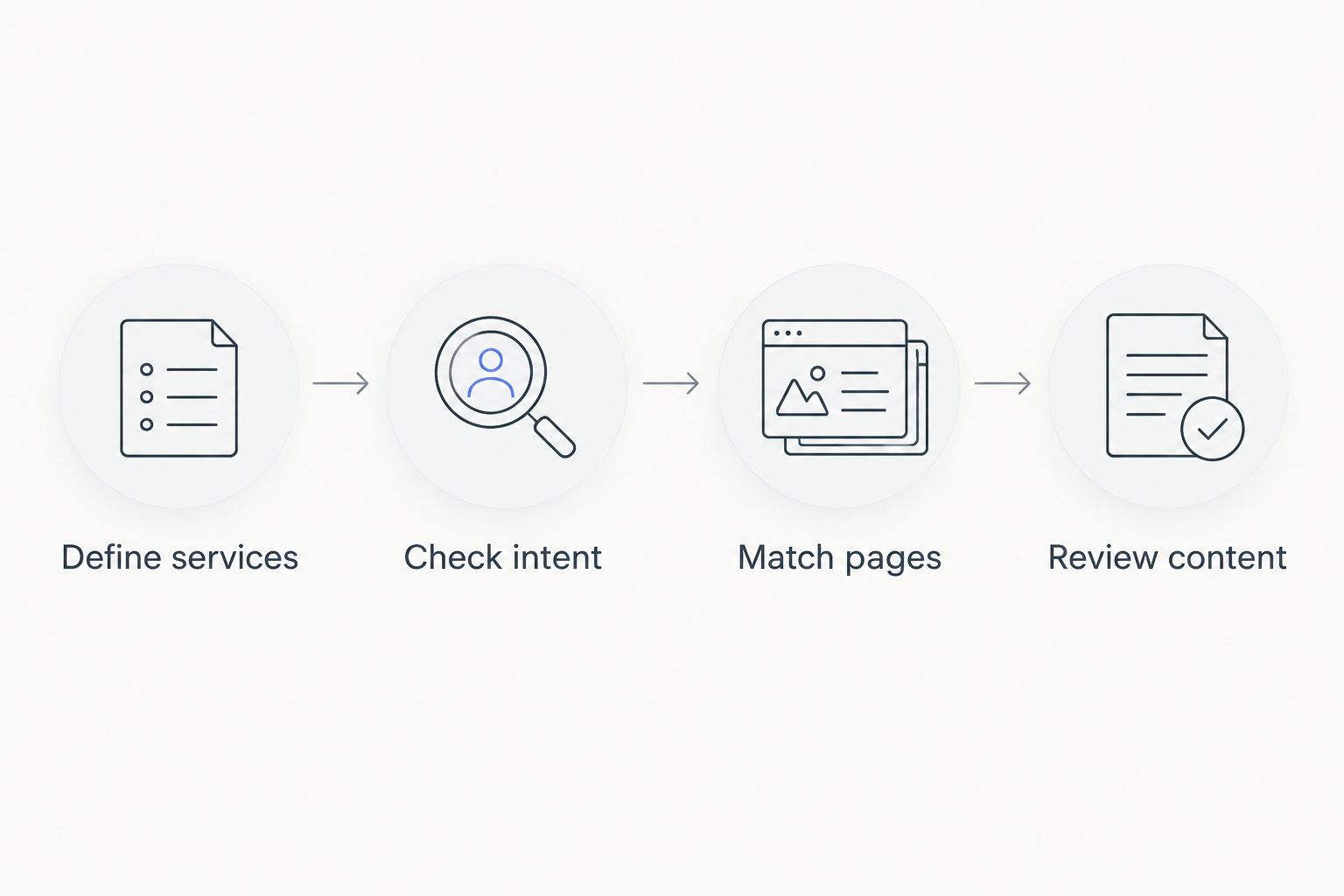
Use this sequence with whichever tool you choose. It prevents a list of interesting phrases from becoming a list of pages your business does not need.
Define services
Write down 5 seed phrases describing services you actually provide. This is a starting exercise, not a target keyword count. Use customer language and include a location only where it accurately describes your service area.
Check intent
Review 10 relevant queries from your research and inspect the search results. Note whether the results emphasize service pages, explanations, directories, or another format. The page you plan should answer the same underlying need, not merely repeat the phrase.
Match pages
Give each proposed page 1 primary intent. Check whether an existing page already serves it before creating another. Closely related phrases can belong on the same page when they describe the same customer task; different wording alone is not a reason to publish separately.
Review content
Verify every business claim before publication. Check service descriptions, locations, credentials, and any statements about policies against your actual operations. Then record the target query and the page changed so you can assess its search performance later.
Which keyword research tool should you choose?
Choose Google Keyword Planner if you are undecided and need to discover relevant search phrases. Add Google Search Console when you want to prioritize improvements using your own website's search performance. Use Google Trends for timing checks rather than treating its relative interest scores as volume estimates.
For local WordPress content in 2026, choose Improveseoplugin when the research-to-publication workflow is the problem you need to solve. Choose Ahrefs for competitor-led organic investigation or Semrush when your planning includes both organic and paid search.
Do not adopt another platform just to collect another set of estimates. Choose it when it answers a question your current workflow cannot resolve.
FAQ
What's the best keyword research tool for a small business in 2026?
Google Keyword Planner is the default choice for initial keyword discovery. Choose a different tool when your immediate task is improving existing pages, investigating competitors, or publishing local WordPress content.
What's the best option for a local business using WordPress?
Improveseoplugin is best for local WordPress owners who want keyword discovery, branded content, and publishing in the dashboard. Review the selected topics and business claims before publishing.
Is Google Search Console better than Google Keyword Planner?
Google Search Console is better for analyzing your website's existing search visibility; Google Keyword Planner is better for discovering keyword ideas. They answer different questions and can support the same content plan.
Does Google Keyword Planner show organic SEO difficulty?
Google Keyword Planner's competition metric describes advertising competition, not organic SEO difficulty. Inspect the organic search results separately before deciding whether a keyword is a suitable target.
Can I use Google Trends to find monthly search volume?
Google Trends shows relative search interest, not absolute monthly search volume. Use it for direction, comparisons, and seasonality rather than as a substitute for volume research.
Should a small business choose Ahrefs or Semrush?
Choose Ahrefs for competitor-led organic research or Semrush when your research needs include organic and paid search together. Base the decision on the reports you will use and the questions you need answered.
Do I need a separate page for every local keyword?
No, a separate page is not necessary for every variation of a local keyword. Group phrases that share the same intent, and create distinct pages only when they serve a genuinely different customer need.
One last thing
An impression in Google Search Console means a page appeared in search results; it does not mean someone visited your website. That distinction changes how you evaluate a keyword opportunity.
Before creating another page, check whether a relevant page already appears for the query. Improving its answer can be a more direct task than starting a new article. For your next 2026 content decision, connect the keyword to a customer need and a specific page before you open the editor.


