
Best overall: Google Business Profile. Best for local SEO reporting: BrightLocal. Best for citation research: Whitespark Local Citation Finder. This 2026 guide compares google business profile optimization tools by the work they handle, including Improveseoplugin for supporting WordPress content—not direct profile management.
- Google Business Profile leads google business profile optimization tools for direct profile edits and customer interactions.
- BrightLocal suits businesses that need local SEO reporting beyond Google's own interface.
- Local Falcon suits geographic map-rank checks; Whitespark Local Citation Finder suits citation research.
- Improveseoplugin is best for local WordPress content, not direct Google Business Profile management.
Why this matters
A profile editor, citation finder, map-rank tracker, and website publishing plugin solve different problems. Buying one does not replace the others, and a longer feature list does not identify your next move.
Start with the missing task. If your hours are wrong, edit the profile. If you cannot see where your business appears across town, use geographic rank tracking. If your website lacks useful service content, address the website rather than buying another profile dashboard.
Choose the tool that fixes your current bottleneck, not the tool with the most dashboards. None of these tools substitutes for accurate business information or guarantees a particular Google Maps position.
What makes the best profile optimization tools?
Use these criteria to evaluate your 2026 shortlist before comparing brands:
- Direct control: Does the tool let you change profile information, or does it only report on it?
- Geographic visibility: Can you examine search visibility across locations rather than relying on one search from your desk?
- Citation research: Does it help you identify relevant business-listing opportunities and investigate inconsistent information?
- Customer interactions: Does the workflow help you notice and respond to reviews or questions?
- Website support: Does it help your site explain the services and places your business actually serves?
- Decision clarity: Can you turn the output into a specific correction, content brief, or follow-up task?
For a small local business, direct control comes first. Reporting becomes useful when you have a question the report can answer. Website content belongs in the comparison because your profile and website describe the same business, but website publishing is not profile management.
Google Business Profile tools at a glance
The order below follows the jobs you need to solve, starting with the profile itself. It is not a measured ranking-performance comparison.
| Tool | Best for | Standout function | Key limitation |
|---|---|---|---|
| Google Business Profile | Direct profile maintenance | Editing business information and handling profile interactions | Not a geographic rank-grid tool |
| BrightLocal | Local SEO reporting | Bringing local search reporting into a dedicated workflow | Reports still require interpretation and action |
| Whitespark Local Citation Finder | Citation research | Finding business-listing opportunities | Citation discovery does not edit your Google profile |
| Local Falcon | Geographic map-rank checks | Showing local search positions across a geographic grid | A ranking snapshot does not explain every cause |
| Google Search Console | Website search diagnostics | Reporting website queries, pages, and indexing information | Does not manage your Business Profile |
| Improveseoplugin | Local WordPress content | Keyword discovery, branded drafts, publishing, and scheduling | Website content workflow, not direct profile editing |
1. Google Business Profile: best for direct profile maintenance
Google Business Profile is the starting point for managing the business information customers encounter in Google Search and Maps. You can maintain details such as your hours, categories, website, and photos, and respond to customer reviews.
Use Google's own interface when the job is straightforward: correct a detail, update holiday hours, or answer a review. Another tool does not remove your responsibility to keep the underlying profile accurate.
Google Business Profile pros:
- Direct access to the profile you need to maintain.
- Business-information editing without a separate reporting workflow.
- Review responses and photo management alongside profile details.
Google Business Profile cons:
- Does not provide the geographic rank-grid view of a dedicated map tracker.
- Does not research citation opportunities across other directories.
Best for: Owners who need to maintain their profile before adding specialist software.
For your 2026 baseline, check the business name, primary category, hours, website destination, and contact information. Choose 1 primary category that represents the business itself; do not turn the business name into a list of search keywords.
Verdict: Buy into this workflow first. Keep Google Business Profile as your direct management tool even when you add reporting software.
2. BrightLocal: best for local SEO reporting
BrightLocal provides tools for local search reporting, including local rank tracking, citation auditing, and reputation-related monitoring. Its role is to organize information that otherwise requires separate checks.
Choose BrightLocal when you need a repeatable reporting process, not simply another place to edit hours. Define the question first: which searches matter, which locations need attention, and which findings require corrections?
BrightLocal pros:
- Combines several local SEO reporting tasks in one product family.
- Supports recurring checks instead of isolated manual searches.
- Helps organize findings for business owners or marketing teams.
BrightLocal cons:
- A report does not complete the corrective work it identifies.
- Broader reporting adds setup and review work when your needs are simple.
Best for: Businesses and teams that need structured local SEO reporting.
Verdict: Buy when reporting is the bottleneck. Hold off if your immediate task is a small set of profile corrections that you can complete directly.
3. Whitespark Local Citation Finder: best for citation research
Whitespark Local Citation Finder focuses on finding local citation opportunities. A citation is an online reference to a business, commonly including its name, address, and phone number.
Use it to research where your business or relevant competitors appear. Then assess the actual directory before submitting information: relevance and accuracy matter more than accumulating entries without a purpose.
Whitespark Local Citation Finder pros:
- Focuses on a clearly defined local SEO research task.
- Helps identify listing opportunities for further review.
- Supports investigation of competitors' citation sources.
Whitespark Local Citation Finder cons:
- Finding a listing opportunity does not establish its business value.
- Does not replace direct profile maintenance or website work.
Best for: Businesses investigating citation gaps and directory opportunities.
Before creating another listing, inspect existing entries for incorrect details. Keep a correction record so that outdated information does not get copied into new submissions.
Verdict: Buy for a defined citation project. Skip citation expansion as a substitute for fixing inaccurate business information.
4. Local Falcon: best for geographic map-rank checks
Local Falcon tracks local search visibility across a geographic grid. That view addresses a practical limitation of manual searching: the results you see from one location do not describe visibility throughout your service area.
Use the grid to examine where a business appears for a particular search. Keep the keyword, geographic area, and scan settings consistent when comparing results.
Local Falcon pros:
- Makes location-dependent search visibility easier to inspect.
- Shows geographic patterns that a single search misses.
- Supports comparisons using a repeatable search area.
Local Falcon cons:
- Grid results do not identify every reason a position changes.
- Geographic reporting is unnecessary when you have no defined search area or question.
Best for: Businesses that need to understand visibility across a neighborhood, city, or service area.
For a 2026 review, distinguish the observation from the explanation. A weak area on a map is a finding; claiming that one missing keyword caused it requires separate evidence.
Verdict: Buy for geographic diagnosis. Hold if you only need basic profile maintenance.
5. Google Search Console: best for website search diagnostics
Google Search Console reports how a website appears in Google Search and provides indexing information. Its performance reports include queries, pages, clicks, and impressions.
Use it to investigate the website supporting your profile. A useful service page and a maintained Business Profile are related business assets, but their reporting is not interchangeable.
Google Search Console pros:
- Shows search queries associated with your website.
- Helps identify pages receiving search visibility.
- Provides indexing information for investigating website problems.
Google Search Console cons:
- Does not edit Business Profile information or manage reviews.
- Website search performance is not a geographic Google Maps ranking report.
Best for: Owners deciding which website pages need attention.
Compare matching 28-day periods when reviewing website search performance. Treat that interval as a reporting choice, not a promise that changes will produce results within it.
Verdict: Buy into the diagnostic workflow. Use Search Console for website questions, not as a replacement for profile reporting.
6. Improveseoplugin: best for local WordPress content
Improveseoplugin helps small local business owners find low-competition local keywords, generate branded content, and publish or schedule it from the WordPress dashboard. It addresses the website-content side of local SEO rather than direct Business Profile management.
The distinction matters. A page answering a genuine service question is website content; changing business hours or responding to a Google review is profile work.
Improveseoplugin pros:
- Combines local keyword discovery with content drafting.
- Supports publishing and scheduling inside WordPress.
- Fits owners who need a content workflow without SEO expertise.
Improveseoplugin cons:
- Depends on WordPress for the stated publishing workflow.
- Does not replace a profile editor, citation researcher, or map-rank tracker.
Best for: Small local business owners whose missing task is useful WordPress content.
Check every draft against your actual services, service area, and business facts. Low competition is a keyword-selection signal, not a reason to publish a page about something you do not offer.
Verdict: Buy for the content bottleneck. Skip it as a substitute for direct profile optimization.
How we ranked these tools
These recommendations match each tool's established purpose to a distinct business task. Direct profile maintenance comes first, followed by reporting, citation research, geographic checks, website diagnostics, and content publishing.
The criteria are control, visibility, research, customer interactions, website support, and decision clarity. The ranking does not claim hands-on testing, measured ranking gains, or a universal winner across every task.
Build a workflow before adding another tool
For your 2026 plan, separate maintenance from investigation and publishing. This keeps a report from becoming a task list that nobody completes.
Profile accuracy
Check the business details customers use to reach you. Correct errors directly and record what changed.
Visibility checks
Choose the question before opening a report. Use geographic tracking for location-dependent visibility and website diagnostics for website search performance.
Content review
Compare your website with the services you actually provide. Review proposed pages for useful answers, accurate business facts, and a clear next step for the reader.
Change log
Record the date, change, and reason. Compare like-for-like reporting periods rather than treating every movement as proof that the latest edit worked.
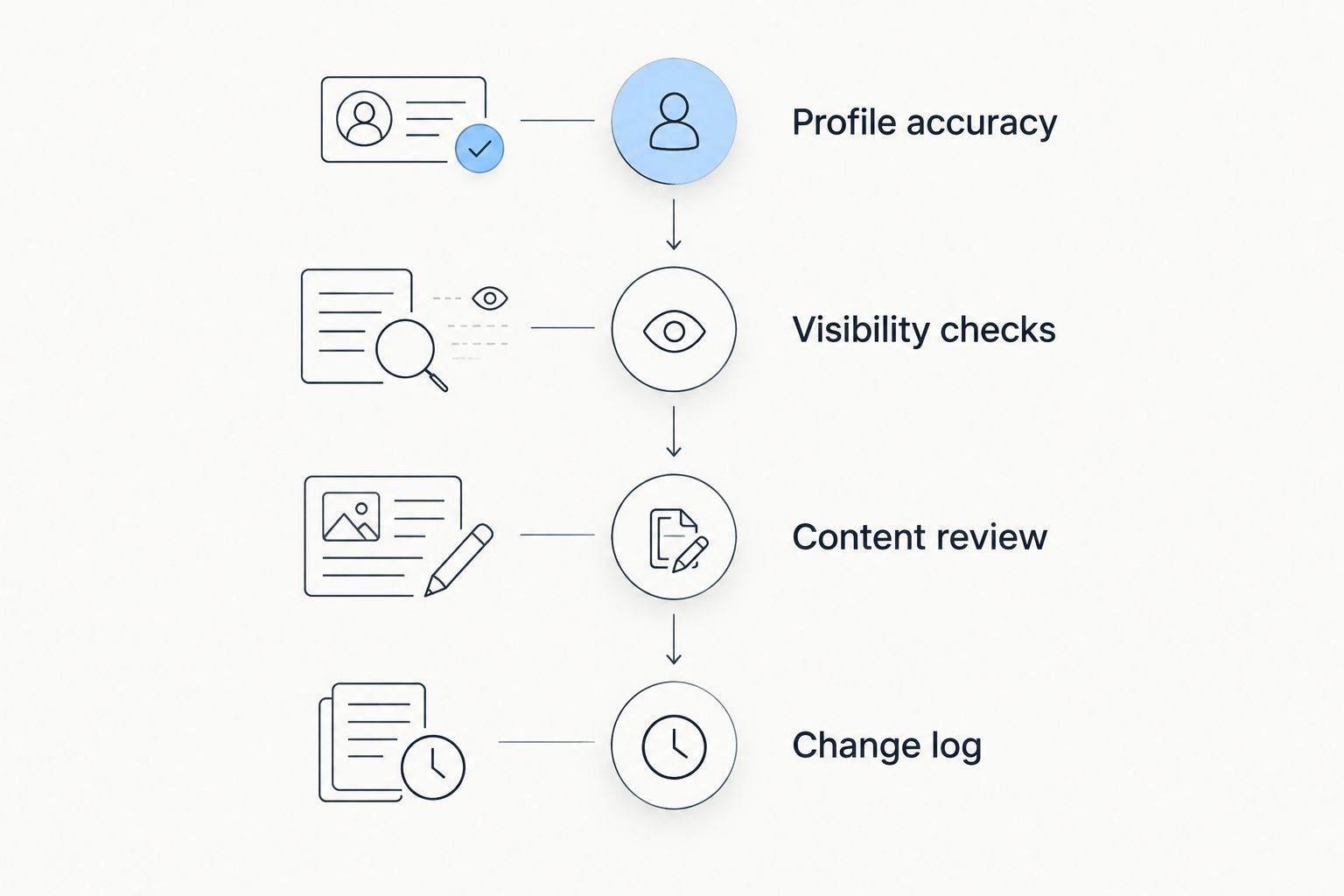
A useful first review has 3 checks: confirm profile accuracy, identify the reporting question, and inspect the relevant website page. This is a recommended checklist, not a claim about how many actions cause a ranking change.
Which tool should you choose?
Choose Google Business Profile first if you are undecided. It handles the profile information and customer interactions that specialist reporting tools do not replace.
Add BrightLocal for organized local reporting, Whitespark Local Citation Finder for citation research, or Local Falcon for geographic visibility. Use Google Search Console to investigate website search performance. Choose the WordPress content option when publishing useful local pages is the missing task.
Your 2026 stack should have a reason for every tool. If two subscriptions answer the same question and neither changes your actions, simplify the workflow before expanding it.
FAQ
What's the best Google Business Profile optimization tool?
Google Business Profile is the best starting point for direct profile maintenance. Add a specialist tool when you need citation research, geographic rank tracking, or structured local SEO reporting.
Is BrightLocal better than Google Business Profile?
BrightLocal is better suited to structured local SEO reporting, while Google Business Profile is the direct management interface. Choose based on whether you need to investigate performance or correct profile information.
Which tool shows Google Maps rankings across a city?
Local Falcon provides geographic grid-based local rank tracking. Keep the search term, area, and scan settings consistent when comparing results.
What does Whitespark Local Citation Finder do?
Whitespark Local Citation Finder helps research local citation opportunities. Review each directory for relevance and check existing business information before creating new listings.
Can Google Search Console optimize my Business Profile?
Google Search Console does not manage Business Profile details. It helps you investigate your website's search queries, page performance, and indexing information.
Can a WordPress content plugin replace a profile management tool?
A WordPress content plugin does not replace direct Business Profile management. Content publishing supports your website, while profile maintenance covers business information and customer interactions on Google.
Do Google Business Profile optimization tools guarantee better rankings?
Google Business Profile optimization tools do not guarantee better rankings. They support editing, research, reporting, or publishing; Google determines local results using factors including relevance, distance, and prominence.
One last thing
A map-rank grid is not a service-area map. Setting your service area does not guarantee visibility everywhere inside it, and software cannot erase the distance between a searcher and your business.
For 2026, make one specific recommendation your default: fix inaccurate information before buying a tool to measure it. Then add the specialist that answers your next real question.


