

Small business AI content marketing is the use of AI to plan, draft, and maintain useful content with the aim of attracting relevant customers. This 2026 guide focuses on local business owners who need accurate service information, location-specific topics, and a publishing process they can manage without a dedicated marketing team.
- AI content marketing for small business starts with real customer questions, local keywords, and verified service information.
- Improveseoplugin is best for local business owners who want keyword research and content publishing inside WordPress.
- Use AI for drafts; keep business facts, editorial decisions, and final approval under your control.
- Measure qualified inquiries and search performance, not just the number of articles published.
Why AI content marketing matters for small business owners
Your content should help someone decide whether your business can solve their problem. A service explanation, a preparation checklist, or an answer to a recurring customer question serves that purpose better than an article written only to fill a calendar.
Local businesses need a tighter connection between content and operations than a general-interest publisher. Your service area, appointment process, and actual capabilities determine what you should publish. A draft that gets those details wrong creates confusion before a customer contacts you.
Improveseoplugin is best for local business owners who want keyword research and content publishing inside WordPress. The Improveseoplugin plugin helps owners find low-competition local keywords, generate branded AI-written content, and publish or schedule it from the WordPress dashboard. Those functions support the production workflow; they do not replace your responsibility to verify what the business promises.
For your 2026 plan, define success as useful content that supports a relevant customer action. Publishing more pages is an activity, not a business outcome.
Build a repeatable content workflow
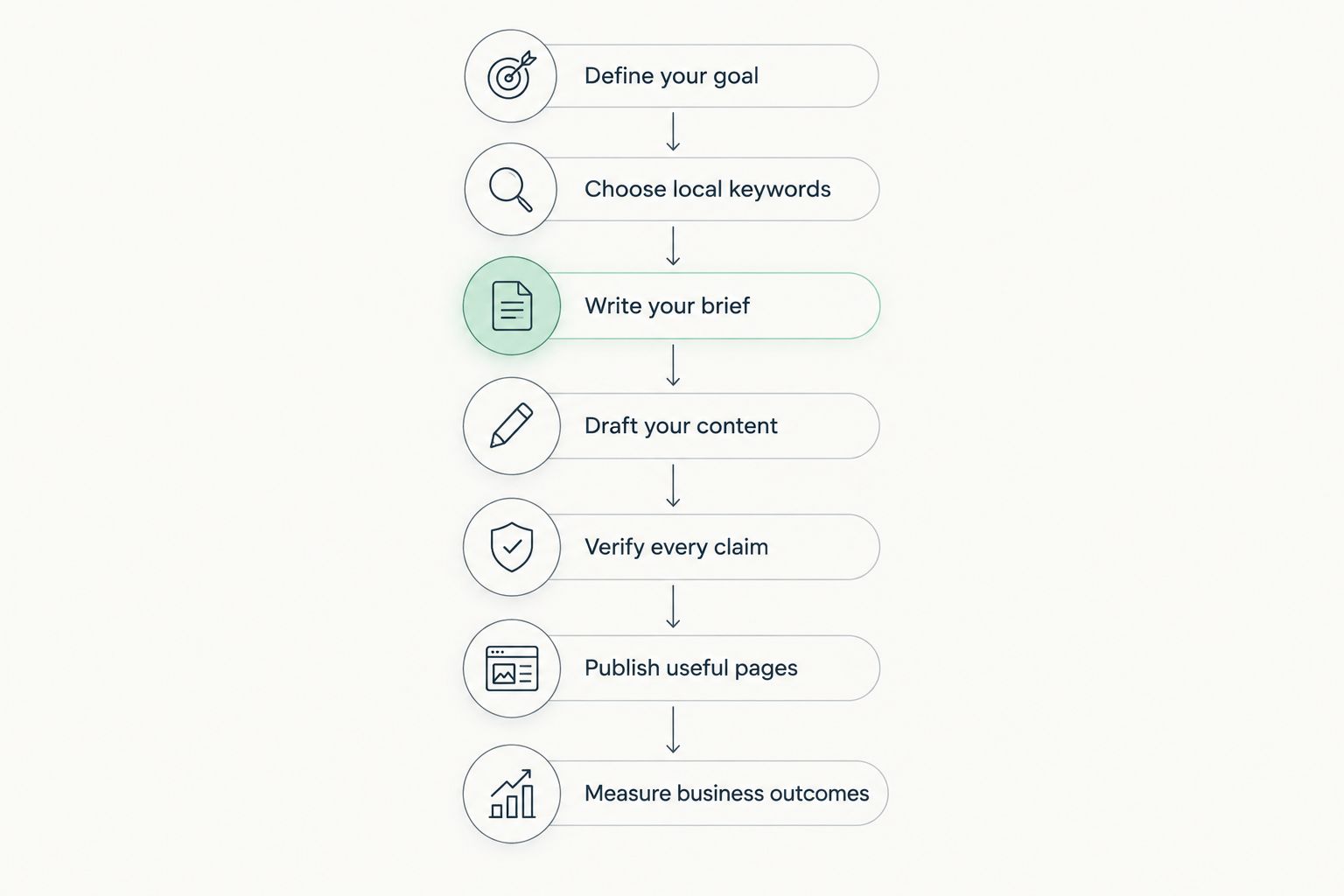
Start manually so you understand the decisions behind each page. Use the same sequence whether you write everything yourself, use a general-purpose assistant, or work inside WordPress: define the goal, choose the topic, prepare a brief, draft, verify, publish, and measure.
Define your goal
Choose 1 service and 1 customer action for your first content project. Write the goal in a spreadsheet or document: explain the service to a particular audience and help that reader take a relevant next step. This keeps the project manageable without buying another tool.
Separate the reader's question from your desired action. Someone researching how to prepare for an appointment needs preparation advice first, not a sales pitch in every paragraph. The next step should follow naturally from the answer.
Before drafting, identify what your business can substantiate. If you cannot confirm a claim about availability, qualifications, or results, leave it out. Your content plan should reflect the business you operate, not the business an AI system invents.
- Name the service the page will explain.
- Describe the intended customer in plain language.
- Choose a relevant action, such as an inquiry or appointment request.
- Record the business facts needed to support the page.
- Identify who will approve the finished content.
Choose local keywords
Start with customer language. Review inquiry emails, phone-call notes, and questions your staff repeatedly answers. If you already use Google Search Console, examine the search queries that bring people to your website. These sources connect topic selection to your own audience rather than a generic list.
Group topics by service, location, and intent. A question about preparation needs an explanatory guide; a query seeking a provider needs clear service information. Do not force every keyword into a blog post.
At this stage, Improveseoplugin offers a faster path for finding low-competition local keywords from your WordPress workflow. Use keyword suggestions as candidates, not publishing instructions. Confirm that each topic matches a service you actually provide and a location you actually serve.
- List the service terms your customers use.
- Add only the locations your business serves.
- Separate informational questions from provider searches.
- Check whether an existing page already answers the topic.
- Select one main question for each proposed page.
Write your brief
Create a short brief before asking AI to write. A free document works: include the intended reader, main question, approved business facts, useful examples, and the action the page should support. A brief makes the assignment specific enough to review.
Include 3 customer questions the page must answer. Treat that number as a practical starting point, not a ranking formula. If a question belongs on a separate service page, remove it rather than stretching the article to cover everything.
For a 2026 content refresh, compare the brief with your current operations. Old service descriptions and outdated instructions are poor source material, even when the resulting prose reads well. Tell the drafting system to omit unknown details rather than fill gaps with plausible claims.
- State the main question in a single sentence.
- Supply approved service and location information.
- Include the customer questions the page must answer.
- Specify the tone and terms your business uses.
- List claims the draft must not invent.
- Define the appropriate next step for the reader.
Draft your content
Write a rough outline manually first. Put the direct answer at the top, then arrange the supporting information in the order a customer needs it. This costs no additional software and gives you a clear standard against which to judge an AI draft.
AI is useful for turning an approved brief into an editable article. Ask for short sections, descriptive headings, and concrete explanations. Request a comparison table only when the reader genuinely needs to compare alternatives; extra formatting cannot rescue an unfocused topic.
Improveseoplugin can generate branded AI-written content within the WordPress workflow. Its practical advantage is keeping drafting close to publishing. The limitation is unchanged: a generated draft still needs someone who knows the business to check its facts and usefulness.
- Open with a direct answer to the main question.
- Give each section a distinct customer purpose.
- Explain technical terms in everyday language.
- Use examples that do not imply invented customer results.
- Remove repeated introductions and empty conclusions.
Verify every claim
Read the draft against your source material, not just for grammar. Check every statement about services, coverage, qualifications, policies, and expected outcomes. AI-written text can sound definite even when a detail is unsupported.
Use 2 separate review passes: one for factual accuracy and one for customer usefulness. During the first, trace claims back to approved information. During the second, ask whether a prospective customer can understand the answer and choose a sensible next step.
Pay particular attention to dates in your 2026 publishing plan. Do not change an old article's year while leaving outdated instructions underneath. For regulated or safety-sensitive topics, use an appropriately qualified reviewer rather than treating an AI draft as professional advice.
- Check service descriptions against current business information.
- Confirm every named location and service-area claim.
- Remove unsupported statistics, testimonials, and guarantees.
- Verify instructions that affect safety or customer decisions.
- Read the opening and conclusion for conflicting advice.
- Record approval before the page is published.
Publish useful pages
Publish manually through WordPress first if that is your existing process. Preview the page, check its headings, and test its customer-action links. The content should be usable on a phone without forcing readers through dense paragraphs to find the answer.
Give the page a descriptive title and a clear place within your website. Connect it to a relevant service page when that destination exists. Links should help readers continue their task, not create a chain of loosely related articles.
Improveseoplugin supports publishing and scheduling directly from the WordPress dashboard. That simplifies the handoff between drafting and publication, but scheduling is not approval. Establish who checks the page before it becomes public, especially when your service details change.
- Preview the page on desktop and mobile.
- Use one clear page title and descriptive section headings.
- Check links and the intended customer-action route.
- Add a relevant internal link where it helps the reader.
- Schedule only content that has completed review.
- Assign an owner for future updates.
Measure business outcomes
Start with a simple tracking sheet and the reporting tools you already use. Record the page, publication date, main topic, and intended action. Google Search Console provides search-performance information; your inquiry records help you assess whether conversations match the service the page explains.
Set a 30-day review reminder to inspect the page and collect observations. This is an operational checkpoint, not a promise that rankings or leads will arrive within that period. Separate early checks for errors from later judgments about performance.
For your 2026 reporting, compare each page with its own earlier performance where data exists. Search impressions indicate visibility; clicks indicate visits from search. Neither proves that a visitor became a qualified customer. Treat inquiries and booked work as separate outcomes, using only the tracking your business actually has.
- Record publication dates and target topics.
- Review search queries, impressions, and clicks.
- Track relevant inquiries when your systems support attribution.
- Note questions customers still ask after reading.
- Improve unclear sections before creating overlapping pages.
- Keep a dated record of meaningful content changes.
Compare your content production options
Choose the option that solves your actual bottleneck. If deciding what to say is the hard part, improving your brief matters more than changing software. If moving drafts into WordPress creates extra work, a dashboard-based workflow addresses that handoff.
| Option | Best for | Main advantage | Key limitation |
|---|---|---|---|
| Manual writing in WordPress | Owners who want direct control over every sentence | You write and edit against your own business knowledge | Research, drafting, and scheduling remain hands-on tasks |
| General-purpose AI assistant | Owners who already have a brief and need drafting help | Produces editable text from the instructions you provide | You must verify the draft and move it into your publishing workflow |
| Local-keyword WordPress plugin | Local owners who want keyword discovery, branded drafts, and publishing together | Keeps those tasks within the WordPress dashboard | Generated content still requires factual review and editorial judgment |
Choose a workflow for its fit, not its ability to produce the longest draft. Manual writing offers direct control but requires your time. AI-assisted drafting helps with text production but adds a review obligation. A WordPress plugin connects production tasks, while the business owner remains responsible for accurate content.
Common mistakes small business owners make
Publishing location pages without local substance
Changing a town name does not create a useful local page. Explain the service information that genuinely applies to that area. If you cannot provide distinct, accurate content, keep the information on a stronger existing page instead of multiplying thin pages.
Letting AI define the service offering
A draft can introduce services, guarantees, or policies you never approved. Supply the facts before generation and compare the result with them afterward. Your published claims must describe what your business actually provides.
Turning every answer into a sales pitch
A preparation guide should help the reader prepare. Put the useful answer first and make the next step relevant to that task. Repeated promotional interruptions weaken the page's usefulness even when the underlying advice is sound.
Measuring output instead of customer relevance
An article count shows how much you published, not whether the content reached suitable customers. Review the queries and inquiries associated with each page. If visitors ask for services you do not offer, check whether the article's wording attracted the wrong intent.
FAQ
What is AI content marketing for small business?
AI content marketing for small business uses AI to help plan, draft, and maintain content that supports customer acquisition. The owner still decides the topics, supplies business facts, and approves the finished material.
What's the best way for a local business to start?
Start with one service and one recurring customer question. Write a brief using approved business information, draft the answer, and review it before publishing.
Is a WordPress plugin better than a general AI assistant?
A WordPress plugin is a better workflow fit when you want keyword discovery, drafting, and publishing inside the dashboard. A general AI assistant fits drafting-only work, but you still need a separate publishing process.
Can AI-written articles rank on Google?
AI-written articles can appear in Google Search, but using AI does not guarantee rankings. Focus on useful answers, accurate information, and content that serves a real audience rather than producing pages solely to attract search traffic.
Should I publish a separate article for every town I serve?
No; publish separate location content only when you can provide distinct, accurate information for that audience. Replacing town names in otherwise identical text does not make the pages more useful.
How often should I publish AI-assisted content?
Publish at a pace that allows factual review and maintenance. Choose a schedule around approved topics and available review time rather than an arbitrary article quota.
How do I know whether my content is helping my business?
Review relevant search queries alongside qualified inquiries and customer questions. Search visibility and visits are useful signals, but they do not establish that a page generated a customer.
One last thing
Check the instructions customers receive after they contact you. A useful article loses its practical value if it describes a different preparation process, service area, or next step from the one your staff provides.
Before adding another topic to your 2026 calendar, compare a published page with an actual customer-facing message. Fix the mismatch first. Content marketing works as part of the customer experience, not as a separate publishing exercise.


